ZSLJV
Members
-
Joined
-
Last visited
Everything posted by ZSLJV
-
Hi everyone I have had some serious lightning damage to my solar installation during which the inverter and lithium-ion battery were damaged and repaired by a local supplier. The 5kVA Firestar inverter’s motherboard and the 4.8kW Ultra Energy Lithium-ion’s BSM were replaced. It is setup as solar first and only revert to the Eskom grid when the battery reached 48V back to grid voltage and back to discharge voltage of 51V. Unfortunately, my system is not performing as previously. The first time it reverts to the Eskom grid, Eskom (or inverter) charge the battery to 48.8V only and then return to battery. After 20 minutes at a 9% system discharge load the system again switches back to Eskom to repeat the same over and over again every 20 to 30 minutes until daylight and the PV input took over. I then increased the back to discharge voltage setting from 51 to 54V as it seems if the battery is not fully charged. This caused the system to remain on Eskom and never switched back to battery mode and was thus compelled to switch the latter setting back to 51V. However, during the day the panels keeps the battery 100% full. 1. Can someone please assist me with advice to overcome this problem? 2. Which software can you recommend as the Watch Power v 1.04 SP1 cannot assist me with monitoring the system properly? Thanks
-
Thanks for your response Coulomb. Unfortunately I do not have the original number. I've looked at my previous exported datasheets, but nothing there. The suppliers just responded that they replaced the old motherboard with a new and upgraded one which cannot communicate with the old software. To overcome the latter I'm preparing an old laptop to install Raspberry Pi 4 software and hopefully that will solve my problem. I need some "evidence" if anything happen especially in vie that I'm a total novice.
-
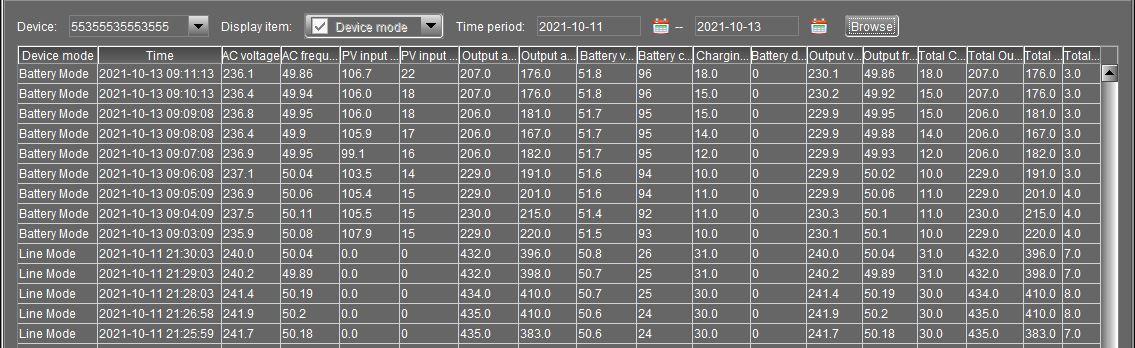
Good day everybody I’ve had serious lightning damage to my 5kVA Fivestar inverter and 4.8kW Ultra Energy Lithium-Ion battery and was repaired by local supplier. After the installation of the latter there is a data loss between 11-10-2021 and 13-10-2021. Attached a copy of the datasheet. Is this an indication of a faulty inverter data storage or the inverter itself? I have my doubts about the repairs because the battery was able to carry the load through the night whilst it is now reverting to the Eskom grid on a regular basis during the night. I might add that there is a communication loss also on a regular basis. Thanks

-
Thanks
-
Thanks for the advice. The machine is operated in cold water and during daytime only.
-
Thanks, I'll give it a try.
-
Hi everybody I'm a newbie to the forum and a total dummy to solar and electricity in general. I've installed a 5kVA inverter, 4.8KW Lithium Ion and 6 x 330W panels complete with COC. The installation is very stable and meet all my requirements and running on gas for the geyser and stove. However, I'm afraid to use my LG 13kg top loader washing machine from the inverter for the simple reason that the machine's washing motion is to spin the drum in a clock and anti-clock manner. Since the machine is 10 years old I could not establish from the specs the wattage needed or the consumption of the latter. Can this alternating motion harm the installation in any way? Thanks