


Jaco Minnie
Members
-
Joined
-
Last visited
Everything posted by Jaco Minnie
-
great guys, thank you, i will climb on the roof today and take a photo of the specs. really appreciate all the advicebrilliant, thanks for the replies, sorry im only getting back to you now, hectic week, late nights. i took screenshot of the specs, if its not enough i will go find the booklet. please see attached. i dont know our exact usage per day, but our towns power was off the other day for repairs to overhead lines and we had inverter power for the whole day.
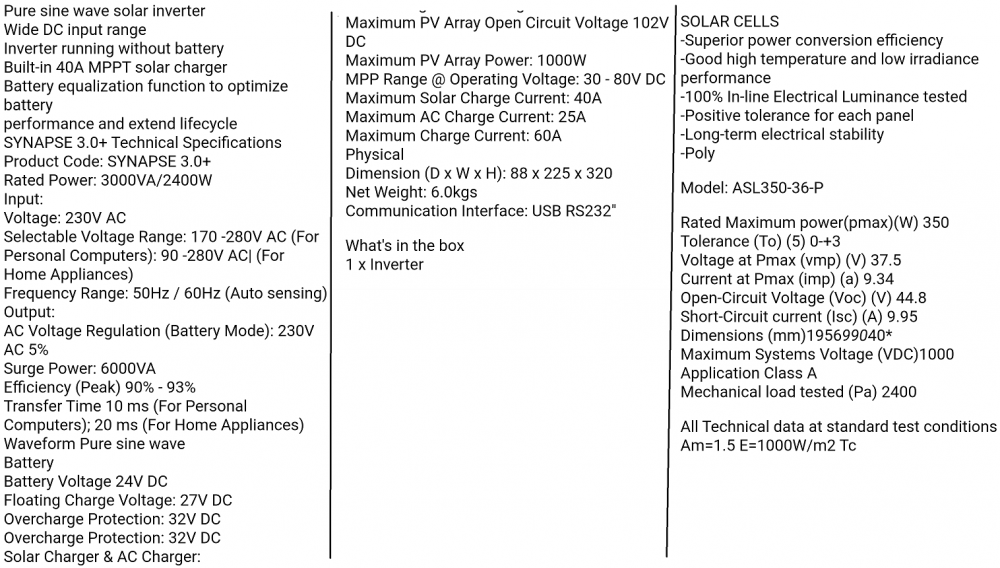 Hi, im new here. I have got a small solar system so run the house (excluding geysers and stove) I have got a synapse 3kva inverter, 2 x 12v 200ah solar gel batteries and 2 x 350w solar panels. It works perfectly for load shedding, but i want to run the house from it completely, charging only with the solar and not utilities, how do i calculate the max number of solar panels i can add to it. ( series or parallel ) And i have got an extra 350w panel and can get 360w and 390 w panels, will htey work ?

