Bongani82
Members
-
Joined
-
Last visited
-
Thank you for this advice, google search is recommending every six months...but I guess I can use my own discretion here as well. https://www.zenenergy.com.au/knowledge-base/popular-topic/how-to-clean-solar-panels/

-
Thank you, I have just registered the battery, and submitted the pictures, will wait for their response. With regards to matching the battery limits on the Inverter, I will contact my installer to assist. I am treating this thing like a new born baby right now, I am afraid of breaking anything.
-
Thank you, I will definitely keep this in mind because this kit is expensive and I am hoping for at at least a 5 to 8 year period trouble free
-
Thank you, we will definitely change our habits and monitor continuously. Picked up that Down Lights and Fluorescent lights consume quite a lot as well. Will start converting all lights to LED lights, hopefully next year will add a second battery.
-
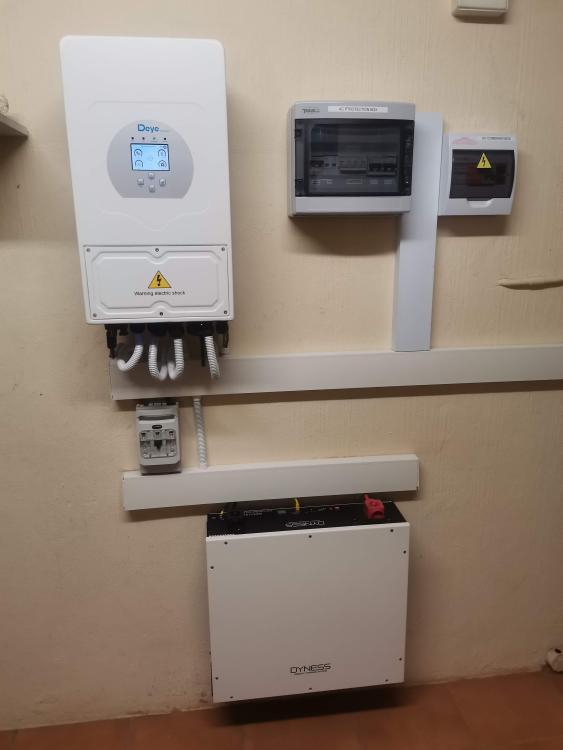
Hi All My family and I have had enough and after many hours of research, we have gone ahead with an installation that we will improve over time: 5Kw Deye Inverter Dyness Dyness 5.1kWh Lithium battery 6 PANEL MONO 550W TONGWE We are in the process of changing behavior, where we don't switch on Microwaves and Kettles during loadshedding. The only concern I have is how do I maintain this system for a long life span. How do the DEYE Inverter and Battery Warranties work