


Gary Mortimer
Members
-
Joined
-
Last visited
Everything posted by Gary Mortimer
-
Add on question, my battery is is shutting itself down at 45% SOC what is the correct number and were to adjust that down to 35%
-
Has anyone tried connecting additional other batteries to their unit's I have a 5kw and would like to add another 5 or 10 via the big lugs. It's the communication bit I am most worried about.
-
I switched the mains going into it off yesterday and the voltage out disappeared, so it must be leaking from that circuit somewhere
-
I have about 30v coming out of PV IN (with no PV connected) anyone else seeing this?
-
Um er um, cough sniffles hangs head. Updated the Pi and it all seems to be there now.
-
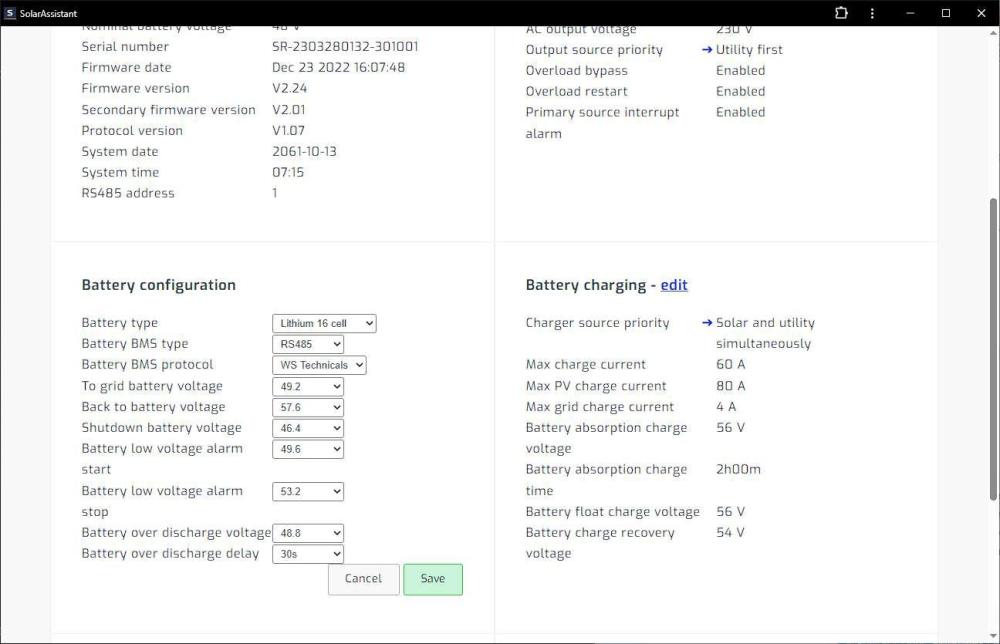
I have it set on 33 but think I have something wrong in solar assistant. I don't see the same options as @RoelofDeJager I will try and add it all manually now.
-
@RoelofDeJager I'm not seeing the WOW option in Solar Assist, connected via a printer cable. It shows me WS Technicals. Getting error 64 so would like to change the battery settings. I must be doing something one, the firmware matches yours.
-
Ok, I'm in. Only 5kWh units left tonight.
