Skip to content
View in the app

A better way to browse. Learn more.

Power Forum - Renewable Energy Discussion

A full-screen app on your home screen with push notifications, badges and more.

To install this app on iOS and iPadOS
  1. Tap the Share icon in Safari
  2. Scroll the menu and tap Add to Home Screen.
  3. Tap Add in the top-right corner.
To install this app on Android
  1. Tap the 3-dot menu (⋮) in the top-right corner of the browser.
  2. Tap Add to Home screen or Install app.
  3. Confirm by tapping Install.

andshoteachother

Members
  • Joined

  • Last visited

  1. Hi everyone, Would you care to have a look at my proposed wiring diagram. Main DB is in the kitchen, so I can't put the inverter and battery next to it, also don't have space left for any more breakers. The proposed idea is to move all my essentials down to a new db in the garage. I Should also mention that the shed (Sub DB 2) is non-essential for now, I am planning on expanding this to a second 5kw Inverter and battery as well as solar at a later stage. would love to hear some feedback on future proofing this for easy upgradability. Thanks in advance!
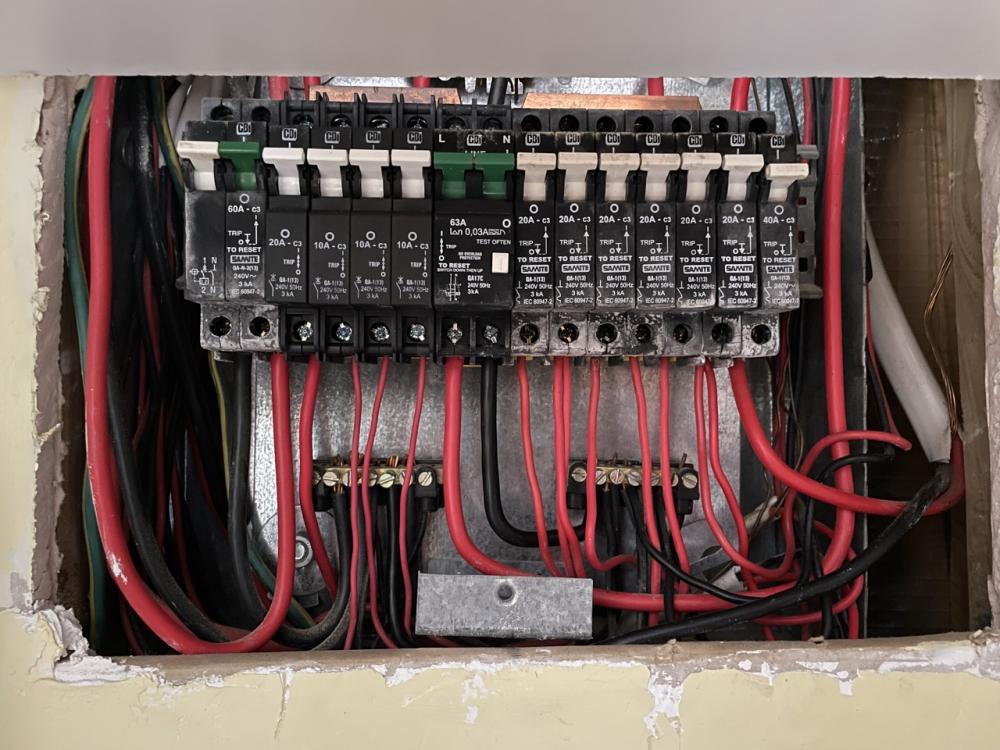
  2. I recently moved into a new house and the breakers has some kind of white residue/marks on them, should I be concerned?
Account

Navigation

Search

Search

Configure browser push notifications

Chrome (Android)
  1. Tap the lock icon next to the address bar.
  2. Tap Permissions → Notifications.
  3. Adjust your preference.
Chrome (Desktop)
  1. Click the padlock icon in the address bar.
  2. Select Site settings.
  3. Find Notifications and adjust your preference.