Mielie
Members
-
Joined
-
Last visited
Everything posted by Mielie
-
Just final feedback on this. It turn out that my Prepaid meter was faulty. It's been replaced and problem solved.
-
Thank everyone, I'll get someone in to review/sort out
-
Thanks for the insight... I think it's clear that I'm not sure exactly how it's all been wired up. I have. deye inverter, 2 5kva soto batteries and 12x 420w panels split as 2 inputs. I'm about to have my DB redone so that I can fit some geyser timers, to I'll ask the sparkie to assist.
-
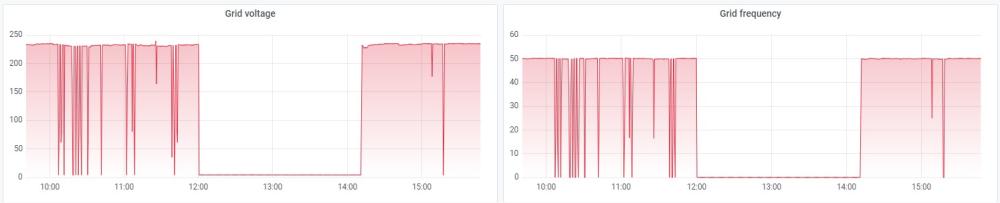
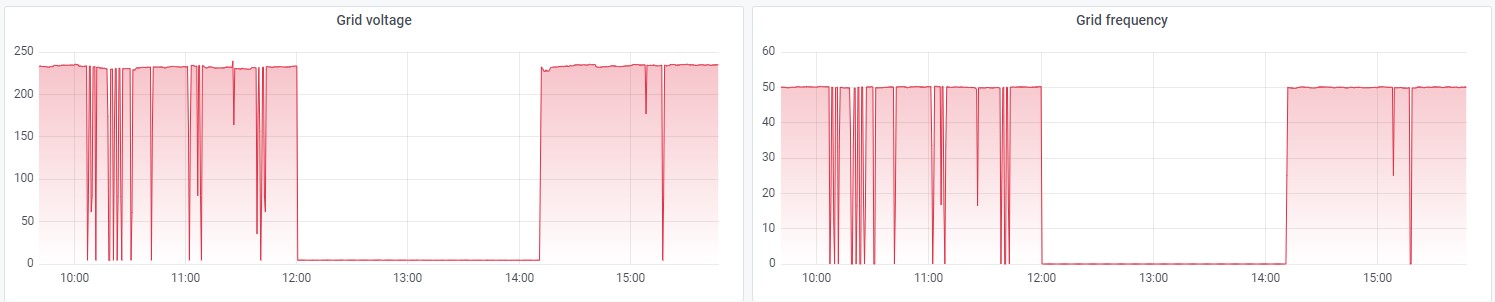
Hi Please help a newbie here... I'm measuring (via SolarAssistant) a huge amount of power drops (via the Inverter input grid voltage). Eskom also feeds my Oven and Geysers directly (not via inverter). I can see the drops on my oven, it'll switch off and then back on again. My prepaid meter stays on... My logical deduction is that there is something wrong on the DB from Eskom feed to oven/geysers/inverter grid feed.... but my installer is trying to tell me that is what Eskom power looks like that now... 😕 ... he also claims that the prepaid meter has a backup battery - again I call BS. It was not like that pre-solar/inverter/battery install. Any experts have advice, please?