Skip to content
View in the app

A better way to browse. Learn more.

Power Forum - Renewable Energy Discussion

A full-screen app on your home screen with push notifications, badges and more.

To install this app on iOS and iPadOS
  1. Tap the Share icon in Safari
  2. Scroll the menu and tap Add to Home Screen.
  3. Tap Add in the top-right corner.
To install this app on Android
  1. Tap the 3-dot menu (⋮) in the top-right corner of the browser.
  2. Tap Add to Home screen or Install app.
  3. Confirm by tapping Install.

jjdub

Members
  • Joined

  • Last visited

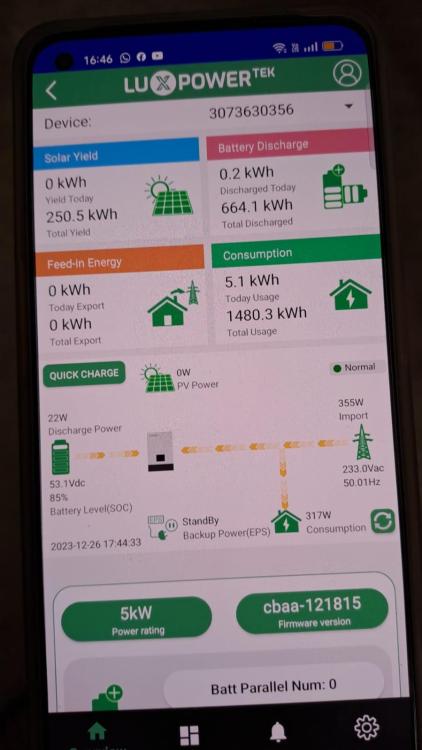
  1. Good day All I am posting for a family member, she had a solar system installed May 2023, it seems according to what she tries to explain is that there is no production from the PV system. I would like to find out if someone can give me contact details for support for a Luxpower system in the westrand of Gauteng. Attached is the images I asked her to send me. I'm located in Bloemfontein so it is difficult to assist her. Any assistance or suggestions will be highly appreciated Regards Johan
Account

Navigation

Search

Search

Configure browser push notifications

Chrome (Android)
  1. Tap the lock icon next to the address bar.
  2. Tap Permissions → Notifications.
  3. Adjust your preference.
Chrome (Desktop)
  1. Click the padlock icon in the address bar.
  2. Select Site settings.
  3. Find Notifications and adjust your preference.