Skip to content
View in the app

A better way to browse. Learn more.

Power Forum - Renewable Energy Discussion

A full-screen app on your home screen with push notifications, badges and more.

To install this app on iOS and iPadOS
  1. Tap the Share icon in Safari
  2. Scroll the menu and tap Add to Home Screen.
  3. Tap Add in the top-right corner.
To install this app on Android
  1. Tap the 3-dot menu (⋮) in the top-right corner of the browser.
  2. Tap Add to Home screen or Install app.
  3. Confirm by tapping Install.

Bianca

Members
  • Joined

  • Last visited

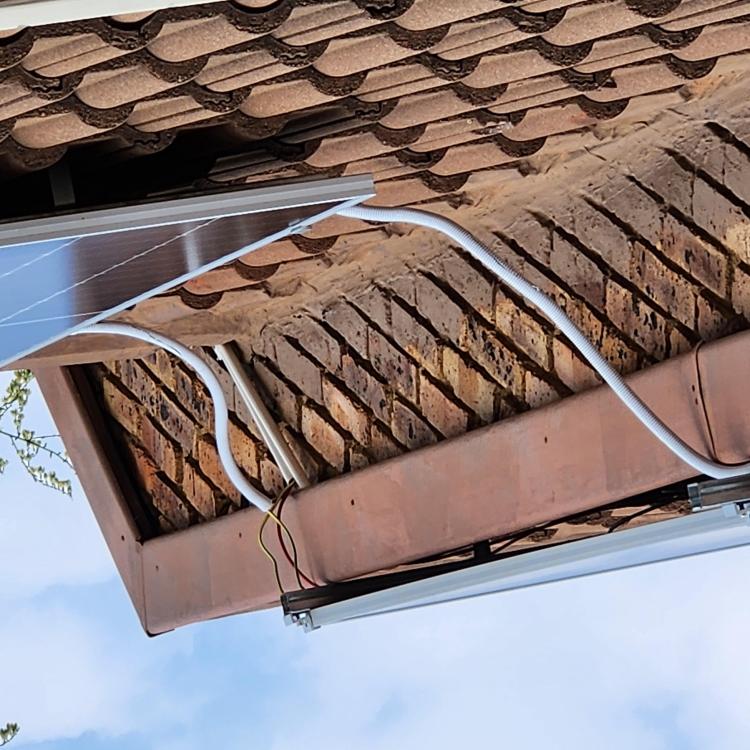
  1. The pictures uploads upside-down for some reason
  2. Good day We think he installed it himself, as we are struggling to get a COC from him
  3. Good day We live in a sectional title complex. According to me this is not installed according to the solar regulations. Can someone please advise
  4. Bianca joined the community
  5. Good day One of the owners in our complex, that installed solar, we don't think this is installed correctly, the GP cable is exposed, and the conduit looks terrible. he also does not have any junction boxes installed; he wants to leave it like this. can you please advise if this is correct.

Account

Navigation

Search

Search

Configure browser push notifications

Chrome (Android)
  1. Tap the lock icon next to the address bar.
  2. Tap Permissions → Notifications.
  3. Adjust your preference.
Chrome (Desktop)
  1. Click the padlock icon in the address bar.
  2. Select Site settings.
  3. Find Notifications and adjust your preference.