jacauc
Members
-
Joined
-
Last visited
Everything posted by jacauc
-
Makes perfect sense! Good way to reduce the spike after loadshedding
-
I created a basic lovelace dashboard panel to be able to see at a glance all values in HA. Guess you have done similar. Dashboard RAW configuration: views: - badges: [] cards: - type: entities entities: - sensor.sunsynk_battery_charge_volts - sensor.sunsynk_battery_output_current - sensor.sunsynk_battery_output_power - sensor.sunsynk_battery_volt - sensor.sunsynk_dayactive_powerwh - sensor.sunsynk_dayreactive_powerwh - sensor.sunsynk_grid_ct - sensor.sunsynk_grid_export_day - sensor.sunsynk_grid_frequency - sensor.sunsynk_grid_gridbuy_day - sensor.sunsynk_invrt_total_pwr - sensor.sunsynk_load_grid_inverter - sensor.sunsynk_overall_battery_charge_day - sensor.sunsynk_overall_battery_discharge_day - sensor.sunsynk_solar_pv1_amps - sensor.sunsynk_solar_pv1_power - sensor.sunsynk_solar_pv1_volts - sensor.sunsynk_solar_pv2_amps - sensor.sunsynk_solar_pv2_power - sensor.sunsynk_solar_pv2_volts - sensor.sunsynk_solar_pv_day - sensor.sunsynk_solar_total_power - sensor.sunsynk_temp_batt - sensor.sunsynk_temp_dctrans - sensor.sunsynk_temp_enviro - sensor.sunsynk_temp_radiator - sensor.sunsynk_total_load - sensor.sunsynk_total_load_calc - sensor.sunsynk_voltage_grid - sensor.sunsynk_voltage_inverter state_color: true
-
Two things to note - HA MQTT does not have a standard device class for frequency. In your inverter NR instance, make sure that the Frequency node is configured as follows: and then in the MQTT Assemble Config node on the publish flow, use the following code: //var fulltopic msg.topic = "homeassistant/sensor/SunSynk" + "/" + "/" + msg.shorttopic + "/" + "config"; msg.topic = msg.topic.replace("//", "/"); msg.payload = { "unit_of_measurement": msg.unit, "state_topic": "homeassistant/sensor/SunSynk" + "/" + msg.shorttopic + "/" + "value", "name": "SunSynk_" + msg.shorttopic, "unique_id": msg.shorttopic, "device": { "identifiers": [ "SunSynk" ], "name": "SunSynk", "model": "SynSynk", "manufacturer": "SunSynk" } } if ((msg.deviceclass != "") && (msg.deviceclass != "none")) { msg.payload.device_class = msg.deviceclass } return msg;

-
I have 2 NR instances - one for the inverter purely to read modbus data and publish to MQTT and Influx. The second is running on a Pi4 together with HA supervised. This NR instance is tied into HA and these flows are configured here. flows (1).json

-
Do you use home assistant in conjunction with node red?1/2 or 7/8? Does it matter?Any difference in the wiring? Only wired up the A and B connections?@Bloubul7, I also found that sometimes the Eskom site get request fails with "Error: read ECONNRESET" I linked the Error output of the switch back into the GET request to repeat the request if failed.
 Thanks Bloubul - Pushed the changes to github.No, sonoff devices will be controlled by HA, not directly with NR. Simpler if all your devices are in HA, then you don't need a special solution/library for each type of device. NR > HA > Sonoff. Name of the module to centrally manage tasmota firmware devices is "tasmoadmin"Simply put, HA controls and polls ALL your devices. Node red controls HADo you have Tasmota firmware on the sonoff devices? There's a good tasmota add-on for HANode red all the way. I have a separate node red instance running on my home assistant pi and do these types of automations there. HA is great for getting all the entities in one place, and node red ties seamlessly into it. HA automations suck.Noticed now that my grid buy value is showing as zero on the inverter itself. Odd My setup is purely ups, no pvs. I have a CT coil installed on the phase feeding most of the house.
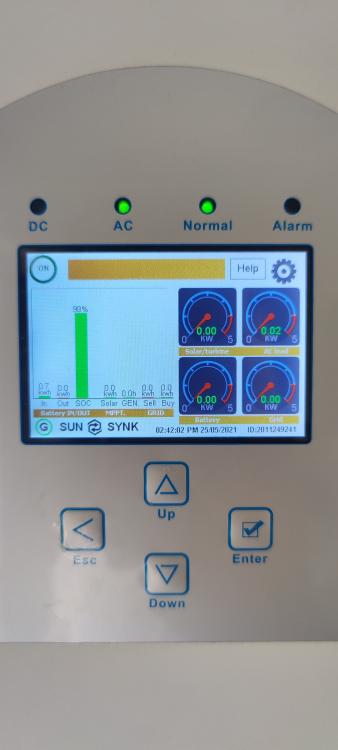 Can someone please give me some more insight on the grid_gridbuy_day and dayactive registers? My values are zero all the time. I'm guessing this should be a very close reflection of my daily eskom unit usage?Makes sense! Haven't played with the Zero before. Think I will get myself a couple, and the 485 hat @JuanHis using. ESP32 will probably be a lot of pain with minimal gain. Definitely easier to deploy new node red flows during runtime than recompiling the arduino code every time you want to make a changeMakes me wonder if it's not possible to completely eliminate the need for a Raspberry, and replace it with an Arduino (ESP32 wifi) . Then have node red (running elsewhere) poll the arduino to get the modbus values. Feels like overkill to have a dedicated Pi for simply reading values into a database and mqtt.We need to figure out how to use the project module properly in node red, to allow one to always run off the latest code on github. Of course anyone can make a pull request to commit new changes, or fork a different branch for unique use cases. Could be a really seamless way to ensure that the latest changes are in the central repository. Any suggestions welcome!Good to know. What device did you use?Thank you! I've uploaded it to the Github page.https://github.com/jacauc/SunSynk-NodeRed Published here - will need to work on Readme and others to give proper credit to @Bloubul7 My current dashboard attached at the bottom of this post. Still a work in progress Open the "influx" shell and then do --list all tables SHOW MEASUREMENTS --copy values from old table to new table SELECT * INTO newtablename FROM oldtablename --delete old measurements DROP MEASUREMENT oldtablename grafana.jsonYes I do I will look into it later today or tomorrowNo problems here... it's already publicly available on this forum anyways