


Gazzab
Members
-
Joined
-
Last visited
Everything posted by Gazzab
-
OK thanks. I have raised the voltage at which the battery switches onto utility so even if it does cycle it cycles to a lesser dod Hopefully extending battery life. Does that sound about right?
-
Spf 3000tl hvm 48
-
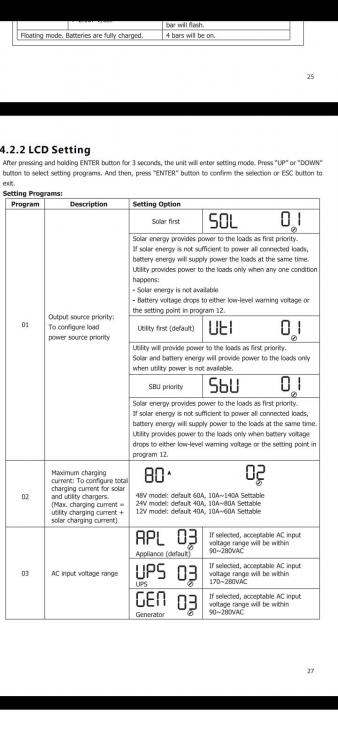
Thanks. But according to the manual there is no sub option. Only sbu which will do the same thing as the solar. What voltage would option 12 need to be to keep the battery at float voltage?
-
Hi everyone. So just had a growatt 3kw system installed only two panels for now with plans to expand. The default setting on the inverter is solar first then the grid takes over when the panels are no longer producing power. My concern is that when the solar production in the afternoon drops below the consumption load then the battery takes over until the panels stop producing and eskom kicks in. This is lowering my battery by about 25% every day which means that my battery is cycling to a 25%did every day. Is there a setting on the growatt that will use solar during the day and then switch over to eskom when that starts dropping to keep my batteries at a float charge for when I need them (Load shedding) and hopefully increase the lifespan of my batteries?
