Pooks
Members
-
Joined
-
Last visited
Everything posted by Pooks
-
Hey GWH, The price was the same. According to them, it was what was available and fit in well with the physical space available. Their reasoning was that the cells were packed more densely inside. Regardless of the reason, they give me great joy.
-
There's about a 60kg difference in weight between the two. My question is simply what is the difference between the two.
-
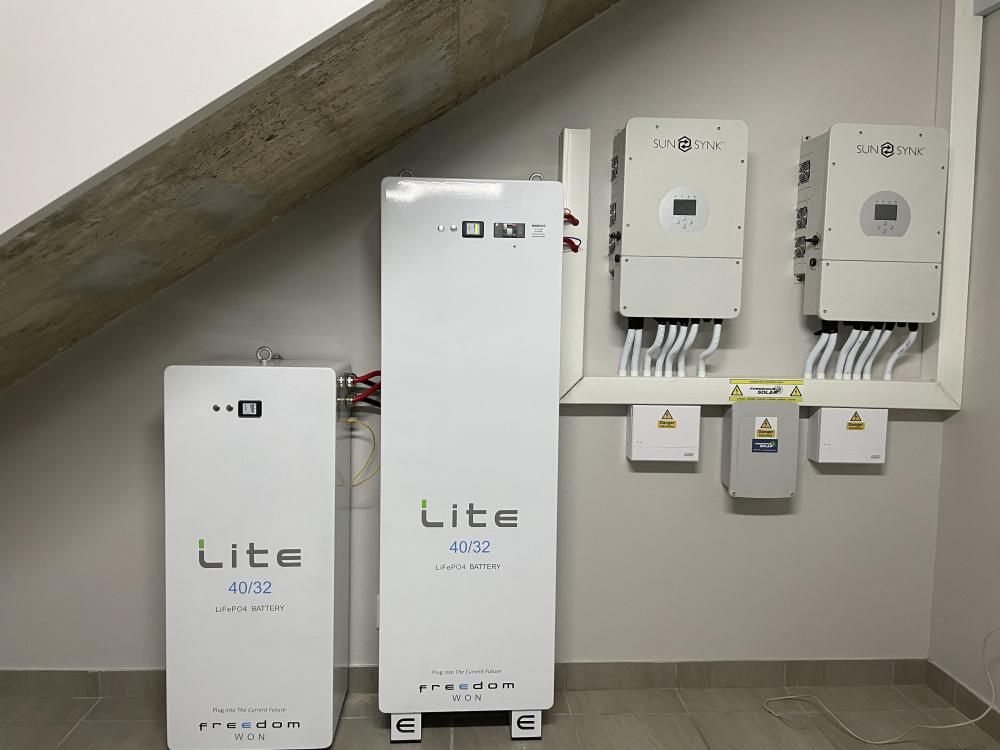
Hey all, I have an awesome system running two Sunsync inverters and two Freedom Won batteries. The batteries are both 40 /32 kWh but one is between a half and two-thirds the size of the other. Both seem to have similar specs. Does anybody know why the size difference and if they should be priced differently? Thank you Pooks
-
Thank you so much for these very informative answers. I am very grateful that you all took the time to reply. I wonder if I could further pick your collective brains. My household uses around 1500kw of power per month. A lot of it during the day when the ironing and laundry get done. I am thinking about putting in around 28 405W Canadian panels with 2 Sunsynk 8Kw invertors and 2 Freedom Won Home 30/24 batteries to try and get as energy independent as possible. Does this sound like a reasonable setup? Thank you again.