


FrancoisV
Members
-
Joined
-
Last visited
Everything posted by FrancoisV
-
I noticed when doing the CT test on my Goodwe you have to pull load on the non-essential side (Between CT meter and Inverter) whilst doing the test, or else I also get the "CT Reversed" error. I usually switch a couple of stove plates on before starting.
-
Make sure your CT coil is installed correctly and that you did a successful "Meter Test"
-
Issue 3: Understanding the battery Solution 3: Having spent lots of time in the "PV Master" application and the graphs over the last couple of days it was interesting to note how sudden increases in load are handled by PV, battery, and GRID sources. As can be seen from the graph above when the load suddenly increases the PV cannot ramp up that quickly so the initial spike is handled by the battery and the GRID and as the PV wattage increases it takes over the entire load. If the new load suddenly drops, the PV is slower in ramping down and the excessive wattage is dropped into the GRID, even with the GRID export set to "0" as per my configuration. I hope some of you find this thread interesting, might add more posts over the next couple of weeks as I learn more. Now I just need a good business case to convince the finance manager I need more batteries for the evenings
-
Issue 2: Under-performing PV panels Solution 2: Having an array with a total wattage of 3290W I could not understand why it produced less than 1KW on average until I realised that the PV wattage follows the load, as can be seen in the diagram below, blue being the PV generation and yellow the load. (The more load you have, the more the PV supply) I know this is probably common knowledge for most users here, but this was a learning curve for me
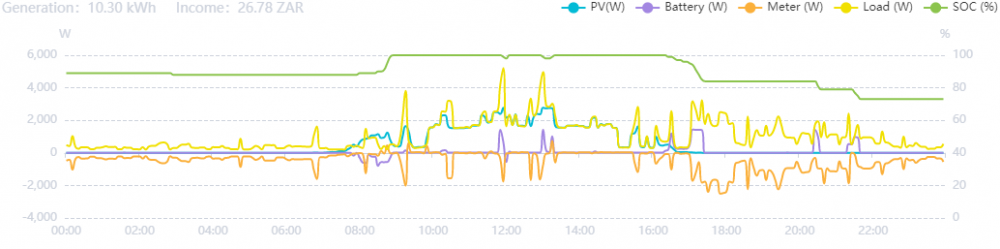
-
Hi All I recently added PV panels onto my Goodwe Inverter after running it for about 6 months in the "Backup Mode" connected to a Pylontech US3000C battery. All worked really great with no issues during this time. I changed my DB board to allow all lights and most of the plugs in the house to be connected to the inverter (Essential load) and also made sure to have the CT meter before the non-essential load (Fridges, washing machine, tumble dryer, dishwasher, geyser, kettle etc.) I added 7 x 470Wall PV panels onto PV1 last weekend, changed the profile to "General Mode" and would like to share some of the issues/challenges I ran into with you. Issue 1: The CT meter stopped working and kept displaying an error. Solution 1: I finally fixed this by turning the PV panels off, turning a couple of stove plates on (non-essential load), and then ran the test which was completed successfully. I turned the PV panels back on and all has been looking good since then.
-
Hi Rehaan Did you manage to get your system sorted out? I did a DIY installation of my Goodwe and PV panels and learned a lot in the process.
