Skip to content
View in the app

A better way to browse. Learn more.

Power Forum - Renewable Energy Discussion

A full-screen app on your home screen with push notifications, badges and more.

To install this app on iOS and iPadOS
  1. Tap the Share icon in Safari
  2. Scroll the menu and tap Add to Home Screen.
  3. Tap Add in the top-right corner.
To install this app on Android
  1. Tap the 3-dot menu (⋮) in the top-right corner of the browser.
  2. Tap Add to Home screen or Install app.
  3. Confirm by tapping Install.

KBS

Members
  • Joined

  • Last visited

  1. KBS replied to KBS's topic in Inverters
    Hi MdF and JL10 I changed the Time Of Use settings to start at 00:00 and end with 00:00 as you suggested and now my battery discharge times are working perfectly. Thank you for your advice Much appreciated
  2. KBS replied to KBS's topic in Inverters
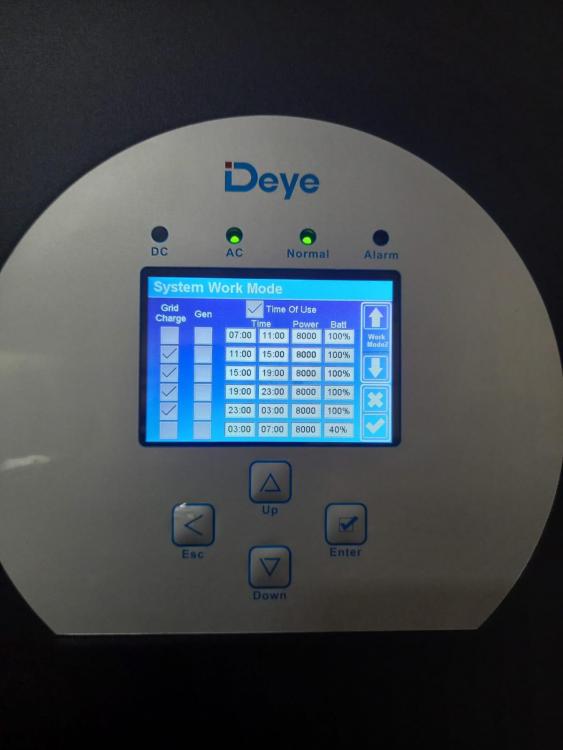
    These were the last settings I put in to try and make the battery discharge at 3am and it still starts to discharge at 11pm until it gets to 40% and then stays at 40% until the PV has enough to recharge.
  3. KBS replied to KBS's topic in Inverters
    Hi Mdf Yes I have clicked the bottom right hand tick. I have even done a reboot of the whole system and still no changes. Thank you for your reply.
  4. HI I have a deye 8kw inverter. I have tried to set TIME OF USE SETTINGS but they don't seem to take. It just continues with the previous settings regardless of what I change them to. I have tried several different settings and don't get the results. Will it help if I did a restart of the inverter once I have the settings I want programmed into time of use.

Account

Navigation

Search

Search

Configure browser push notifications

Chrome (Android)
  1. Tap the lock icon next to the address bar.
  2. Tap Permissions → Notifications.
  3. Adjust your preference.
Chrome (Desktop)
  1. Click the padlock icon in the address bar.
  2. Select Site settings.
  3. Find Notifications and adjust your preference.