Hamish
Members
-
Joined
-
Last visited
-
Hey Guys/Gals I'm very chuffed because my new PylonTech UP5000 Li-Ion battery has arrived which will replace my 4 x 12V 200AH AGM batteries. 🙂 My existing batteries are now game over thanks to continuous load shedding. I haven't connected a Li-Ion battery before and I'm diligently reading my inverter manual and well as the battery manual. I chose the PylonTech because my Mecer Inverter has a "PylonTech" battery type so I figured they would be compatible 'out the box', and it says it takes care of most of the settings. I also know that the BMS connection is important. Other than that hookup seems as straight forward as the old batteries. At this point my only questions is earthing the Li-Ion unit with the cable provided and I imagine I can just tie that to any earth. If anyone has any advice / best practices or "gotchas" to watch out for please share 🙂 Thanks so much! H
-
Yeah, Mustek still have the SOL-I-AX-5P here in South Africa. I'm going to try and push ahead with the SOL-I-AX-5M4 due to the slightly increase in rated power and the fact that the unit has build in WiFi for management. I need to reconfigure my panels and an electrician is helping me tomorrow check the earthing 😉
-
Thanks, that was going to be my next question. Is there any benefit to doing it on the roof vs in the box? Also, at the moment I have multiples of two panels in series (275W) and my Open Circuit Voltage is about 38VDC per panel...with the two in series about 76VDC. Now my new inverter wants at least 120VDC minimum. So I could change the configuration to say 4 in series which gives me 152V but I see the inverter goes up to 430V so would it be better to have say 6 panels in series at 228VDC (which sounds a little scary 😳) or even 8... Is there a benefit to increasing the voltage? Obviously you don't want to be too close to the minimum or max. I'm just beginning to understand the DC side of Solar and I'm chatting to an electrician too who's going to take a look but I'd like to understand my system better and what the constraints are. In the future I may want to add additional panels or even sync another inverter. Feel free to shove me in the direction of a website or article that explains this if I'm asking a fairly obvious question. Apreciate your time.
-
@CoulombThank you so much for taking the time to reply. As you rightly spotted my old inverter had a PV input Min of 40-145VDC and I see the new one (specifically the SOL-I-AX-5M4) is 120VDC min 🙄 It needs 120V to 430V from the solar. So it would indeed seem that I've bitten off more than I can chew and may will need to change how my panels are wired 🤔 But this seems like a much better unit so maybe I should just go through the pain and not return it to swap for what I previously had. I agree that the bridge seems dodgy...Yeah my knowledge is lacking when it comes to earthing and neutrals and I don't have the skills to measure and make sure it is safe....so I'm trying to reach out to someone for help. I'm also pretty concerned about playing around with 100+ V DC on the panels. Thanks again for the help and at least I'm learning. Looks like with the new inverter I can at least add more panels in the future which will help with Eskom.
-
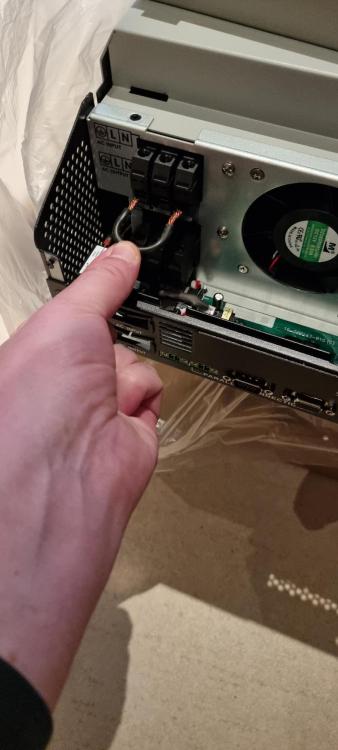
Hi Guys, Long story short; Our inverter stops working (A Mecer SOL-I-AX-5M) and before I know it my wife has called an electrician who has removed it and taken it away. Word comes back that it is uneconomical to repair. I'm fine with this as I wanted to upgrade in the future anyway.... But I did want to make a note of how everything was connected to the inverter and now I can't :-( After doing a bit of research I decide that a Mecer SOL-I-AX-5M4 is better and should also just be a "drop in" replacement. The connections seem identical. The new unit arrived this week and our regular spark is not available for the next two weeks. Got a quote from another electrician to simply reconnect the new inverter which seems ridiculously high (around 8k!) especially since all the wiring and connections already exist. Batteries were tested and are fine. Although I'm not an electrician I'm very comfortable working with electricity and I understand the principles at work. I'm generally pretty self sufficient with domestic electrical stuff including wiring and troubleshooting - but always get a spark to check my work. Looking at the inverter it seems like a pretty straight forward job to hookup the replacement. The connections on the new inverter are almost identical to the previous and all the wiring is already there. The PV connections are straight forward (noting that the unit must be off when connecting to avoid damage). Likewise the battery connections are obvious. I know to be careful with DC and there are isolators on the PV supply and batteries so I can connect safely. When it comes to INPUT / OUTPUT I can clearly see the RED (live) and BLACK (neutral) for the input. I can clearly see YELLOW (live) and BLUE (neutral) of the output. I can confirm this visually and with my multimeter. The earth is an uninsulated silver wire so the yellow above isn't earth its definitely live out. This is where I'm stuck: 1. There is only a single earth cable coming from the DB to the inverter. Should this be connected to the INPUT or OUTPUT earth??? (Looking at the uninsulated wire it really doesn't seem like it connected to both the E on INPUT and OUTPUT) 2. There was a small piece of black GP wire left behind. (See image1) It fits perfectly as a bridge between the Earth and Neutral terminals. I'm convinced it was used to bridge E to N. What I don't know is was that on the INPUT or the OUTPUT terminals. I'd also like to know why this would be done? Once I've got the unit hooked up I'm fairly sure I can set the other menu options correctly. (I'm going through the booklet and making notes of anything I think I need to change on the LCD setup for Propper operation) Thanks for the time and advice, its sincerely appreciated.