


CRD
Members
-
Joined
-
Last visited
Everything posted by CRD
-
Thanks RiccoS, appreciate your input The Batt Restart setting makes more sense to me now I did not think of that
-
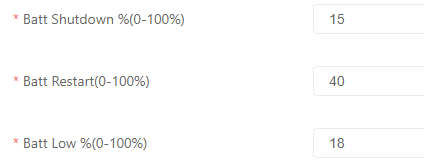
Hi Is there anyone that understands these settings well? I have sort-off an idea but want to be clear on these settings. In the screenshot is how the settings is set on my Sunsynk inverter. Batt Shutdown and Batt Low I understand and makes sense for me as I have my DOD set on 80% so my batteries SOC is set to go as low as 20%. But the Batt Restart confuses me, does this mean my battery restarts when it reaches 40% while discharging and going down to 20% SOC, it does not make sense to me. Any input will be much appreciated. Thanks
-
Hallo Does anyone know how low I can set these specific batteries to discharge safely without damaging the batteries? Currently I have my SOC set to 25% before I start charging again but was thinking of going lower to 20% to get some more usable battery capacity. Shoto Sda10-48100 5.12kwh Thanks
-
Hallo Does anyone know how low I can set these specific batteries to discharge safely without damaging the batteries? Currently I have my SOC set to 25% before I start charging again but was thinking of going lower to 20% to get some more usable battery capacity. Shoto Sda10-48100 5.12kwh Thanks