ibrahim007
Members
-
Joined
-
Last visited
Everything posted by ibrahim007
-
how can I get display firmware to show LIB battery type option at watchpower app?
-
Hi Coloumb hi Coloumb can use this firmware in Axpert king 2 inverter or not?

-
From other inverter ls i can see 3.1.1.1 while min is 3.1.1.0. check below from Growalt inverter types

-
You can see from attached LIB and LIC option not available

-
I know how to update, but I need the Software. software comes in ZIP file include the application on laptop and the firmware files for update the wifi dongle
-
LIB and LIC battery types are not available when i open watchpower app. however i check with other voltronic inverters types like Growatt( voltronic) they have a version 3.1.1.1 and they can see all types of Batteries including LIb and all while In my Voltronic inverter i can see only few types. In inverter pannel we can see LIb type but in watch power we cannot see. our wifi firmware version is 3.1.1.0 and that why i need 3.1.1.1 and above
-
Hi we need the software for the WIFI CPU of voltronic KING 2 5Kwatt inverter. current version: 3.1.1.0 new version needed to solve couple of missing settings at the inverter. br
-
Problem is the battery BMS, battery is Taico using maybe like Pylontech BMS what setting under battery should I choose from battery Monitor with Victron inverter it is OK. but with Axpert seems not. do you know anyone tested Taico with Axpert inverters? What dip switches? According to expert catalog the battery address is for group and not for battery pack for instance if Dip 0000 means first group and master battery. others not restricted. If RS485-1 port
-
Can you help me with axpert king 2 voltronic inverter software do you have any new firmware which could help in charging current to be maximum while we have LIB type of battery selected as BMS is working fine however, current is limited to 30amp at inverter also I have three inverter in parallel KIT mode, one of them is master
-
In my case it is not like this easy it is giving fault 04 when I choose like this i should select the right inverter from battery tool during setup. The problem in mycase is the charging current when i select LIb type in inverter Is low and BMs is ok i need to fix this by changing the type of battery and see, but how and what i should from battery setting
-
Now it seems from my side for RG485 i used from inverter 3 5 and from battery 1 2 now for Pylontech? do you have battery software to configure? What did you select RG485 then which inverter type?
-
You are right! Sorry for pins your picture is right?
-
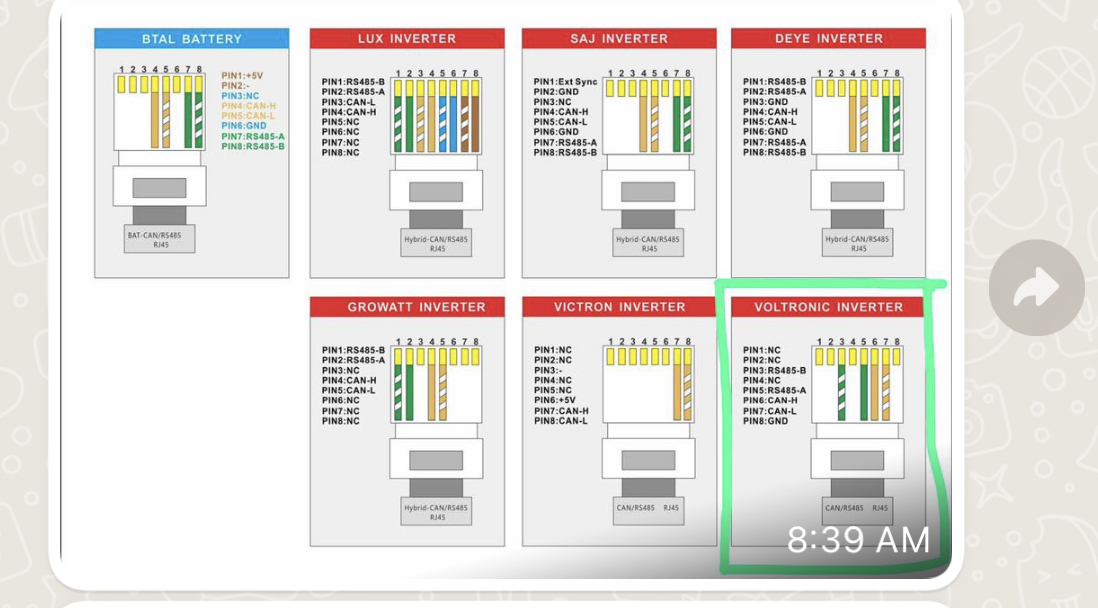
In your picture there is mistake, from batery should be 3 5 for RG485 and from inverter should be 7 and 8 in my case / yes 3 5 from inverter it is 67. what is the dip switch you make in the master battery?
-
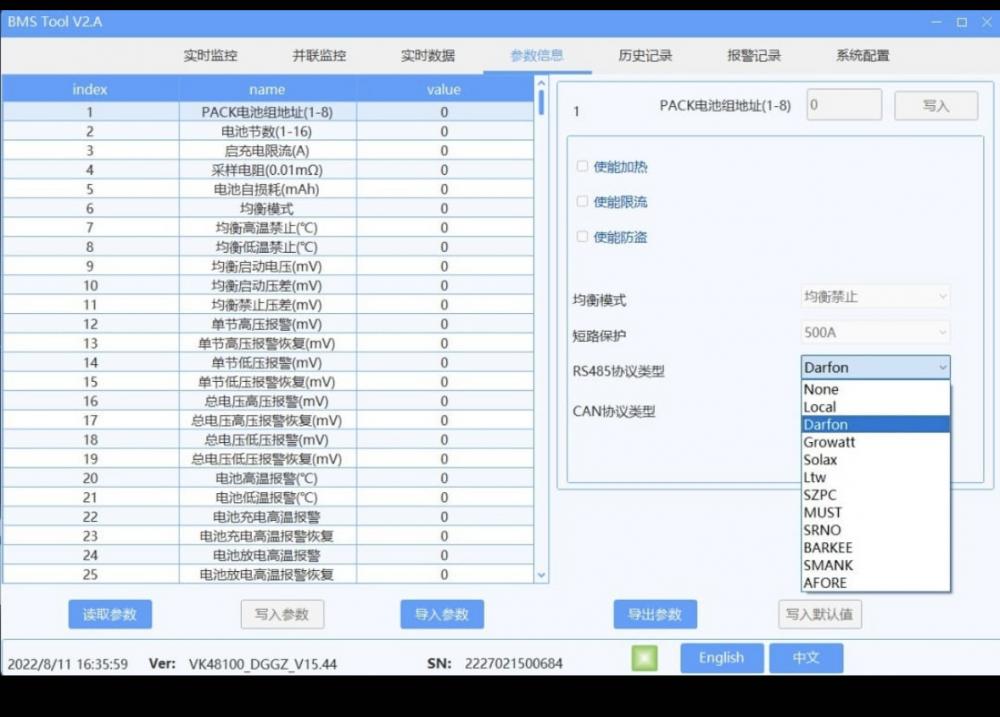
What i should choose for Victron it is CAN for Daifon RG485 this is a Taico BMS monitor, what you choosed in your case?

-
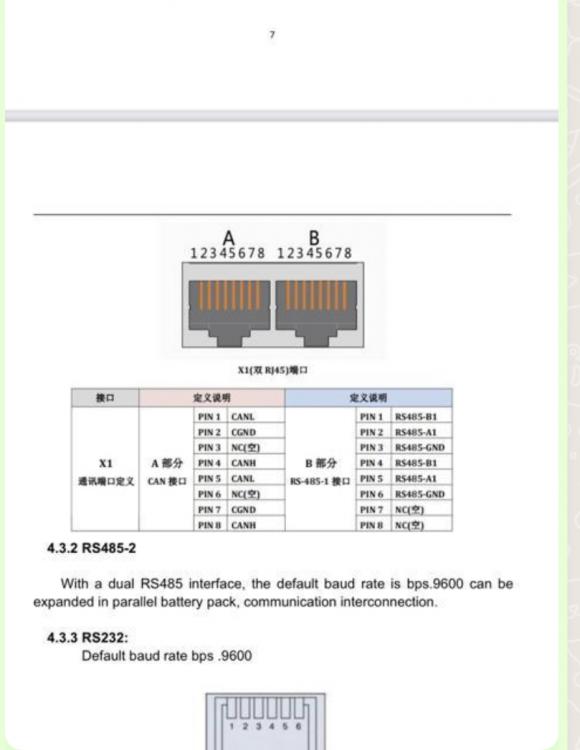
For cable, I did the right one. Now on the battery side, when you use pylontech. in the BMS of the battery what you choose, you choose Victron or another type of inverters. because in my Taico monitor software, I should be selecting the type of inverter to talk to Axpert. for example: if you choose LIB in Axpert I works with RG485 and Daifon on Taico battery now you are saying Pylontech what should I use in Battery side as victron or what. how many batteries you have? which dip switch on master u use? 0 0 0 0 or 1 0 0 0 ?


-
Hi, please check attached
-
Hi what is the right DIP switches for my 4 TAICO batteries. Master DIP switch? Slave1 dip switch? Slave2 dip switch? Slave4 dip switch? so I can see in master inverter 800AH and 40960Watt batteries capacity. Axpert king 2 only show the value like P04 or p01 and Group!!! do we have a way to see the 4 batteries capacity with Axpert king 2 inverter/. br
-
Who can decide the protocol CAN or RG485, the Battery or the inverter as the cable that I did support both connection types!? from battery it seems there is an option to select communication type?! Is this right? why terminator at battery with CAN? Is this must or optional?
-
Hi @jumper, but you shared with me this link and it shows https://community.victronenergy.com/questions/125321/taico-bms-not-detecting-by-ccgx.html and they said they used Victorn and Pylontech from voltronic with CAN and it works. I asked Taico and they said it works. @coloumb: is saying that it should be RG485. I need a solid answer, did anyone try the same setup like my setup 3 inverter Axperts king 2 with 4 Taico batteries or not? i need a solid solution to solve my issue, trying and trying, no one is telling something solid. do I need Firmware? do i need RG485 or CAN? do I need Poly, LIB or other from inver? do I need Victron, Darfon or any other setting from Taico? why Taico does not test such setup at their end and close the story?!!!!!
-
CAN option A from battery to Voltronic option in inverter who can confirm that?

 I have made the cable to support both CAN and RG485 as per battery R&D: from battery side pins-4 5 6(G) from axpert inverter pins 6 7 8(G) however i missed to add the G pin in my cable can CAN protocol work without G or not. - second, do we need a terminator for batteries when we have parallel batteries connetion incase of CAN according to Taico batteries they said to work with Axpert you have to select Victron option from battery- CAN then Pylontech at inverter and tryHi i will try to change the protocol to Pylo and Victron from battaries using CAN-A type communication. and check if current changing will be possible.We will try to give a try?