


Rohan
Members
-
Joined
-
Last visited
Everything posted by Rohan
-
I am also new to this ... so excuse my newbness. I have a 5kw Deye Hybrid inverter with a 5.1kwh CFE 5100 S battery with no solar at this stage. At first I had an issue with the battery constantly showing fault and run at the same time, but it was due to battery capacity set to 200ah instead of 100ah. The comms port was also plugged into the 485 port instead of the CAN port. After fixing this, comms seems to be good and no more fault light. I have two issues that I would like clarity and assistance on if possible. Issue #1 - I am unable to connect to my CFE battery with the CFE App from their website. I have tried the alternative app as well from another thread in here and the steps still do not work. I think it might be an issue with the firmware requiring and upgrade, but I don't see a guide on how to do this or where to get the app to do this. Is it really necessary to be able to connect with my battery if I can already see the details of the battery on my invert's Solarman app? I am not sure if any settings needs to be set on the CFE App. Issue #2 - On my inverter and Solarman app, I have the same screen animation depicting the following when the eskom / grid power is on. a. Grid to ON / middle b. Battery (100%) to ON / middle c. ON / middle to house It does this until my battery is down from 100 to about 92%, then it changes around for point b above where it is ON / middle to Battery until it is 100%. I have had my charge and discharge setting at 25 and 60 previously, but changed it back to the default 40 on both. Is this normal? Should I be changing any settings to stop this? It basically creates a saw tooth graph essentially in my solarman app.
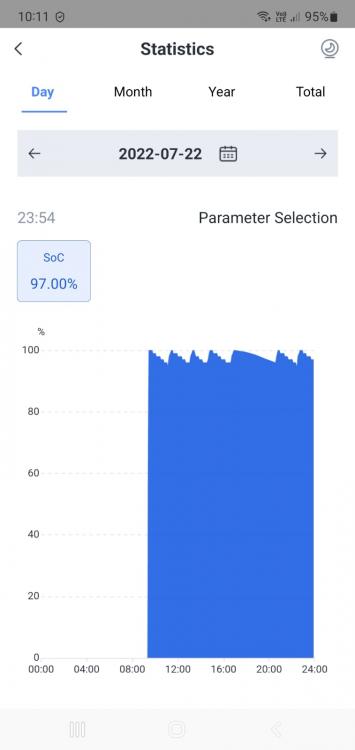
.thumb.jpeg.bc4be0141b70902e123b5ed318b65d79.jpeg)
-
I finally found the answer to where to find the APK in this thread, thank you so much. I am unable to pick up the wifi name from the manual when pushing the reset button for 7 seconds. Anyone else have this issue as well?

.jpeg.64cbf1ab69f99b8f0f7c18d3a2dd0477.jpeg)