tsf
Members
-
Joined
-
Last visited
Everything posted by tsf
-
Thanks everyone. As you say, the panels won't produce more than can be used. I understand that now. I tested that by only charging my battery to 70% last night. That meant there was still a charging requirement at peak solar time today. The panels were able to generate produced 5kw to meet that need and export the rest.

-
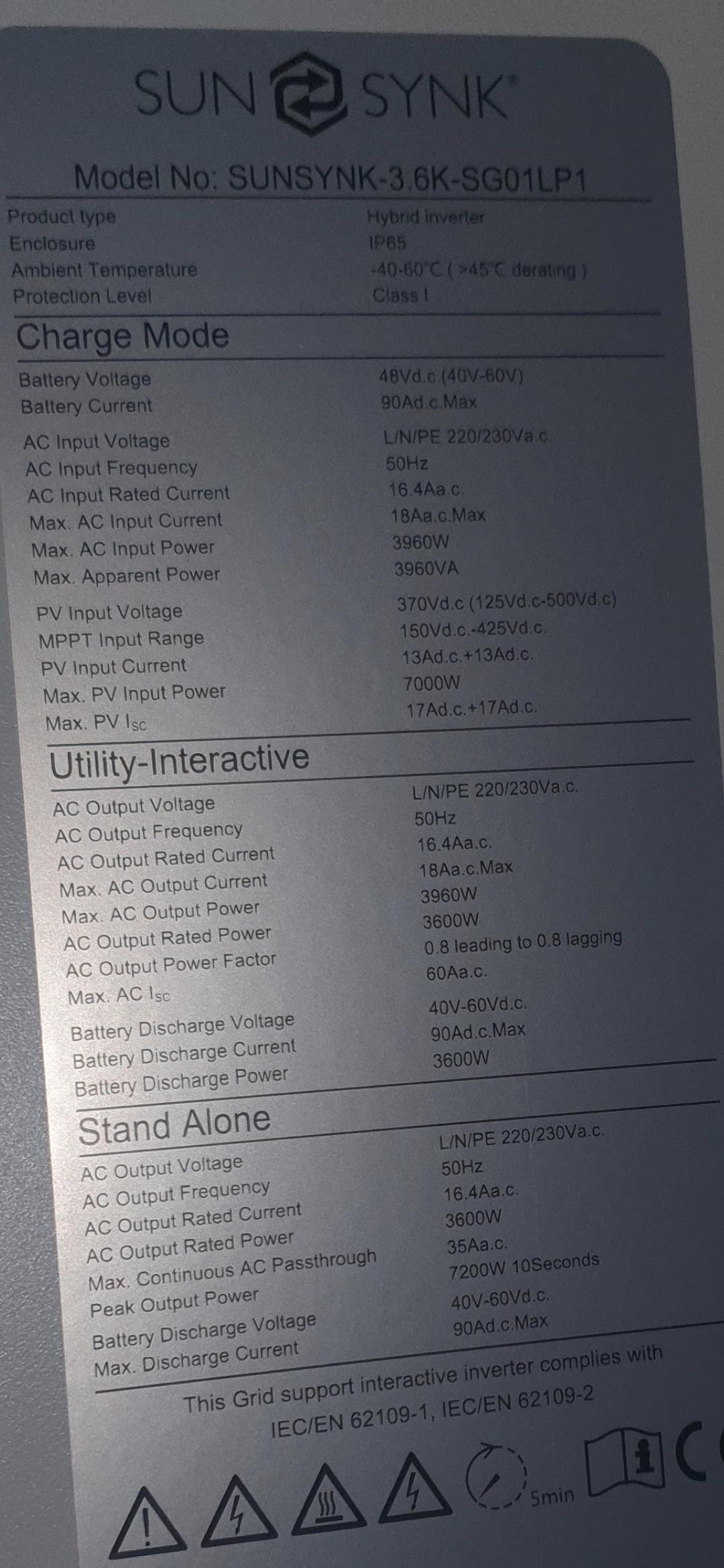
Thanks for the quick reply I've checked the spec plate on the side of the inverter and it says 7000w max solar input. (Pic attached). The output power is 3.6kw. It was installed by a well respected national installer, so I'd be surprised if they overloaded it with too many panels. But again, sorry if I'm not understanding your point correctly. I don't interact with the inverter much so don't really have a deep understanding of the tech.
-
Hi I have a sunsynk 3.6kw inverter, max solar input 7kw. 15 x 385w panels (5.7kw) My solar input seems to be limited to just under 4kw. The input chart seems to be shaved above that (attached) Is this a setting somewhere to increase this 4kw solar limit, or am I misunderstanding what is happening? ?

-
Thanks for the info. We are OK to always export here; I'd just prefer to put the extra power to better use (EV, appliances). I don't have an export contract, but even if I did, I think we'd only get 10% of the retail cost per kwh. So unless I'm missing something, neither export nor zero export help me get an ROI. We have some suppliers here in the UK offering half-hour market-price tariffs via an API (or at least we did before our energy crisis). And separately, as a result of the crisis, we may also be offered load shedding incentives in the evenings. So if/when this happens it would probably be time to improve my automation position, with respect to grid-charging my batteries when receiving notification of good prices / shedding schedules. I've taken another look at kellerza and it still feels a magnitude more complex than I am comfortable with, at this early stage of my journey. I suppose it's typical for us techies to just stick with the tech we are familiar with. In theory I could just have another selenium script charge my batteries when I detect good prices (even negative prices) from the API. So that could be a next step for me.
-
After getting fed up not being alerted when I start to give away my power to the grid, I've finally got a quick solution to this. I just use Selenium to scrape my Sunsynk.net account and send off emails when I'm approaching 100% SOC / about to start exporting. Am I missing something - is there an easier way / is there an API I should be using for this kind of thing? (IFTTT type thing) I notice another thread "sunsynk monitoring" that looks a bit beyond my pay grade as a little domestic user. I was just checking that there is nothing official or obvious I'm missing regarding notifications? Notifications seem such a basic critical feature to be completely missing from the Sunsynk offering.
-
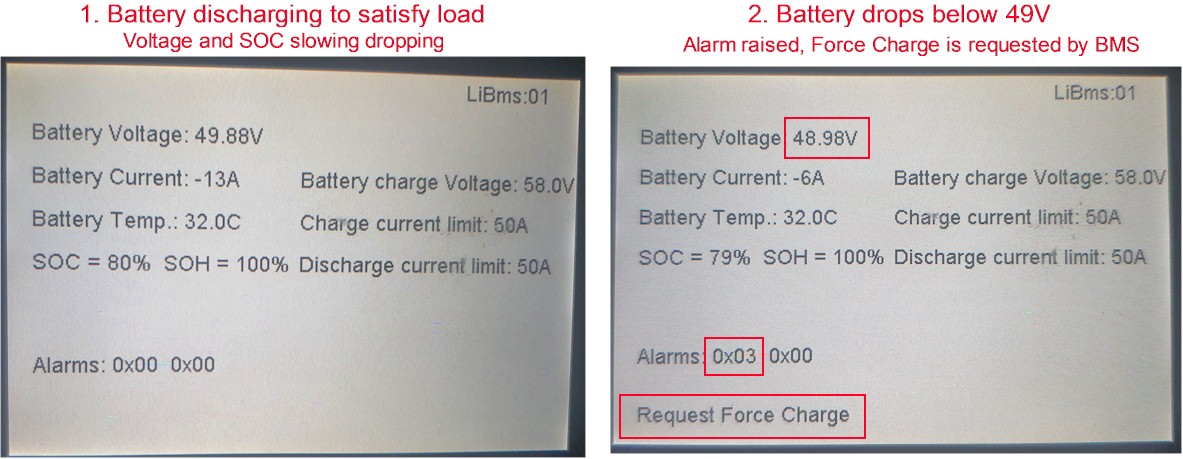
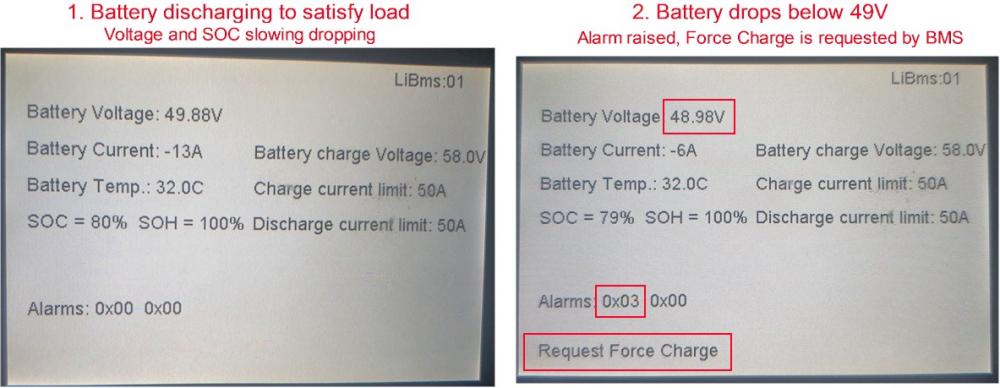
I have a possible lead regarding my problem with the battery constantly recharging from the grid in a constantly repeating cycle every 10 mins. "Force Charge" Request I have been looking more at the BMS screen on the inverter. It seems that there is a threshold of 49 Volts, below which the inverter will perform a "Request Force Charge" and raise an alarm "0x03". Please see the attached pictures. You can see that a "Force Charge" request was placed by the BMS when the battery dropped below 49 Volts. Even though the SOC was 79%. Can anybody explain the purpose of this feature.. and what is the implication. Does it mean my battery is broke / has low voltage? You can see the voltage is low even though the SOC is high.
-
Thanks. How do I do a "battery reset"? I am in a slightly tricky situation where, at this initial investigation stage, I do not really want to interfere with the hardware, or even the settings. Unless there is a "slam dunk" settings change that we can identify that will almost certainly fix the issue. This is because I am holding out hope that the installer will help at some point, and I do not want the installer to claim that something I did could have contributed to the situation. Can I ask again about the "50 volts" battery threshold that I am observing? Can this be a factor? All of the problems seem to start when the battery drops below 50 volts. In the first few days, this correlated to a SoC of 44% or 57%. Last night, it correlated to 97%. So last night the battery was recharged by the grid in a repeating cycle from 97% to 99%, all night. Every 10 minutes. Is 50 volts normal operating voltage?, or could something in the inverter/BMS assume this is a warning threshold and the battery needs some sort of jolt form the grid to "correct" it's voltage. (Sorry for the newbie theory)
-
How can you tell? My firmware is COMM:e424 - MCU:2374
-
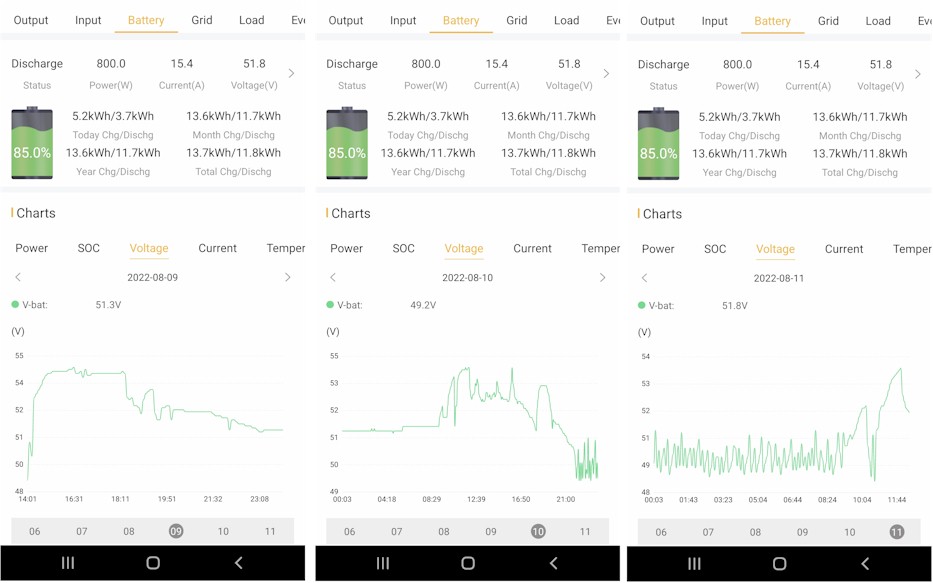
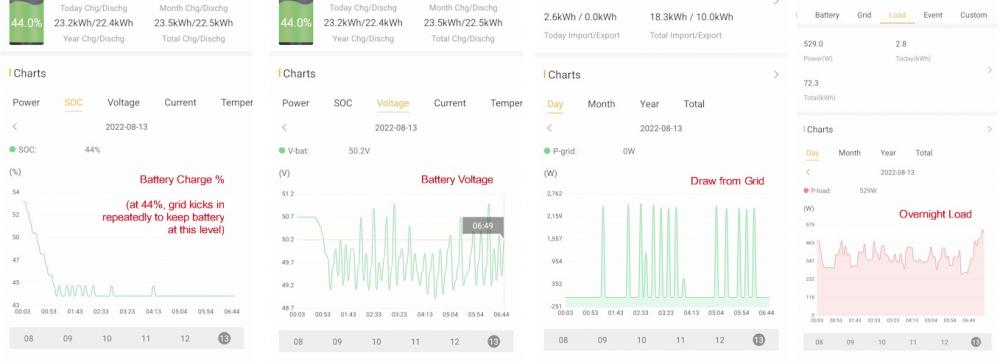
Yes - this is the core of the issue. This 2kW is not load, it is the inverter intermittently pulling from the grid to recharge the battery. Even though I do not have grid charge active. It seems to happen when battery voltage drops below 50V. Here is the diary of activity so far: Day 1: battery fully drained as expected to 20% (51V) overnight. Then grid was used to power the small overnight load. - (as expected) Day 2: battery only drained to 57% (50V), and then the inverter started pulling intermittently from the grid to keep the battery marginally above 57%(50V) - (not expected) Day 3: battery fully drained as expected to 20% (51V) overnight. Then grid was used to power the small overnight load. - (as expected) Day 4: battery only drained to 44% (50V), and then the inverter started pulling intermittently from the grid to keep the battery marginally above 44%(50V) - (not expected) Last night's charts attached. Battery settings attached. My thoughts: 1.There is not enough overnight load to justify the draw from the grid. 2.The only "constant" I can see from the last 4 days is the grid kicks in when battery voltage drops below 50V. Ultimately my question can be summarised as: Why is the grid kicking in overnight, before the battery has discharged to it's 20% minimum? How do I do this on the mobile app?

-
Wow thanks for your quick reply. I will grab the settings and post them when I can. But my thinking was: -the system was working as expected on "Day 1" (Top left screenshot) - i.e. battery discharges all the way to 20% -on Day 2, the battery will not discharge past 57% (Top middle screenshot) So that would imply a setting was changed? But nothing has changed. Thanks again - I'm hopeful we can work this out with you help. I will post the screenshots when I get back.
-
Hi I have a new solar installation installed this week by a 3rd party. Their support is very slow so I was hoping to get some input from you. I hope you can be patient with me, as I am very new to this. - Sunsynk Hybrid Auto inverter - Synsynk 5.12KWh battery - 4KW of panels Everything seemed to work fine for the first 36 hours. The battery discharged to 20% overnight, then grid power was used until the sun came up. All good. But last night the battery discharge was unusual. When the battery reached around 57% / below 50V, the inverter drew from the grid to recharge the battery. This is now happening repeatedly every time this 57%/50V threshold is crossed. The battery is not set to "grid charge" Can you advise what is going on?