sohail anwar
Members
-
Joined
-
Last visited
-
let met correct myself hare.it is 428v phase to phase.
-
yes dear i have e mailed them and ask for solution.is there any way i can turn ot on by setting its software accordingly?
-
yes dear i have e mailed them and ask for solution.is there any way i can turn ot on by setting its software accordingly?
-
the Standard AC voltes in my country is 220V and operating frequency is 50to 60 hz
-
you are saying that i must have 230v on each phase and ground??and which settings are you talking about? ac voltage setting pv settings or inverter internal settings? yes this inverter is usa brand and i am looking for its manual or a program CD or a way to set it up according to my regional settings
-
-
i have 200vac on each phase
-
i think it requires a software setting.and i dont have a manual or a cd to configure it through pc.
-
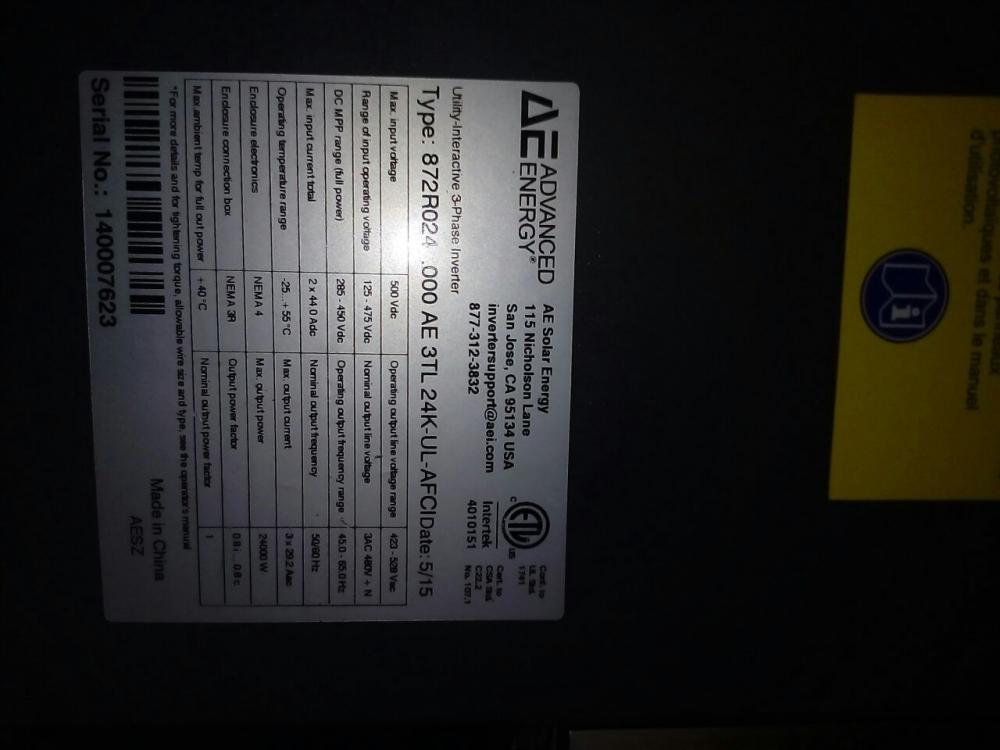
it doesn't turn on without grid supply. it has a pv switch to turn it on and off.if you please check the pics which i have attached with the message.
-
hello every one.i hope i get some help through this forum.i have a Advanced Energy grid tia inverter model number 3tl 24k 24000watts it is a pv inverter i am having problem understanding its on-board settings.after installation when i turned it on it shows error sign.on display it says grid under voltage and grid frequency error.will some one tell me how to fix this issues