Skip to content
View in the app

A better way to browse. Learn more.

Power Forum - Renewable Energy Discussion

A full-screen app on your home screen with push notifications, badges and more.

To install this app on iOS and iPadOS
  1. Tap the Share icon in Safari
  2. Scroll the menu and tap Add to Home Screen.
  3. Tap Add in the top-right corner.
To install this app on Android
  1. Tap the 3-dot menu (⋮) in the top-right corner of the browser.
  2. Tap Add to Home screen or Install app.
  3. Confirm by tapping Install.

ILuvmyXJ

Members
  • Joined

  • Last visited

  1. Hi, Stumbled on this. May I please ask for the details. I am also struggling with mine.
  2.    ___ reacted to a post in a topic: Fridge
  3. Bit the bullet today... We have been without a fridge for 2 weeks now, so pretty desperate. Will post if it doesn't work out. Seems great right now, I can tell you.
  4.    ILuvmyXJ reacted to a post in a topic: Fridge
  5.    ILuvmyXJ reacted to a post in a topic: Fridge
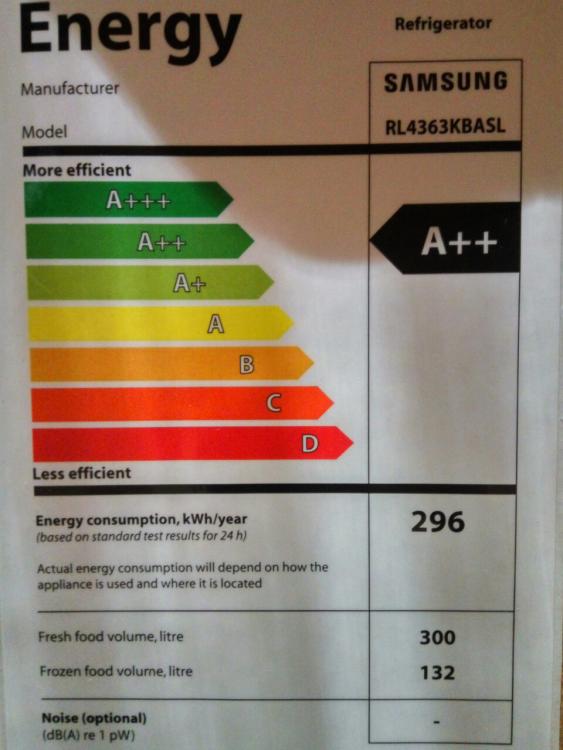
  6. Tx. Ironically it was the energy rating that was tipping me towards the Samsung. I have not seen a A+++, the Samsung quoted is A++ which got me interested, most of the rest A or A+. Frustrating...
  7. Did you ever go for this one? I am on the brink of buying one and just want to check if you were happy?

Account

Navigation

Search

Search

Configure browser push notifications

Chrome (Android)
  1. Tap the lock icon next to the address bar.
  2. Tap Permissions → Notifications.
  3. Adjust your preference.
Chrome (Desktop)
  1. Click the padlock icon in the address bar.
  2. Select Site settings.
  3. Find Notifications and adjust your preference.