De Silva
Members
-
Joined
-
Last visited
-
I am using a Growatt 5000 es off grid inverter with SAKO 5 k lithium battery My home usage is around 12 units per day Once the battery power is over in the night battery is charged by utility in full It takes minimum 6 units of power and 4 hours Since this looks not economical I restricted battery charging time to 2 hours starting 5 am each day During this time it takes about 3 units from grid and the battery is halfway charged Once the 2 hours charging time is over utility stop charging the battery When the sunshine comes in the morning solar starts charging the battery until it is fully charged but does not share solar power with home needs while charging Meantime grid continually provides power to the house without disconnecting I wanted to know whether there is a setting which I can use to share battery power while charging from solar in order to economize my solar input
-
I am using a Growatt 5000 es off grid inverter with SAKO 5 k lithium battery My home usage is around 12 units per day Once the battery power is over in the night battery is charged by utility in full It takes minimum 6 units of power and 4 hours Since this looks not economical I restricted battery charging time to 2 hours starting 5 am each day During this time it takes about 3 units from grid and the battery is halfway charged Once the 2 hours charging time is over utility stop charging the battery When the sunshine comes in the morning solar starts charging the battery until it is fully charged but does not share solar power with home needs while charging Meantime grid continually provides power to the house without disconnecting I wanted to know whether there is a setting which I can use to share battery power while charging from solar in order to economize my solar input
-
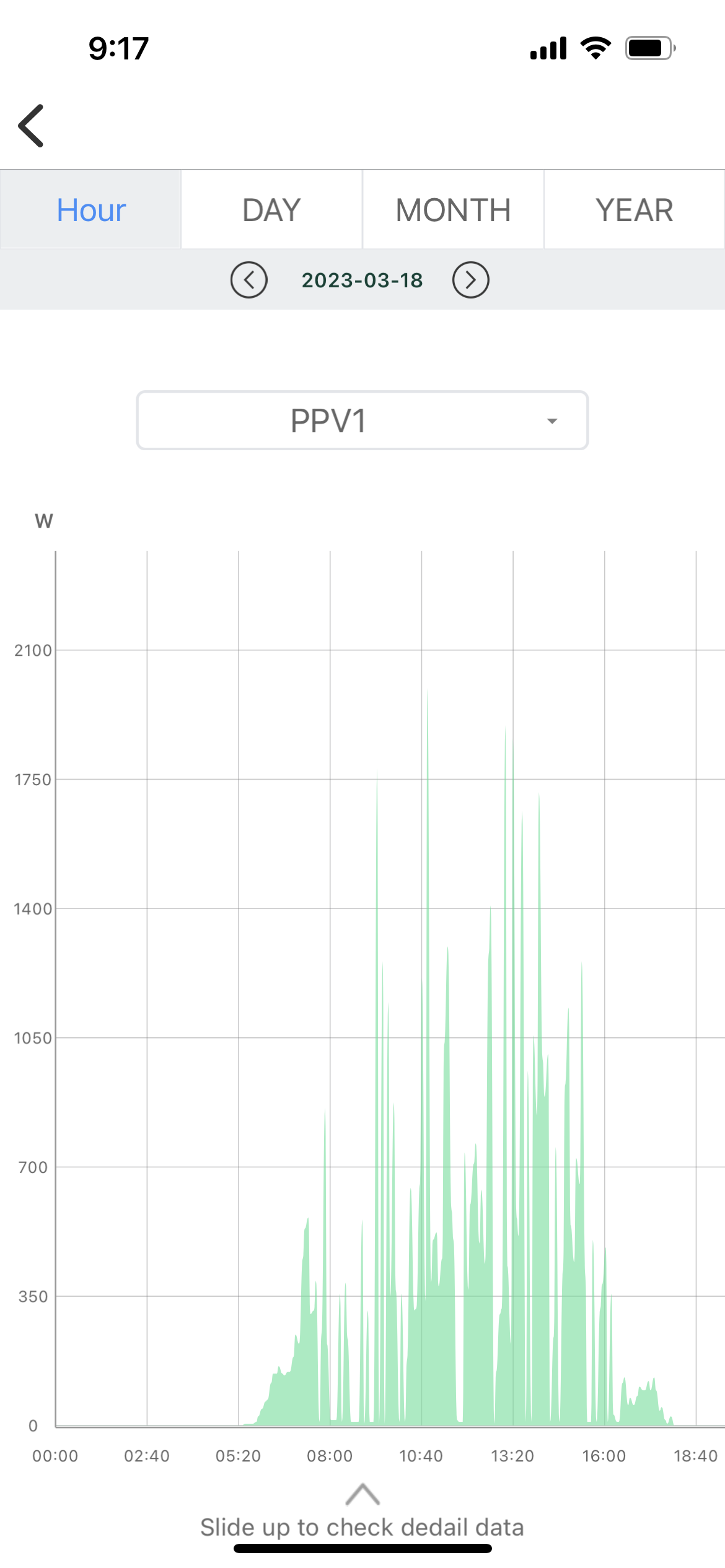
I too experiencing the same issue My inverter is Growatt 5000 es 5 kv my Panal capacity is only 3.2 kv Worked last 6 months well but noticed PV power fluctuation for the last few days i will post a pic to see how the OV input is behaving no error message coming

-
This is how PV input is behaving

-
This is how the PV input is behaving
-
This is happening mostly when the sun is shining brightly When the sun light is low there is no interruption my inverter capacity is 5 kv but my Panal capacity is only 3.2 kv So can’t understand why the PV power is get disconnected and connected instantlyI only hear a beep sound when the PV power is disconnected but immediately it is get connected No error messages or error light is seen because of this issue I get very less solar outputI have 6 panels 540w connected in series and I have been using same configuration for the last 7 months without issues I noticed this issue only few days agoI am using a Growatt 5000 es inverter fixed 7 months ago For the last two weeks we hear a beep noise from the inverter On examination we find that the solar line in display is interrupted ( connected and disconnected) very often Once it is disconnected we get a beep noise No error code is shown and no error messages are coming Although the inverter is working the solar production is very less PV line is checked but reported no issues will anyone help to resolve this issueI am using a Growatt 5000 es inverter installed 6 months ago in my display the solar line is interrupted every movement specially when the sun is brightly shining This is not happening during morning and afternoon inverter is working in all other aspects I want to know why the solar display line is interrupted ( Disconnected and connected)I am hearing an unusual beep noise occasionally from my Growatt 5000 es 5 k inverter installed 6 months ago I inspected the display panel and noticed that just before the beep noise comes solar connection display gets cut off for few seconds and reconnected but the power source not changed When the sunshine is in peak I hear the beep more frequently but no beep during night time This is not the usual beep noise making when changing the power source Inverter does not show the usual red error light or an error code I checked the solar line connections from inverter to the DC breaker but could not find anything Despite this unusual beep the Inverter is running as usual Can anyone help to fix this isI am hearing an unusual beep noise occasionally from my Growatt 5000 es 5 k inverter installed 6 months ago I inspected the display panel and noticed that just before the beep noise comes solar connection display gets cut off for few seconds and reconnected but the power source not changed When the sunshine is in peak I hear the beep more frequently but no beep during night time This is not the usual beep noise making when changing the power source Inverter does not show the usual red error light or an error code I checked the solar line connections from inverter to the DC breaker but could not find anything Despite this unusual beep the Inverter is running as usual Can anyone help to fix this isGrowatt 500 ES inverter error code 2 i have the error issue can some one help how to rectify error code 2 this happened after heavy rains for 3 days inverter is working with the error code beepingDe Silva joined the communityMy Growatt 5000 ES is giving same problem after heavy rains continue sky for 3 days I got error code 2 It can’t be over temperature I kept it without working for over 12 hours Still I get the same error Please let me know how to rectify