IGR
Members
-
Joined
-
Last visited
Everything posted by IGR
-
Latest firmware was supplied but the problem supposedly fixed in the release was not fixed now have to take it in.
-
PS there is a long article on their website explaining how they solved my particular poblem but this current battery is apparently one of 3 that has experienced the problem that they claim was resolved in the latest firmware update.
-
I agree that the batteries perform once you get them to work but poor quality control requires taking them back to get them to work.
-
Initially we bought 3 AM 5.5 Batteries in 2019. Then added 3 more a few months later. All 3 had problems from the go and had to be taken down for repair and reinstalled. Now bought another 3. One ok. Second has problems with charging and 3rd I still need to mount. Again the failed one needs to go in for repair. How can a company sell products with 50% failure right from install. All get repaired at cost, time and effort - all because of poor quality control at manufacture. Hubble need to have a warranty exchange program which if done will sink the company if they don't jack up their quality control. How about accepting the challenge?
-
They will struggle to enforce warranty abuse. They need to prove that looking at info has damaged the battery.
-
As a matter of interest how would they know? You don't have a password and if you have you should not use it. Only use PMBS to view status
-
Hubble send a link that expires. Critical that you have correct versions as it does not imply both batteries will be on same version of firmware. I kniw of update done where versions were newer but not the same
-
My hubbles run at 3.72 to 3.73 and is not a setting i can change
-
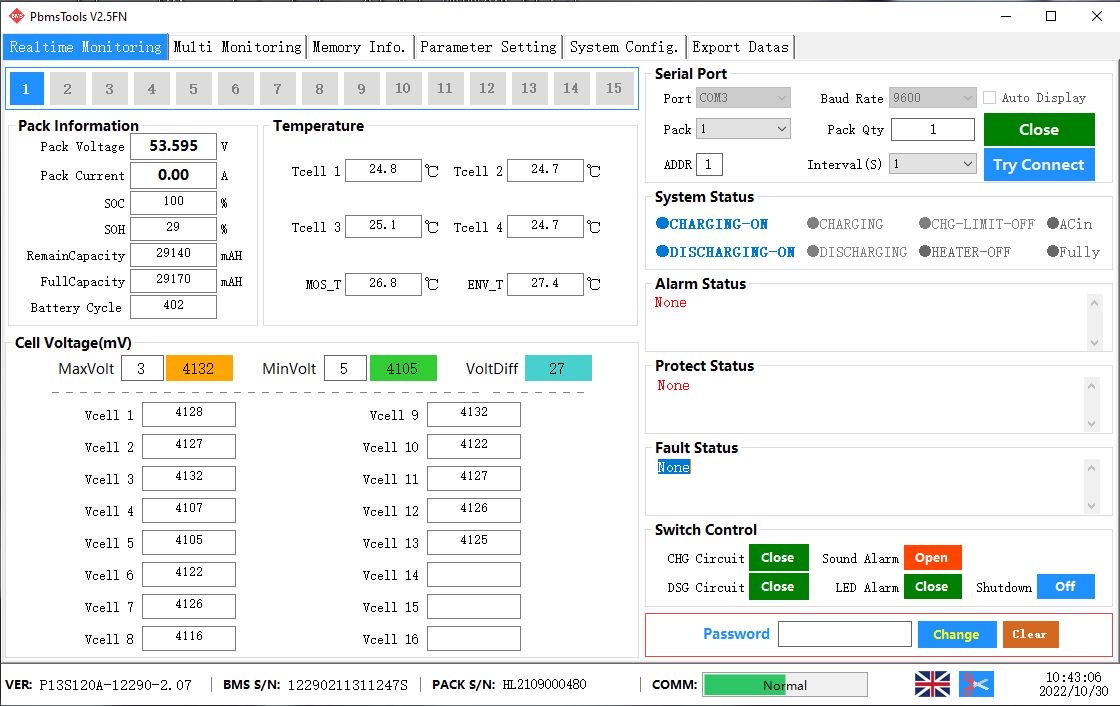
Your full capacity on batt 1 is the problem at 48. See 2nd is 100 which is correct. Same problem I had. The can fix it in Jhb or Cape Town
-
Our problem was with 3 sets of dual batteries (1 bought in Des 21 and 1 in Sept. 22) where the older batteries only had 28-31 Amp capacity when the second battery was added - on own they were 100A. Inverter BMS averages readings so we only identified the problem when we added SolarAssistent My experience with 2 battery setup was to log a call on email in my previous post. State all possible info with screenshots. I used this to show my batteries had different capacities Hubble responded quickly. They first sent new firmware releases (may be different for batteries) to ensure both batteries are at correct releases. Hubble also suggested the AGM process using V to charge both batteries to 53.8V. When this failed I took problem battery in and they got the problem sorted out. So to recap: * Get correct firmware versions * Get Hubble to identify the problem by providing as much info as possible * Then get the problem sorted out by Hubble Hope this helps

-
I have found that it is better to log a call on: [email protected]
-
You need to take it in and they will reset it to 100ah
-
Yip got the firmware updates from Hubble. Will try the AGM volt option for a few cycles
-
And PBMS confirms this
-
Hi Guys With Solar Assistant have you noticed different SOC for AM2 batteries while the Volts are the same? I get say 20% average SOC with 2 batteries showing different SOC eg 18.2 and 23.6% while both have 43.6V
-
Hi Ben i have 2 Hubbles and one had max 28 Ah. I sent it in and this was fixed. What I now have are 2 batteries with exact same Volts but differing SOC %. I gave tried the suggested AGM charging to balance SOC but no success. Have logged another call.
-
I loggef my request at [email protected] and got support from Jason and Jesse in CT. Booked my batteries in at Jhb branch and after about 10 days got them back fixed. So I am pretty happy and now have contact details for remote support. I agree the Riot & cables are an extra cost but it is the only way to assess the batteries individually.
-
That is if you have Riot box
-
So Hubble in Jhb did a BMS balance on the 3 batteries we had with the same problem of max capacity being around 30Ah and now all seems fine. Hubble recommend BMS balancing every 500 cycles and they can do this remotely.
-
He zsde Turns out it was a bad cable. Waiting for replacement. Thx
-
Thx. Not sure if my BMS is damaged. My Deye just shows battery at 100% and Solar Assist is slowly dropping from 53.7v to 53.3v
-
Cable is new. Problem occurred when I did the proposed AGM discharge and charge to balance SOH. As I moved from 44v discharge to charge I experienced the problem. Strange indeed
-
On pbms the RS242/485 comm times out
-
Has anyone experienced problems accessing the BMS data with tools like pbms or Solar Assist. I cannot see the charge and discharge voltages in AGM mode on either pack1 or pack2 which I was able to in the past
-
Jip pack 1 dip 1 and pack 2 dip 2 on