


Miko
Members
-
Joined
-
Last visited
Everything posted by Miko
-
Thanks @paul99. I tried your trick on my iPhone SEMS Portal app and could not get the configure button to appear. I raised a support ticket with Goodwe and they sent me a link to register as an installer. Once that registration is approved, I will be able to log-in as an installer and have access to the configure option. This is what they said: Good Day Michael The remote settings are available in the installer account. Your Account is a end user account. You will have to register with a different email address or we can request our team to delete your existing sems portal account. Kindly note a different department is deleting the sems portal accounts. This may take 3 working days or more. You can use the link below to register the installer account if you will use a different email address. https://www.semsportal.com/Home/InstallerRegistration/f3626c16-a97f-4a61-aaa8-870703c13e65
-
I have opened up a ticket with Goodwe to see if they can enable that option for me.
-
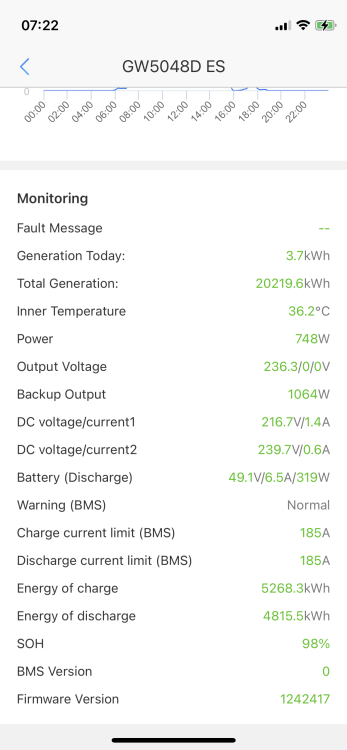
Hi @paul99 I checked my app (using the iPhone version) and could not see a configure option next to monitoring (see screen shot). Are you using a different version of SEMS portal? Mine is Version 3.3.16. Regards, Michael
-
@paul99 thanks for your explanation. I'm just trying to keep it simple. My main objective is to buy as little electricity as possible. So I'm just using Eco mode in the late afternoon/early evening to charge my batteries up to capacity, similar to @Bobster. I had it set for a shorter period at 80% power rating, but then experienced an instance when the inverter tripped because someone turned on a microwave (my charging period overlaps with a potential busy kitchen period). So I made the charging period slightly longer at a lower power rating. Outside that short charging period, I am just letting the system run in default general mode. My batteries discharge to between 30 and 45% and the cycle repeats.
-
Hi @paul99. Thanks for the interesting set up tips. So are you saying that if you only set 1 mode, it will be "lost" every time? I noticed I had a mode 1 setting and when I checked a day or two later, it was reset. My DB board is wired so that big load demand items (pool pump, two geysers, washer/dryer, dishwasher) are on a separate circuit from the inverter fed circuits. So, when we have load shedding during the day, the PV mostly charges the batteries. I have been using Eco mode and it has made a difference--I had left it on Backup mode while we were away overseas so that the house sitter didn't have to do anything with the system. SInce I've returned and set it on Eco mode, the PV amount has gone up significantly--the contribution ratio has gone from 50% or below on Backup mode to over 80% on Eco mode. I'm curious why you set no 2 to discharge at 1% for the morning hours. Also, is there a science behind the 21% charging from 3PM to 11PM? I had my charge hours set at 80% from 16h00 to 20h00 but scaled it back down to 50% after a microwave caused the inverter to trip. My reasoning was that unless there was a four hour load shedding between 16h00 and 20h00, this charge setting would ensure full batteries for the rest of the night. From 20h00 to 07h00, my batteries will go from 100% to 35-40%. Cheers, Miko
-
Hi Cef So could you give me an example of how you configure your system in Eco mode. Also, what is your battery capacity? When I am back in Johannesburg, I am definitely going to start tinkering with Eco mode as that seems to be the best way to get maximum use out of PV and batteries, while minimizing the need for the grid. Like I said earlier, we are away for a few weeks and I didn't want to have to school our house sitter with the ins and outs of PV Master. I also didn't want to leave it on a particular Eco mode setting for fear that there might be some days (weather or heavy load shedding) when the batteries would not have enough charge to see out a load shedding event. So I just left it in Backup mode, which ensures a 100% charge. I have noticed that our PV generation in Backup mode is about 50% of what is used to be when I managed the system, and our grid consumption has gone up. Cheers, Miko
-
With Stage 6 being implemented just before we left for holidays, and the unpredictable weather, I left the system in Backup Mode and our house sitter has not had any issues with power. We are consuming more electricity than if I was there to manage the load, but it is not significant and I don't have to worry about our house sitter.
-
Hi Greenfields. Yes you are right about the storage capacity. I guess I'm trying to find a one size fits all setting, and that's not possible with the unpredictability of weather and load shedding schedules. I've been managing the load with PV Master either when I'm home or I message my son to switch modes with PV Master (since you cannot do it remotely). We're going away and I have a house sitter, so don't want to school that person on how to manage the load. So I'm going to try Eco mode for a period in the afternoon into the early evening to make sure the batteries are charged fully by nightfall. The batteries can then carry the load through the night easily and the cycle can repeat the next day. Failing that, I'll just leave it in Backup mode while we're away.
-
Thanks Bobster. I'll play around with this. When we go away and have a house sitter, I'll just leave on Backup mode. It will use more from the grid, but will ensure full batteries and the house sitter doesn't have to fool around with anything. Just a question on the rated power calculation, where rated power is a %. I have the GW5048D-ES and the capacity is 5.048 kW. So if I understand this calculation, if I set the rated power to 80%, it would send 80% x 5.048 or just over 4 kW to charge the batteries each hour? I have 5 x Pylontech US3000C batteries, 3.55 kWh each or about 17.75 kWh in total. You mentioned the amount of current that the batteries can receive and I didn't understand that correctly as in your second sentence you came up with "about 73A". According to the Pylontech data sheet, the battery has a charge/discharge current of 37 (Recommend) 74 (Max@60s) 90 (Peak@15s). So how do these current ratings equate to what rated power is used? Also, did you say that you just set the charge times in Eco mode and the rest of the time it behaves as if it is in General mode? If there is load shedding during an Eco mode charge time, would it revert to General mode and discharge the battery for the load?
-
Hi folks. I have a Goodwe GW5048D-ES inverter with 5 x Pylontech US3000C batteries, and 18 x 335W solar panels. Before load shedding got bad, I would typically keep it on the "General" mode which prioritises battery discharge when required. I have now switched to "Backup" mode, which prioritises battery charging. Now I don't have too many worries for multiple two or four hour load shedding periods per day. Here's the catch: since the batteries charge at night from the grid, they don't use much solar for charging during the day and consequently there is a lot of unused PV capacity. Is there a better setting for this that will get better use out of the PV capacity? I noticed that there is an "Economic" mode that allows you to set up to four charge or discharge periods. Would that work if I set a charging period for say 08h00 to 00h00 and a discharge period from 00h00 to 08h00?
