Franco321
Members
-
Joined
-
Last visited
-
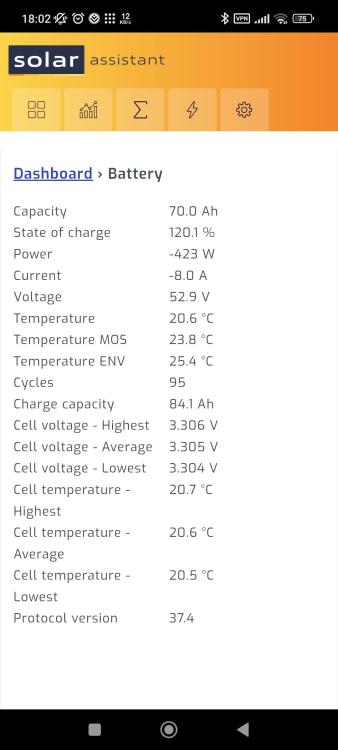
Just an update on this issue. So I spoke to Pierre and they did update and calibrate the software to match the readings the Inverter is showing. The Beta released today has this change for this Sunsynk battery. Seems like everything is showing the correct values now.
-
Nope, not on the Beta Program. But will join the beta and see if it was resolves the issue. Thanks.
-
Thanks, will report it to SA.
-
Hi Guys, I have successfully Connected my 5kw Sunsynk inverter to solar assistant. I have also connected the battery through the RS232 port directly to solar assistant. But solar assistant shows the capacity as only 70ah and not 100Ah. This is a Sunsynk 5.32kwh battery. It is connected to the RS232 port as per the instructions on the Solar assistant website. https://solar-assistant.io/help/battery/sunsynk. So my SOC is showing up wrong in the attached screenshot because the battery capacity is wrong. It should be 84% and not 120%. When I select "use inverter values“. Everything seems fine. All the other values also tie up with what the inverter is showing. Only the battery capacity that is wrong. Has anyone else successful connected this battery directly to solar assistant?