ramacfie
Members
-
Joined
-
Last visited
Everything posted by ramacfie
-
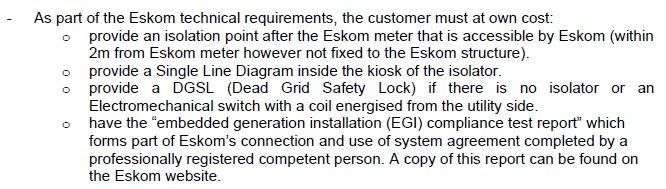
Anyone know of any approved DGSL (Dead Grid Safety Lock) for South Africa? Eskom wants clients to install the DGSL at their own expense according to the SSEG Application Form, but don't supply you with the approved list of DGSLs. 20220401-Eskom-Application-Form-for-SSEGAprilFinal.pdf
-
I'm looking for the supplier of the LCB Batteries in SA. Specifically the LIT48140BT/140AH 48VDC (6.5kWh) LCB Battery. Client is looking for an additional battery.

-
Try emailing Francois ([email protected]) and / or Ayanda ([email protected]) at TAG SA for help on the Shoto Batteries. I don't think the 4850 (50Ah) can be connected to the 48100 (100Ah), as they are different models. Try the following (disclaimer: I've never tried connecting to a Sunsynk Inverter) 1 = On 0 = Off On the 48100 the Master Dip switch is 1 0 0 0 0 0 Cable should be RJ45 to RJ45 (Pin to Pin) Dip Switch 5 (On) is for CAN Communication
-
Is there anyone in Gauteng that has a 2nd hand Shoto SDA10-4800-L5 BMS Board that they know works that they would like to sell?
-
The guys from Tag SA have helped me a lot today. 4 of my SDA10-48100-L5 batteries were locked and that's why the SOC, Alarm and Run lights weren't working. 1 of SDA10-48100-L5 batteries has a dead cell, so it won't unlock. They used their own software to connect to the batteries, but they wouldn't give me all the passwords, as I'm not registered with Tag SA as an installer. Their software works well.
-
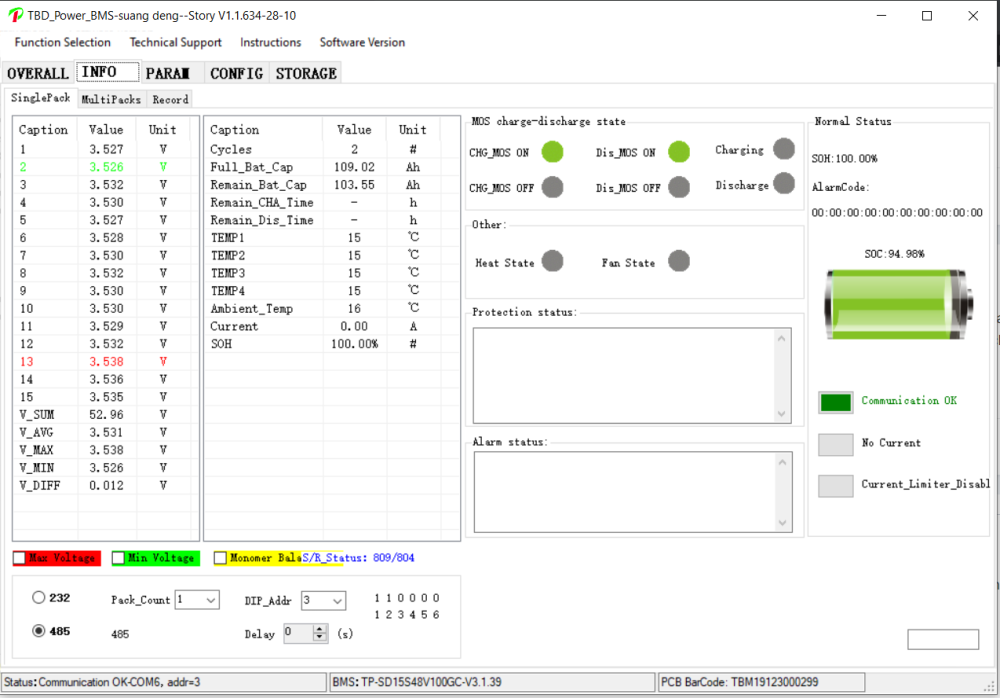
I've contacted the importers of the Shoto batteries to assist, as the application is not connecting to the batteries via RS232 or RS485. I know the cables are working, as the ICM Software connects to the batteries. We have 4 x SDA10-48100-L5 and 1 x SDA10-48100, which have 6 dip switches and not 8 dip switches like all the documentation keeps mentioning and they don't have a CAN Port.
-
@jumper Thank you. The protocol imported into the Battery Monitor App.
-
@jumper Any idea why non of the agreement files will import into the BatteryMonitor.exe?

-
@jumper Thank you very much.
-
Does anyone have any documentation on how to do the firmware upgrade on the different models of Shoto SDA10-48100 batteries and the software and files to do the upgrade? I have 5 x Shoto SDA10-48100 batteries that need to be updated.