ZackAfro
Members
-
Joined
-
Last visited
-
-
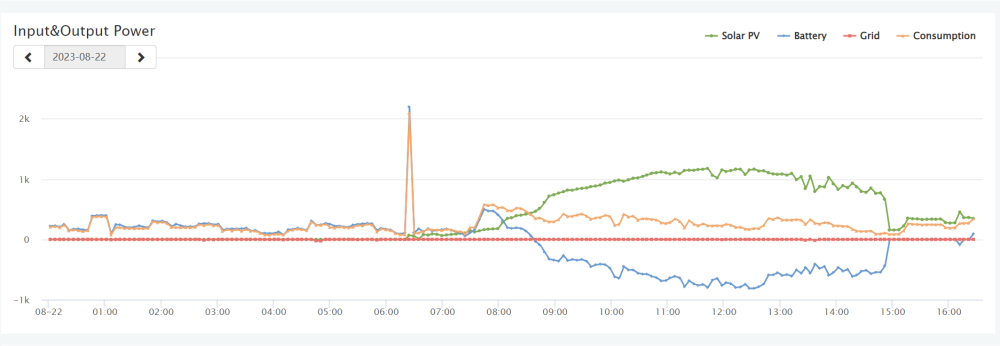
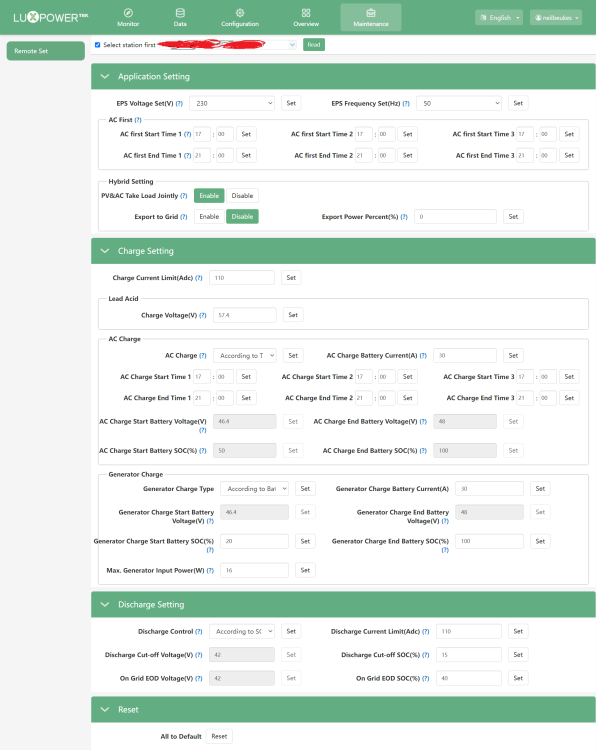
Hi, I got a Luxpower SNA5000 inverter around a month ago and have been struggling ever since to find a good example of setting to achieve what I want to thought I would share what works for me here. My setup: Luxpower SNA5000, 5.12KW Dynness battery, ~1800w solar panels. What I wanted: This is mainly a backup solar system but I also dont see the use wasting sun when it is there shining on my panels anyway so here is what I did. 8:30AM - 4 PM : My system will only use Solar+Battery during sunny hours 5PM - 9PM : I will allow AC (ESKOM/GRID) to charge batteries if Solar did not charge fully during the day (has never happened, battery usually back to 100% at around 2PM). I also leave it on AC during this time since it involves lots of consumption as we prepare dinner here. 9PM - ~8:30AM: : I let it run on battery only since its light load (I switch over to AC if it dips past 40% for some redundancy for Load Shedding). And by time it gets around 50% in the morning after coffee etc. The solar starts charging it up again. So in a perfect day I only use AC from 5 - 9PM This works great for me to get some extra use out of the panels and not let them just idle during the day. This works great but would be better if I had more batteries and panels, but for now its worked great, here is my settings below to get an idea of how I achieved this. feel free to criticize or ask questions. Neil