


Nabeel Ahmad
Members
-
Joined
-
Last visited
-
Yes these settings are ok.but you can set charging SoC to minimum so that grid charge the battery just u reqired to run the load in early morning.(when PV is less than load)
-
Dear when you set time of schedule as discharging and set discharge current to Zero Amp in early morning say 6am to 12pm you can use solar to asist load 1st in this case when extra solar is availabe then inverter will charge battery.. i am using same with not facing any problem. Chk green graph in attached pic

-
You are using old firmware.. if you want to stop export to grid then you have to go to option "Grid Feed in Power Limit" and set value to zero.. and use time of use switch to add schedule.
-
Can you share screenshot of ur solis app? I am also using pro version.. app display should be same.. plz note i have connected the inverter via bluetooth and in installer mode.
-
1st go to storage mode and uncheck allow export ur export will be stopped. 2nd to stop drain the battery you have to create charging/discharging schedule with 0 Ampere just like in attached pic
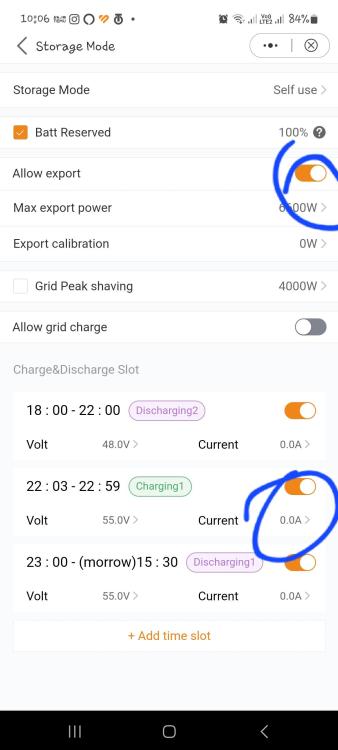
-
Change your baseline SoC to 10%.
-
Actualy its not exporting... your production is far less than export. Actualy its importing the grid. You have to change the ct direction physically or go to setting and reveresed the ct. Further kindly select only 1 option i.e feed in power limit to zero watt and uncheck feed in current limit.
-
Kindly tells us detail of your experiment? How to set heavy load triping on 48V led acid batteries. We have to select 2nd load option or smart load option. What is follow grid option??
-
-
Soc % is for lithium batteries, you have to select Volt for lead acid batteries.
-
Yes you can apply smart load setting. Ist uncheck genport load on then select smart load and select battery voltge 51 and lower side 50. App has option to upgrade firmware connect through Bluetooth and select as installer.
-
What is the latest firmware version of DSP and HMI in your inverter. Is it ok to manually upgrade the firmware using app? To update DSP first or HMI ??
-
Yes i am from pakistan thanks alot i also contacted solis pakistan they upgraded my HMI and DSP firmware after that Aux port has been opened but same problem not turned back on when grid back. Kindly keep in touch when your or mine problem resolved
-
i do exactly the same that you have advised but relay was not turned on. i am using lead acid batteries and SOC %age was not shown on these batteries rather only batteries volts are shown, i set voltage range to turn on the AUX port but same result Port was not opened. My HMI version is up to date but when i tried to Update DSP to newer version, an error occurred and my DSP couldn't be updated.
-
By enabling smart load tab, Gen port still disabled. Output from Gen port only available when i select Gen port Load open otherwise no output.
-
I am using S6 Pro hybrid and currently using dual output 1 from critical load and Gen port as heavy load. I want to turn off my heavy load if battery percentage reduced to 70% but smart port setting not functional and in absence of grid and Pv my battries drained quickly. Some body plz help me.


