


XBoxBro
Members
-
Joined
-
Last visited
Everything posted by XBoxBro
-
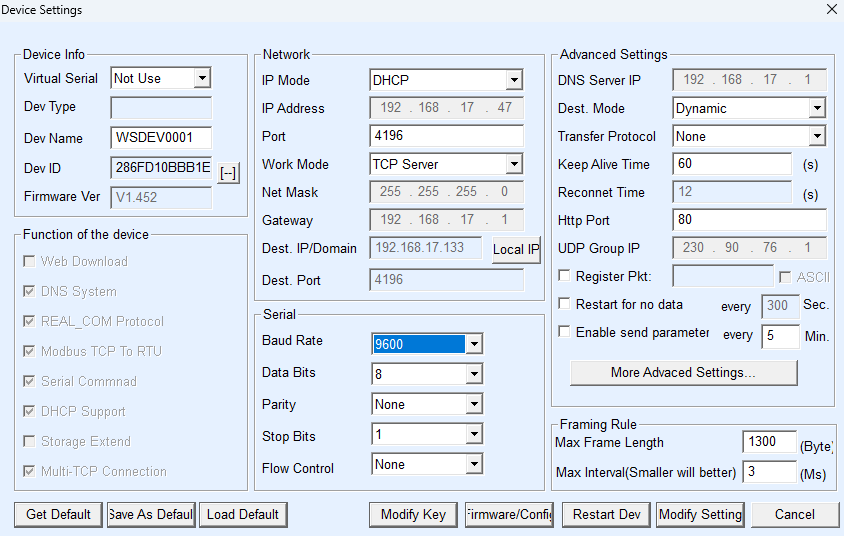
Hi @DocFog Yes i did it! TODAY My setup: Batterysystem: https://tewaycell.com/products/tewaycell-48v-200ah-10kwh-all-in-one-mobile-ess-built-in-hybrid-inverter?variant=41313098858553 Rs232to Eth: https://www.waveshare.com/wiki/RS485_TO_WIFI/ETH Installed bmspace Addon- its really JUST install the addon. NO prerequisits needed! Configured: Configured the Waveshare (with VirCom_en.exe) as follows: Afterwards the Addon could connect and i directly retrieved: Many thanks for this Addon !!!!!!

-
Sorry but I am struggeling with the basics. I do have a System from Tewaycell Tewaycell 48V 200Ah 10Kwh All-in-one Mobile ESS Built-in Hybrid Invert and they provided a RS232 to USB Cable with it. They also sent the PACEexTool but its completely in Chinese. Now i found your Home Assistant integration. 😀 Can you explain a bit more how i do get the basic connection? I think i need to install the USB driver for Linux first on the Homeassistant Raspberry. Is that possible? Then i have questions for the requirements: paho_mqtt==1.6.1 PyYAML==6.0.1 pyserial==3.5 I dont know how to get the reuirements. I have Mosquito MQTT and use it already for my OpenDTU and ESP32
