


Jacco
Members
-
Joined
-
Last visited
Everything posted by Jacco
-
Received updated server settings and this fixed the problem

-
Finally i received the settings. All working 100% now
-
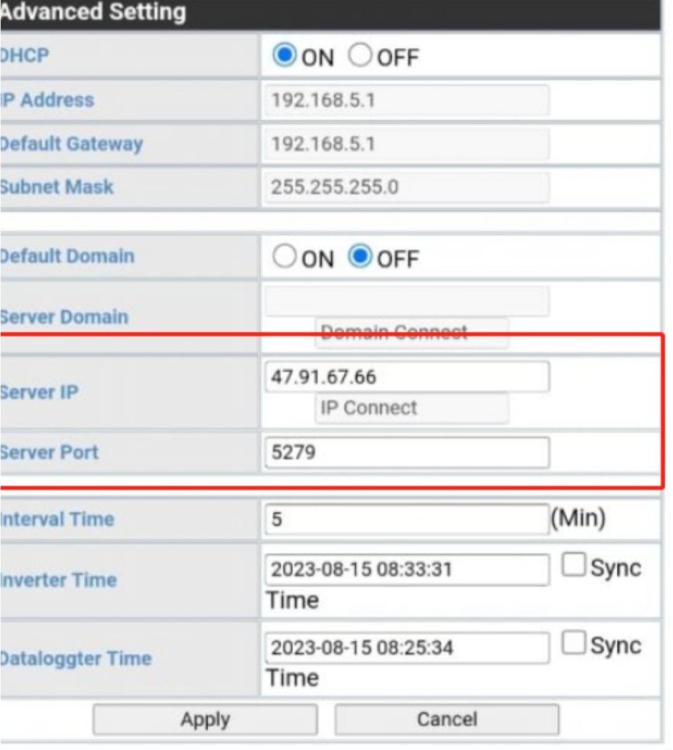
Good day, Can someone kindly advise on the correct server for growatt inverter. I have been hearing and reading a few conflicting stories. Attached how my server settings are looking, however I can't seem to connect to the server? Any one who has the same problem? Or better yet - what the correct settings should be?

-
That's correct. The inverter works as it should. I can also change the settings without issues, The app and website show that the inverter is disconnected. And the lights are flashing green. So all is fine, except I can't monitor and/or change settings remote.

-
Hi all, Just an addition to the post, There are no errors on the inverter. I have the LI with 01 protocol. All was working till Friday morning. Resetting and rebooting does not work. WIFI router and password has not changed. a little bit stuck here.
-
Hi all. I have growatt spf5000es inverter. Never any issues with the inverter or the nenergy battery. Since Friday morning, the inverter shows disconnected. There are green flashing lights on the datalogger. I've rebooted, reconfigured, tried to change settings. Nothing. Our internet is working fine and no changes made to the router Any suggestions? Many thanks


