AppleJack
Members
-
Joined
-
Last visited
Everything posted by AppleJack
-
MPPTs have been bridged and everything is ticking over beautifully, thank you so much!

-
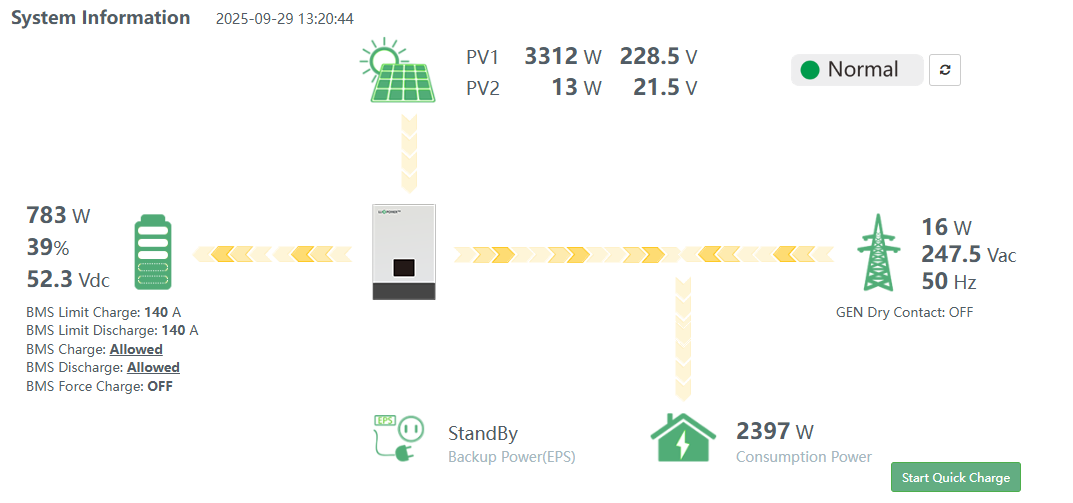
Hi Guys Thank you for your help with this. I have installed my 2 x new panels, and everything is humming along nicely. Earlier today I got a spike of over 5kw on the PV1 circuit (i suspect it was cloud lensing), and now I am worried about popping the mppt. Seeing as though I do not have a 2nd string, I see no harm in bridging the 2 mppts. The user manual explains the setting, but not how to wire the panel in order to bridge the 2 x mppts. Please would you help me here?
-
I was not aware of that, thank you! Do you perhaps know what the latest firmware version is? My current version is cbaa-1A221F
-
Thank you for this, feeling much better about it. My inverter's manual says I can bridge out the MPPT's to combine the input - do you think this is a good idea, or do I just stick to 1 x MPPT and clip the extra 10% as an when?
-
I ran a 4kw heatpump off a cheap 3.6kw inverter and 4 panels for nearly 2 years. The heatpump was set to start at 9AM and switch off at 4PM, and as long as it was sunny, I got a free geyser full of hot water every day. The heatpump was bought second hand for R4k, and installed by myself and a friend. Added benefit is that if you add a bit of battery capacity, you have some electricity to tide you over during loadshedding/ outages at night.
-
Good morning I am currently running 1 x Luxpower SNA6000, 1 x Hina 14.3kw Powergem Battery and 6 x Longi 555W panels on a single string. Due to my energy usage, I have bought 2 more identical panels to up my production. Is it better to add all 8 panels on to a single string (panels are rated at 49V open circuit, in practice the 6 string setup runs at between 220V and 240V) and to bridge the MPPTs, or should I run 2 x strings of four panels per MPPT? Also, does anyone have experience with bridging the MPPT's, and advise in this regards? Thank you in advance.Hi Everyone I have a small solar system driving some essential loads (TV, internet fridges) and my pool pump and heat pump. My inverter is plugged into a normal 20amp 3 pin plug point. Inverter is set to SUB priority, and my heat pump and pool pump are on timers to optimize running off solar. Batteries are only for backup during loadshedding, and not being used at night. System details: 1. Inverter - Sun (Conderenergy) S-2542 2. Panels - 6 x Jinko 555W in series 3. Batteries - 2 x Hubble S100 in Series Recently, my inverter has been tripping the main earth leakage. I have 2 x output DBs on the main and essential outs of the inverter, both of which have earth leakage and 10 amp CB's. I would like to run a separate input to my inverter in parallel to the house DB, effectively splitting before that board. My current plan is to install a small DB fed from the Eskom input, with a Main switch (two pole), earth leakage and 30 amp breaker, feeding a 4mm line to the inverter input - effectively allowing the inverter to trip independently from the house. My question is whether it is normal for the inverter to trip the earth leakage? It was running quite happily for around 6 months, and is now consistently tripping after being on grid for about 5 mins. I have tested with the inverter only powered from the db, and it still trips is this normal, or is the inverter faulty?Please check your DMGood morning The inverter manual specified "PYLON FOR 485 for lithium battery communications" - is this the right thing? This is new to me - thank you for helping me with it!Unfortunately there is no option to set a voltage for the smart circuit monitoring, the manual states that the battery comm terminal must be connected. There also is no option to set voltages for this in the settings menu - it goes straight past that option in the menu. I really do not want to open the batteries or mess with any of the internals - I am 100% sure that I will not know what i am doing. The coulomb counter sounds like exactly what I have in mind. The inverter has the following comm ports: Available Ports: RS232/RS485/WIFI/GPRS/LITHIUM BATTERY Please forgive me if this is a dumb question, as the Victron Smart Shunt has a V.E. Direct port and the inverter has a RS232 port, could something like this work? https://www.victronenergy.com/accessories/ve-direct-to-rs232-interface If it could, this may be a solution for R3 000-00 as opposed to R12 000-00, which is a much easier pill to swallow!Hi Everyone I have been following threads on the forum for a while, and have been helped immensely by it. I have recently completed an upgrade to my home inverter setup, including a upgraded inverter and some new out feed wiring. The inverter that I have installed has two outfeed circuits - a "Main Power" and a "Smart Power" Circuit. From the manual, it seems that the "Smart Circuit" is the essential loads - so when the inverter is running on battery, it will cut the "Main Loads" at a set battery level and just run the other circuit to conserve battery power. This appeals to me greatly, as my pool pump runs on the inverter, and if we have load shedding during a cloudy day, it may drain my batteries a lot (i do not have a lot of battery capacity at the moment). The batteries that I have are lithium drop in replacements for AGM batteries (Hubble S100 x 2). According to Hubble the batteries do have an integrated BMS, but they do not have any comms ports. The inverter requires a comm port for the essential load cut-over, as this is set on % of battery backup available. If the comm port is not active, this option is not available in the setting on the inverter. So after this very long story, I would like to know if there is a type of "plug and play" external BMS that could solve this problem? Something that could be connected inline with the batteries, be set with the appropriate parameters, has a compatible comm port and could enable use of the "Smart Circuit. I am very much hobbying along with this project, and i would hate to be forced to spend R12k or so replacing perfectly good batteries just for this what if scenario. On the other hand, the "Smart Circuit" logic is very appealing, and seems like something i would really like to get going. Details on my current system: 1. Inverter (new -installed last weekend) - Sun Solar S2524 (4.2 kW load, 6.2 kW MPPT at 60-500V, 24V battery at 12A)(https://solarwarehousesa.com/products/hybrid-inverter-24v-4-2-kva-4200w-mppt-120a-inverter-pure-sine-wave-sun-solar?variant=48852775272769¤cy=ZAR&utm_medium=product_sync&utm_source=google&utm_content=sag_organic&utm_campaign=sag_organic&gad_source=1&gclid=CjwKCAjwm_SzBhAsEiwAXE2Cv_GUYULcSD2IFJhJFB4Fr41qOV9LFgPG_eiFQl2aZ5Y7kElppyQGwxoCsZ8QAvD_BwE) 2. Solar Panels - 4 off Jinko 555W connected in series (40V per panel for string voltage of 160V) - North facing on roof m(https://www.solarpanelenergy.co.za/docs/Jinko 555W Datasheet.pdf) 3. Batteries - 2 off Hubble S100 connected in series with Hubble battery balancer ( https://powerprovider.co.za/product/hubble-s-100a-and-24v-battery-balancer-bundle/) 4. Connections and switching - 4.1 Grid to inverter through 20A plug socket from main DB 4.2 Panels through Solar Combiner Box with surge arrestors, fuses and circuit breaker (4mm string cable with MC4 connectors) 4.3 Outfeed - 2 x DB boxes (one for "Main Feed", one for "Smart Feed") each box has manual switch over to grid, earth leakage and 10 amp or 20 amp breakers for circuits as appropriate Thank you guys in advance!