Skip to content
View in the app

A better way to browse. Learn more.

Power Forum - Renewable Energy Discussion

A full-screen app on your home screen with push notifications, badges and more.

To install this app on iOS and iPadOS
  1. Tap the Share icon in Safari
  2. Scroll the menu and tap Add to Home Screen.
  3. Tap Add in the top-right corner.
To install this app on Android
  1. Tap the 3-dot menu (⋮) in the top-right corner of the browser.
  2. Tap Add to Home screen or Install app.
  3. Confirm by tapping Install.

bleki315

Members
  • Joined

  • Last visited

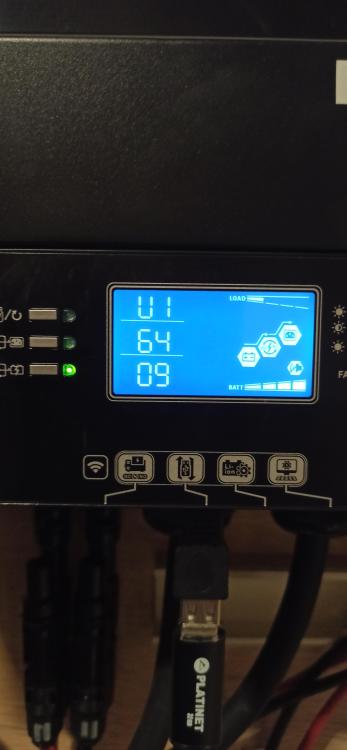
  1. I have an Easun smw 11kw with a removable display. I have 64/09. I tried to upload 64.62 from a USB pendrive. After about 10 minutes, the display returns to the main menu and freezes. nothing can be switched. I have to turn the inverter off and on but the software is still old. what am I doing wrong? Should there be only the "dsp.hex" file on the pendrive? or some other file?
Account

Navigation

Search

Search

Configure browser push notifications

Chrome (Android)
  1. Tap the lock icon next to the address bar.
  2. Tap Permissions → Notifications.
  3. Adjust your preference.
Chrome (Desktop)
  1. Click the padlock icon in the address bar.
  2. Select Site settings.
  3. Find Notifications and adjust your preference.