Jumbo
Members
-
Joined
-
Last visited
Everything posted by Jumbo
-
Thank you, appreciate it!
-
Thank you for your reply, who sells the bms and cells, thanks.
-
Thank you for your advice, will give it a try. Cheers
-
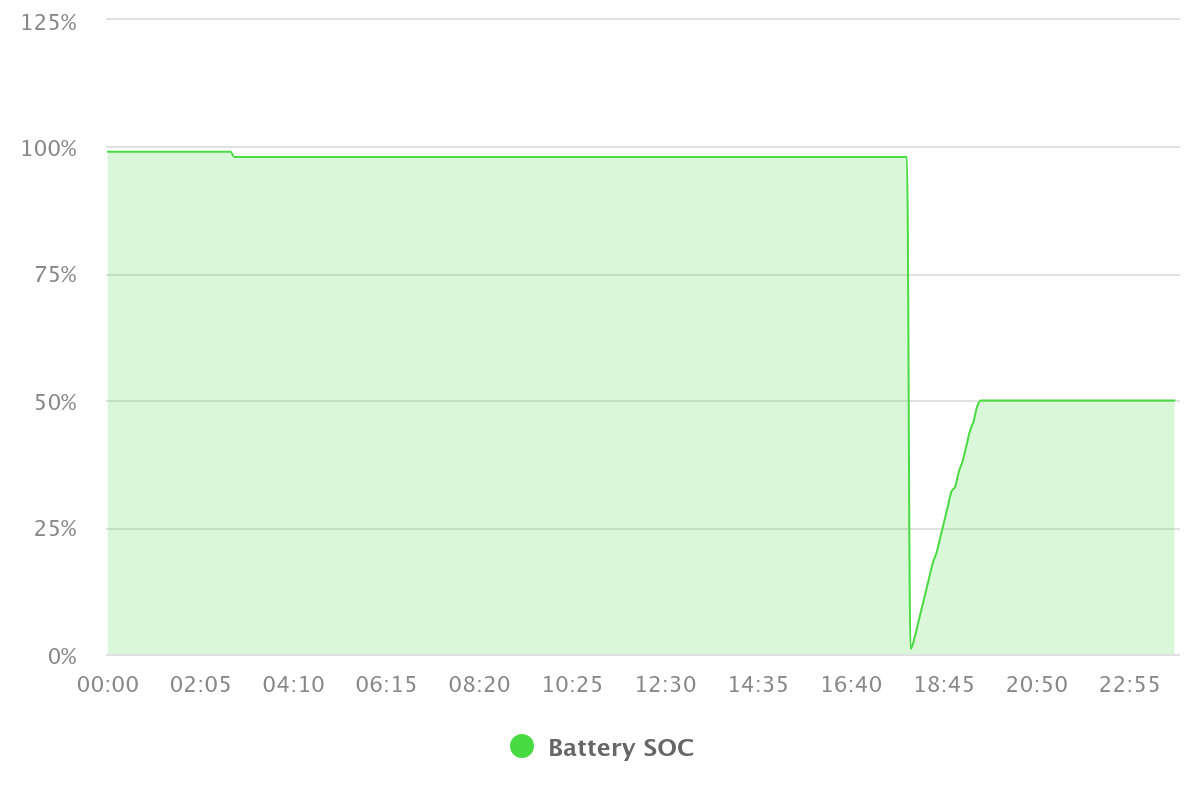
They were while the SOC was being increased from 1% to 50% after the massive drop......
-
Thanks for the reply. Here is the incident which i was around for. I had made a change to keep the battery at 100% SOC by selecting SUb on Growatt hoping the all cells would reach balance and it still drops. From the screen on the battery, i also got the cell voltages (15 cells) and opened the battery to measure and confirm (incase the BMS readings were out). Also checked all connections, pushed and pulled on all wires, plugs, etc to see if I could trigger the drop, no luck.The Growatt battery SOC reflects the battery BMS each time. Hope this helps......


-
Hi, I have the same setup and got success with a straight LAN cable connected between inverter and battery CAN. Selected 05 for Lithium and protocol 52 and it works after 20 seconds. My problem is the Nenergy battery every 2 or 3 days instantaneously measures 1% SOC and uses Eskom to charge back to 50% irrespective of the battery SOC at the time. Was lucky to be home when it happened and the battery 6 SOC LED's correlated with the Growatt battery SOC so I'm more convinced it is the actual battery BMS and not the Growatt algorithm. Has anyone had this with their Nenergy battery? Anyone got a manual for this battery?