IvanZah
Members
-
Joined
-
Last visited
Everything posted by IvanZah
-
I have already installed the 3rd module MCP2515. But unfortunately I have not received data from the IN port. I don't know how to deal with this((((
-
Hi. Tell me please, how did you manage to make two CAN modules friends via UART ports? I use the Wemos D1 mini board. If there is only one esp32_can, it works. I add the second esp32_can and both do not work. Maybe the problem is in the ESP32 board? Here is part of my yaml: esphome: name: deye-bms friendly_name: deye-bms #comment: ESPHome_For_Deye_SE-G5.1Pro esp32: board: wemos_d1_mini32 framework: type: arduino # Enable logging logger: baud_rate: 0 # disable UART logger level: WARN # Enable webserver web_server: port: 80 version: 3 log: true ota: false # Enable Home Assistant API api: encryption: key: "************************" ota: - platform: esphome password: "*****************" wifi: ssid: ******* password: ******************* # Enable fallback hotspot (captive portal) in case wifi connection fails ap: ssid: "deye" password: "*********" #spi: # id: MspSpi # clk_pin: GPIO18 # Change to your wiring needs # mosi_pin: GPIO23 # Change to your wiring needs # miso_pin: GPIO19 # Change to your wiring needs canbus: ############################################### # Порт IN (250KBPS), зовнішній модуль MCP2515 # ############################################### #- platform: mcp2515 # id: mcp2515_can # spi_id: MspSpi # cs_pin: GPIO17 # Change to your wiring needs # mode: LISTENONLY # clock: 8MHZ # use_extended_id: True - platform: esp32_can id: in_can # use_extended_id: True tx_pin: GPIO23 # CAN HIGH YELLOW rx_pin: GPIO22 # CAN LOW LIGHT-YELLOW can_id: 100 bit_rate: 250KBPS on_frame: # Напруга комірок - can_id: 0x02098001 ... ... ... ################################################### # Порт PCS (500KBPS), внутрішній CAN на ESP32_CAN # ################################################### - platform: esp32_can id: pcs_can tx_pin: GPIO05 # CAN HIGH BLUE rx_pin: GPIO04 # CAN LOW LIGHT-BLUE can_id: 200 bit_rate: 500KBPS on_frame: # Параметри заряду/розряду аккумулятора - can_id: 0x351 ... ... Thank you for your answers.
-
Thank you, I understand. But in my case it is not so. My inverter does not support working with BMS. Only manual settings.
-
Hi. Please tell me how you change the voltage.
-
Hi. You don't know how to change the polling interval. I think 1 second is too much.
-
Hi. I started to get it. There really is a CAN module needed between the ESP and the battery.
-
You probably forgot to say in the description that there should be a module like TJA1050 or SN65HVD230 between the ESP and the Battery? Link https://esphome.io/components/canbus/esp32_can.html
-
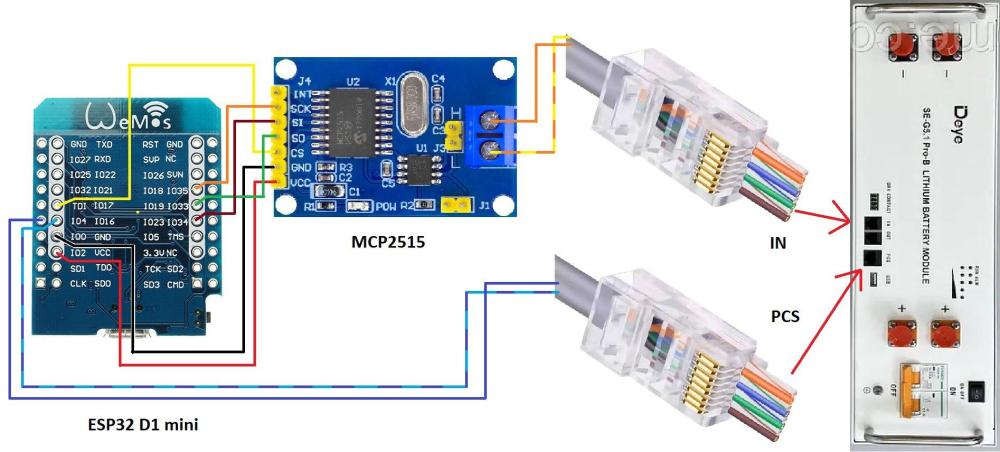
Hi ZS1SCI. I tried to use your development from github, but unfortunately I couldn't get data from the battery. From the description here and on github I made this circuit. Maybe it's not correct? PS. I have only one battery, but I'm not sure if that's the reason.