


Bricoleur
Members
-
Joined
-
Last visited
-
@VisN any update, did you sort it out? Have the same case here
-
Hello guys, My inverter that I fix, and sometime, go into error 52 (low bus voltage), anyone knows what it is ir hiw to fix it? Another important point and with another GOOD inverter, when utility goes out and when it comes back, the fridge compressor does a strange noise for 10seconds, anyone knows why and how to fix it, is it something related to zerocrossing voltage source change between inverter and utility?
-
Thanks Coulomb, pitty that the service manual doesnt mention anything on this PAR card. Anyine knows what it does really, I ve followed it and it seems that twonof the transistors are put in parallel of the relay between Lgrid and L output.
-
Thanks Coulomb, Is it different from the parrallel card that we have at the bottom of the inverter as my installation is two inverter in parallel. I am really worried of connecting it up in parrallel with the other inverter. Anyone has the service manual of such (not the user one)
-
-
Thanks for the advice, will sure do once the issue is over.
-
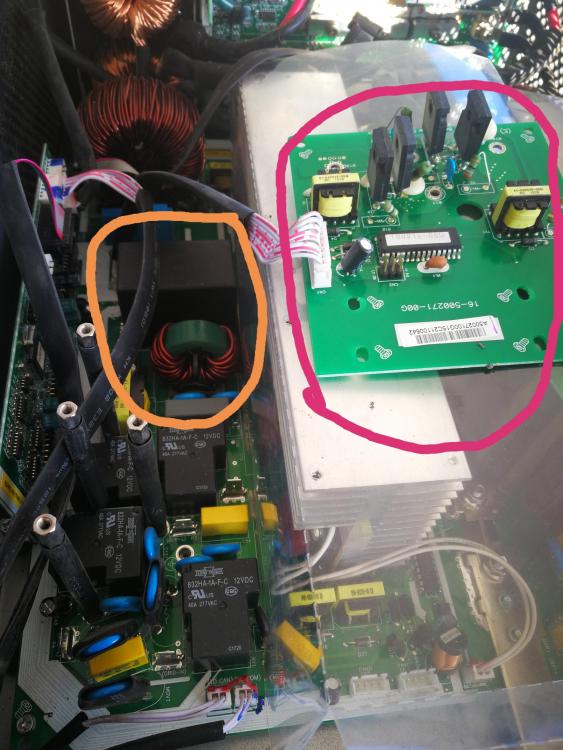
Update, I ve changed the melted big black Capacitor, two other small ones (C50 & C60) and the inductor which were near the Cap (orange line in picture attached) I ve turned on the inverter and: - good news: voltage ramp up to 230V and stick to this voltage - bad news the shortcircuit between AC input and output still exist. Follow the short circuit and it was not the relay, instead was the transistor in the card (holded by the four large metallic rope rising from the main board, in RED in the attached pic) I ve replaced the card (from my existing burnt board) but the problem persist, infact I think (I am not sure) that the transistor on the new card burnt also once I ve turn on the inverter (no abnormal appearance but the transistor Source and drain well shorted out) Then I ve disconnect the card and turn on the inverter, It ran smoothly with 230v output without any error. Anyone knows what is the purpose of this card?
-
@weber Hi Guys, anyone tried to make these inverter more robust? I know that they annouced lots of protection but it seems these protection, overload, overcharging etc.. Are not working, this is my second inverter melt down and circuit breaker are not helping. Is there a way to protect them better? Like a current limitter circuit/relay on the AC input output and DC. Also extending this to parallel design?
-
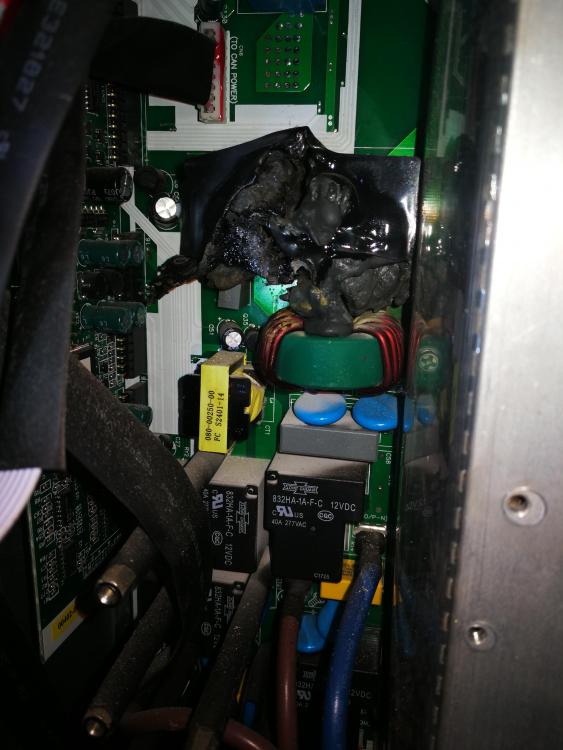
Ok guys, I ve opened the inverter just to make sure of the type of relays and here comes the surprise: something big and black was metled... (see photo attached) anybody knows what it is? And if replacing it will solve the problem or I need to change the IGBT also. Thanks
-
A nice cocktail then, appreciated
-
I think this is my mistake as I ve used 40A circuit breaker on the input and output which is more that what the inverter can support, also I didnt use single circuit breaker per inverter which now I beleive I should. Also circuit breaker will allow more current for few seconds so I hope this is the case and not a FET or IGBT thing. Will check it during the weekend and update you guys. By the way I dont live in your great country guys I am french-lebanese living in Lebanon 10month of sun. Hope this doesnt play against me but I thought such forum is great to be part of. Thx a mil
-
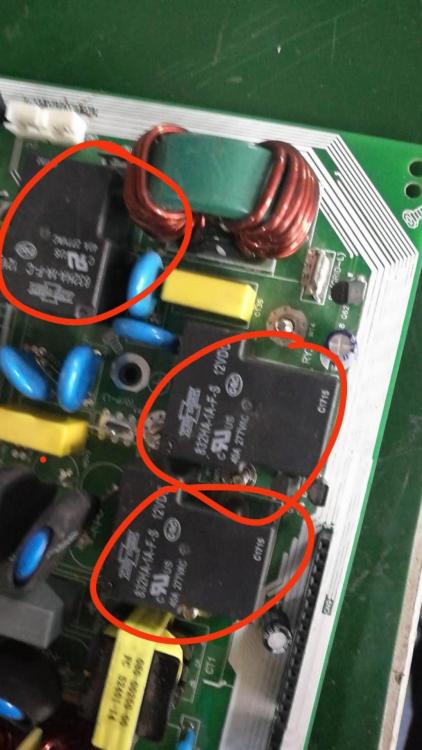
Heads up, I ve received an email form the vendor as per below: " Engineer said it might cuase by overload .Pls check the relay on the board , replace the relay to see if can work . Pls check attachment for reference of relay ." Yesterday I ve checked the input and output of my inverter while it is off and they are shortcircuit, is it normal? Next step: during the week end I will dismantle the inverter and check the relay and have a lookk to the FETs and IGBT.
-
#plonkster thank you and I have the same board, can you tell me where I can find the IGBT driver?
-
Thx a lot guys, I think I will tear diwn the inverter in the coming weekend to check it up. I had before a failure with single install for my summer home (MPPSolar 4k inverter) and I ve replaced the faulty IGBT but with no luck..in fact at that time, inverter explode when I ve started it. Can anyone let me know where I can find the IGBT driver so I can also replace it. I ve ordered two main boards just incase and it will arrive next Month for situation like this :). Will update you with my findings..
-
@Val I will support the idea of going string inverters as it is the most effective for your situation. With big loads (your 14 guest room will need more than 1MegaWH!!! of battery if you want to go completely offgrid to sustain good source of power and this is without the microwave, kettle etcc, Only ligting 12000 BTU, etc.. and for only the guest house) My 2 cents: Don't separate source powers for guest house and main building. Aggregate and centralize, then use Genset (at least two, better than a big one) with syncro to follow your load (of course after a good optimization exercise as refered to by #PaulF). Here you need to introduce a third element which is the solar genset control (there are few in the market, DEIF is a good example) to ensure that your genset will not run below the minimum load.
-
Thx a mil #Jaco will wait for similar good men to advise


