


Padwan
Members
-
Joined
-
Last visited
Everything posted by Padwan
-
There are a number of things to consider here. First, afaik Axpert's factory unpatched firmware misreports a number of readouts, I've given you a brief overview of that in our PM discussion. Chief among is an early float bug, and in case of LFP most notably the voltage thresholds are far too high in the factory firmware. For example, the battery warning comes on at two volts above the cutoff setting. So to start the conversation, what are you using to monitor your Axpert/Batteries and what does stand out to you that lead you to conclude they are not speaking the same language?
-
Similar experience with my unit, still brand new so I'm sending it for a checkup Few wise men suggested that my symptoms are similar to malfunctioning SCC/MPPT Check details in this thread
-
Well other than those I’ve got confirmation from members here that my symptoms are classic blown MPPT, no. I’m in contact with supplier who asked few questions like what’s the SOC, Some details about PV array configuration and specific. And of course pointed out the obvious that there would be no wattage shown on inverter if there where clouds and or voltage from pv is below 60V. I guess one has to route all out. Other than that they suggested I would have to send the unint back to be checked. So I’ve ordered new unit, which seller has graciously offers to me at his cost price, so it will take few days for the new one to arrive. Till than I’m sitting thight as the unit still works as ups so will wait for second unit to arrive before I can do anything more re PV.
-
LOL, I hear you. I'm certainly having fun its become my new "obsession". Having said that I do believe in buying and paying for good quality products that "Just Work TM". Thing is that I simply need more time to experiment and experience to define what is is that actually suits my needs. Rationale here is that system im playing with now is going to serve as auxiliary backup supply, once I start understanding what my actually needs are and what is the premium product that Just Works TM, buying spares seems like a reasonable thing to do. Until such time that I have option to have grid tied inverter [Currently not possible under Eskom, who is my provider, as i understand it] I figured I limit cost, play learn and have fun. Always open for guidance and experiences of others when it comes to their equipment and use cases.
-
So Iv'e been in touch with a supplier, its likely I will need to have sent over for checkup. I'm considering getting another one to always have "backup" as it does look that, as much fun as those Axeprets are, there are some issues that require tinkering and down time.... Or should one actually look at some of the other options on the market, and if so what would be next natural progression up the quality/price scale ... Your thoughts?
-
thx @Coulomb ;( Yes, failed whilst running only popped a lid afterwards o try to visually inspect and take few photos (to further our discussion on discovering genuine origins ) So how can one confirm this and fix? Ordering spare parts or does this need to go back for "professional" treatment? Yes, the faint smell was noticeable when it "works harder" in past. So I'll just make a mental note to not panic
-
Like a classic “Windows reboot”, I think I did that, switched batteries off and turned off switch on the inverter. Waited few seconds and turned it back on. Is there any particular sequence or time delay or something else I missed ? How to check if MPPT is blown, there was a bit of smell in the vicinity when I first had a look. I’ve opened up the coveres but could not see anything obviously burned or charred. Or smelling of burn for that matter.
-
So something odd happened today. Perfect sunny day, PV was pushing ~2kW/40A load was about 20% charging batteries and supplying load ... and next thing i know all PV input just dropped to 0 ...(yes it's still middle of the day clear and sunny ) I've checked all connection and cables to PV array, and am getting a reading of 100V on the terminals in the inverter. No errors reported and everything else seems to be working ok .. Any suggestions for troubleshooting such issues?
-
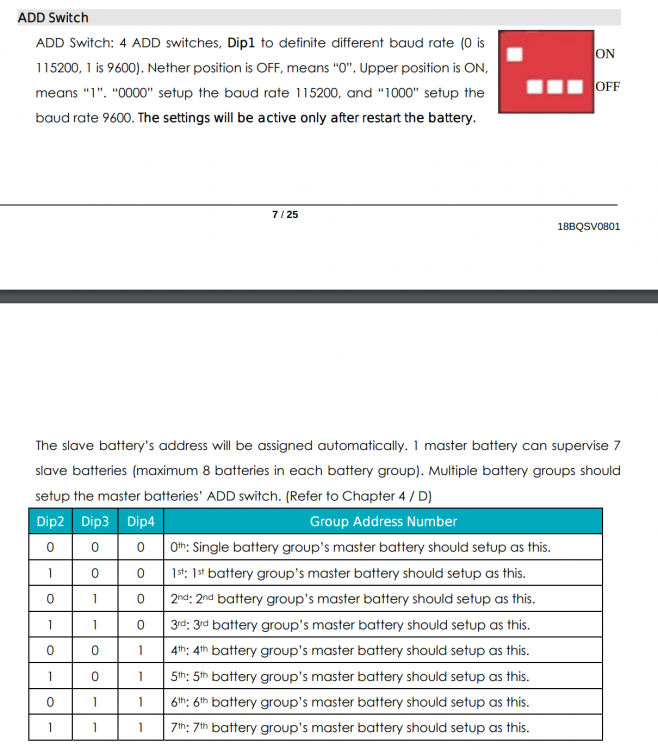
SOLUTION: So this was all part of confusion on my part. After reading the pylontech setup manual again, i've changed ADD dip switches to 0000 on master and slave battery. This change has enabled ICC to read both batteries stats, and looks all is in order now. Thank you @Chris Hobson and @Manie

-
swt thx, ill hit him up on icc email .. not sure if he still swings around here ?
-
@Chris Hobson quick question since you seem to have most hands on experience with Axpert/Pylontech/ICC. (How) does ICC interact with multiple Pylontech batteries? I've got two US3000 and connected with cable they offer for pylontech kit. But their software only shows one battery is connected .... and i cant really figure out have i missed something with setup / connection

.thumb.jpg.8f69041f555e5b790a867c3d552c15ac.jpg)
-
I've poured over the wealth of accumulated knowledge on your forum. Strange thing is, that those barcode descriptions and markings dont match pretty much anything on my unit. So i assumed it was some ZA local distributor that branded this unit, including different barcodes etc. Yes, master Obi Van, it came straight out of the box like it is on my wall now, firmware and all!
-
Any way to confirm this without popping the lid and scanning chipset serial numbers?
-
Priceless resource master Obi Van!! As it turned out my firmware is 72.70c. Which according to the resource above is one of yours master. Not clear what actual hardware it is [ill assume its some genuine Axpert MKS II for now], as barcodes and other insignias on the box are possibly some South African rebrand, so they must have flushed before shipping. Indeed, low bar entry to slide into the new ear of the solar [r]evolution.
-
I'll add that to a list of things to try before my "nuclear" option of rebooting. What are the recommended resources to check firmware updates and known issues?
-
So even weirder is that this morning it produced for a short while and than off .... Must be a setting is selected wrong?

-
I've just lost my solar virginity couple of weeks back, small setup for play and learning purposes. 3 x 265 AE pannels, 1 x Aexpert 5KVA, 1x US2000 Pylontech. Using ICC to monitor and configure an inverter, also monitoring battery with the custom us2000 cable for icc software. The last couple of days I've noticed that Axpert simply stopped using PV input. It shows a mppt reading of ~100 V but it's not using any of it. Not sure if I got some settings mixed up, or there is something else going on. But only way to get pv to be used is to "reboot" inverter. Any ideas ?


-
this could very well be related, I've tried two older B+ Pi both filed same way with ICC and interestingly one other software, and the image is the ICC latest so I'm guessing latest Debian stretch ...
-
thx @Jaco de Jongh & @plonkster i guess whilst we await Manie to get a spare cycle to glance on this, ill get that box off Pi's and try a different one in case there is a genuine hw issue.
-
So here is the thing, the ICC software does not start, only sdisplays the aobove error, so where does one get this machine code ? Only refferences to this code, that I could find in the manual are showing this in context of running ICC app. Am I missing osmething ?
-
Thx for your input @ebrsa. Pretty much followed all the steps you described, apart from asking for a demo code. I've read all good reviews and thought phukit ill just buy the licence and figure the rest out. I particularly liked the addition of cable and support/integration for Pylontech, alas i cant even get the basic app running. Ill give it anohter try, perhpas @manie is looriking arround here and can assist?
-
Oh I see the confusion, yes you are correct. My order was placed via iccsftware.co.za, but i see that my invoice reads Centurion Solar. Also all the correspondence that ensued was from Centurion Solar representative. And links with suggested kit where pointing back to them. https://centurionsolar.co.za/shop/pylontech-cable/ https://centurionsolar.co.za/shop/icc-pi-kit/ I woudl if they actually offerd that, person talking to me literally siad " .... and the time spent trying to troubleshoot it is often worth more than the license itself. It's for that reason that our kits are a bit more expensive than doing it all yourself, as it comes with support as well, whereas the license only version is left completely to the ability of the nd user to get it working. " Perhaps Im having a missunderstanding moment with them.
-
Well I would oblige with mashing code if application showed what needs to be done . On top the sales person did not reallly offer or ask for the mashing code ether. i bought it via icc website
-
Out of interest, what did you move onto? Perhaps one should look around at the alternatives. Not really sure how I feel about my current experience with ICC. I paid for software, got to download, installed their image, and got error message. They where engaging and quick with correspondence, but Im bit puzzled with response of here is refund to your original purchase if you want this to work buy full kit and than we can help you.
-
I did buy licence, person that communicating with me from ICC suggested I should buy full kit. So he refunded my original purchase and sent me links to full kit. 🙄


.jpg.ae94e7e2b8b8203c20daa0bb3f9c2caf.jpg)


