jfmm
Members
-
Joined
-
Last visited
Everything posted by jfmm
-
I apologize for the delay in my response. Judging by the inspection I did, I don't think it's any kind of corrosion. The inverter is installed inside the house in a room that is below ground level, with low temperature and humidity values. I noticed that turning off either of the two groups of panels stops the event from happening, so it reinforces the possibility that the event is due to a low capacity of the DC bus capacitors to respond to abrupt variations in the energy produced by the panels. At this moment, I don't see this event as a failure, but rather as a firmware safety procedure to control a problem of poor dimensioning in the DC bus design. Kurt, in your case, how is the power distributed in the two MPPTs? In my case, I have 2670 Wp in MPPT 1 and 3115 Wp in MPPT 2, making a total of 5785 Wp.
-
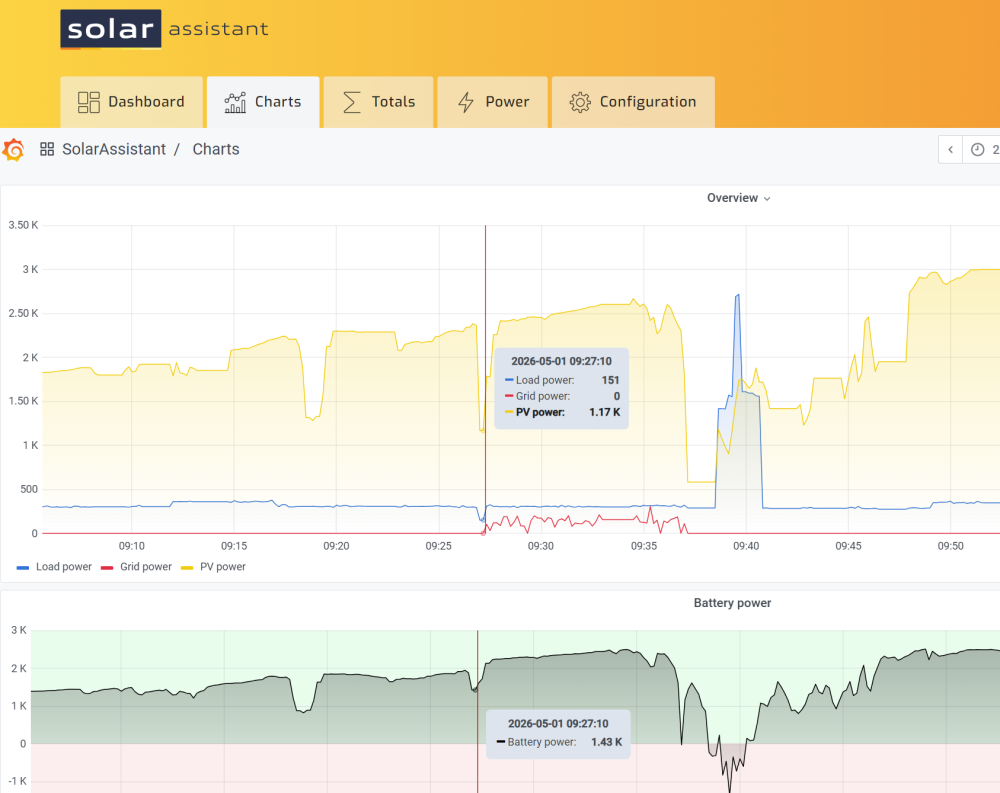
Hi Coulomb, thank you for your quick reply. The inverter was purchased in September of last year and went into operation in December of last year. It hasn't even been running continuously for 5 months yet. No. Temperatures are never very high because the installation is 600 meters away from the sea. Currently, we are in the middle of spring, and on a sunny day like today, the temperature at two o'clock in the afternoon is around 19 degrees Celsius. Even in summer, it is very rare for temperatures to reach 30 degrees Celsius. I realize there is a coincidence with the installation of the second group of panels. With only one group of panels (2670 W), the abrupt variation in power due to cloud shading did not have as much impact on the system. Currently, the impact is greater because the total power has increased to 5785 W. However, the problem has mainly occurred under low load conditions, around 300 W (residual load of the house), both in the morning when there is still little sun, and when the inverter starts to reduce the battery charging power, as it is already almost fully charged. The event happened on 10 of the 14 days since the second group of panels came into operation. Before, it never happened. Since the inverter is practically new, could it be a problem with the capacitors? If so, could it be a manufacturing defect, or does the brand use very low-quality capacitors? Should I give up on this type of inverter before I have some other kind of problem? I don't know if you can see it in the attached image, but the event occurs where you see a small peak on the red line, which corresponds to the 10 minutes that the inverter switches to line mode.

-
Hi, I installed the second set of panels on the MPPT2 about a week ago. Since then, once or twice a day, the inverter has been behaving strangely. For no apparent reason, the inverter stops powering the loads for brief moment (maybe half a second) and stops working in off-grid mode, connecting to the grid for the next 10 minutes, after which it returns to off-grid mode. Here's a screenshot I took from Solar Assistant at the time of one of these events. Has anyone else experienced this or read about it to explain what the cause might be? Thanks in advance.


-
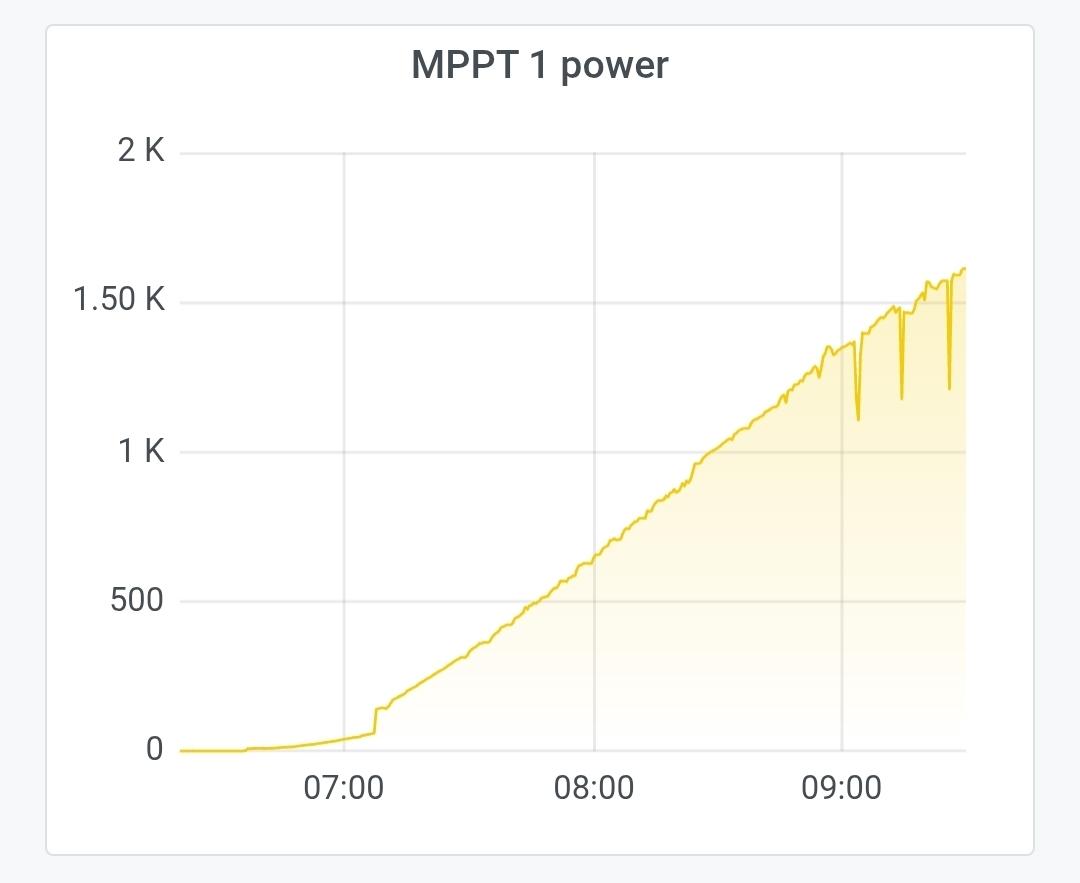
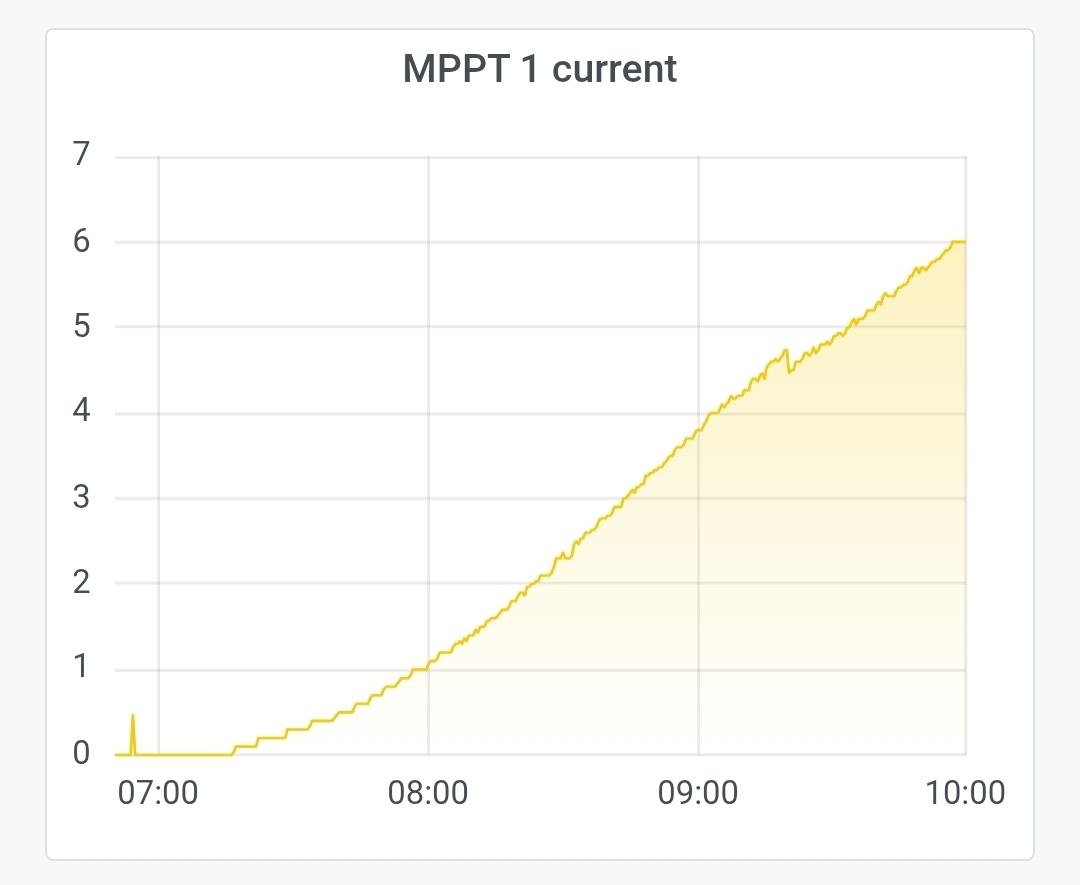
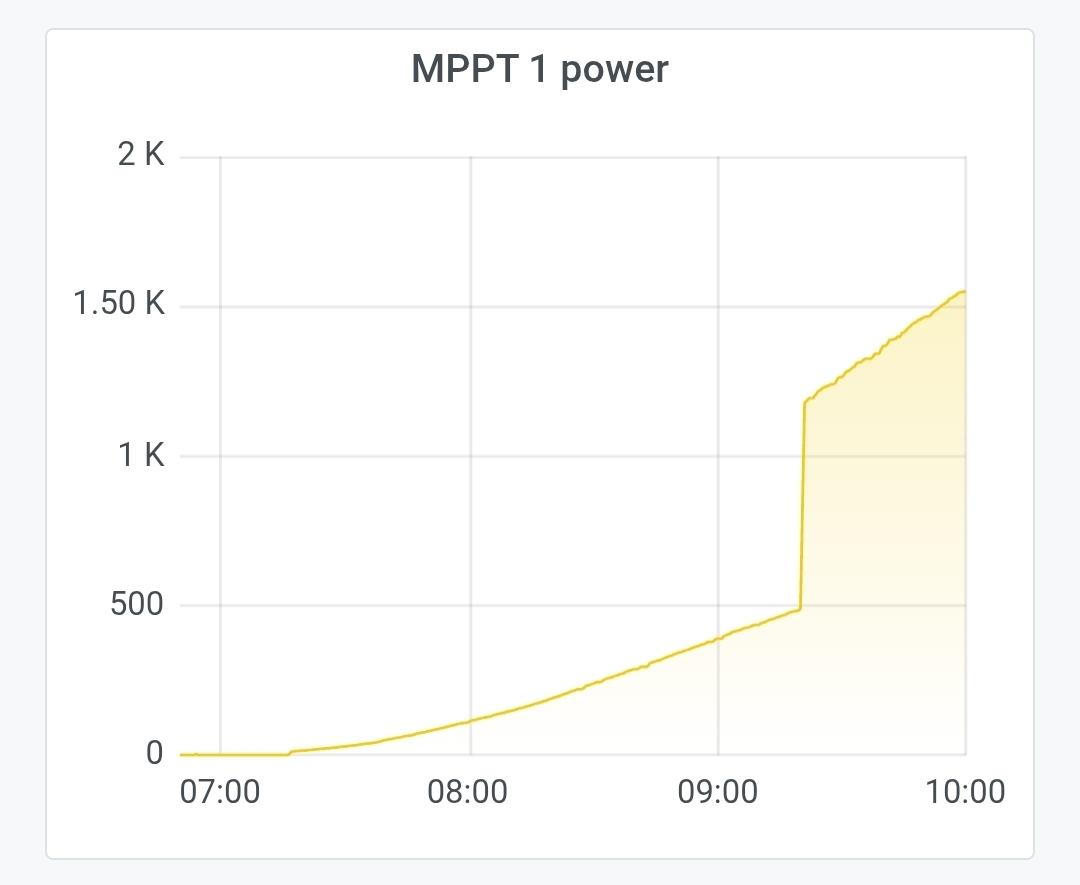
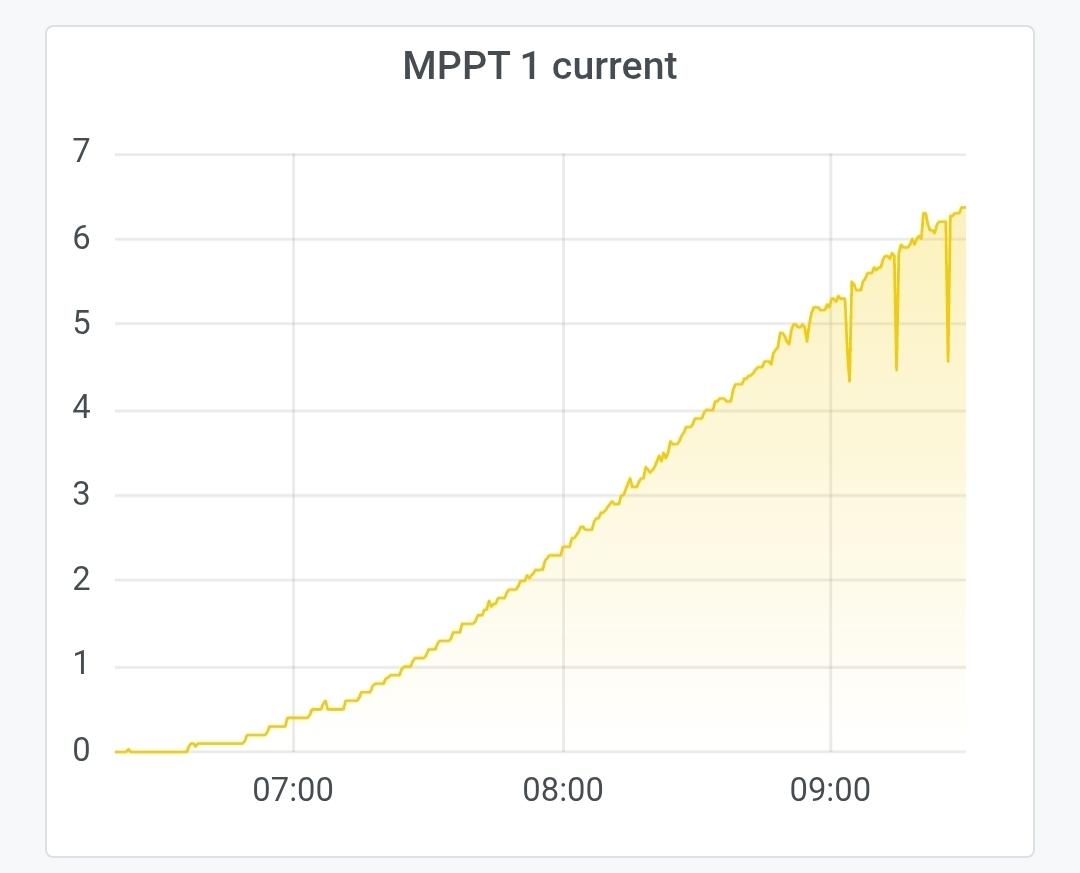
Hi, I currently have the automatic "wake-up" mechanism working. When the MPPT voltage is between 95 and 105 V, and the current is above 0.5 A, the MPPT input is switched off for 1 second, which causes the MPPT voltage to rise and consequently the power as well. It's working correctly, however, I'm going to try another approach instead of interrupting the input. Although the interrupted power is around 50 W, a load interruption is never good for the electronics... Therefore, instead of cutting off the input, I'm going to apply a momentary load of a resistor in parallel with the input, in order to simulate shading. I hope it works. Attached are the voltage, current, and power graphs of the MPPT before and after applying the input cut-off automation.
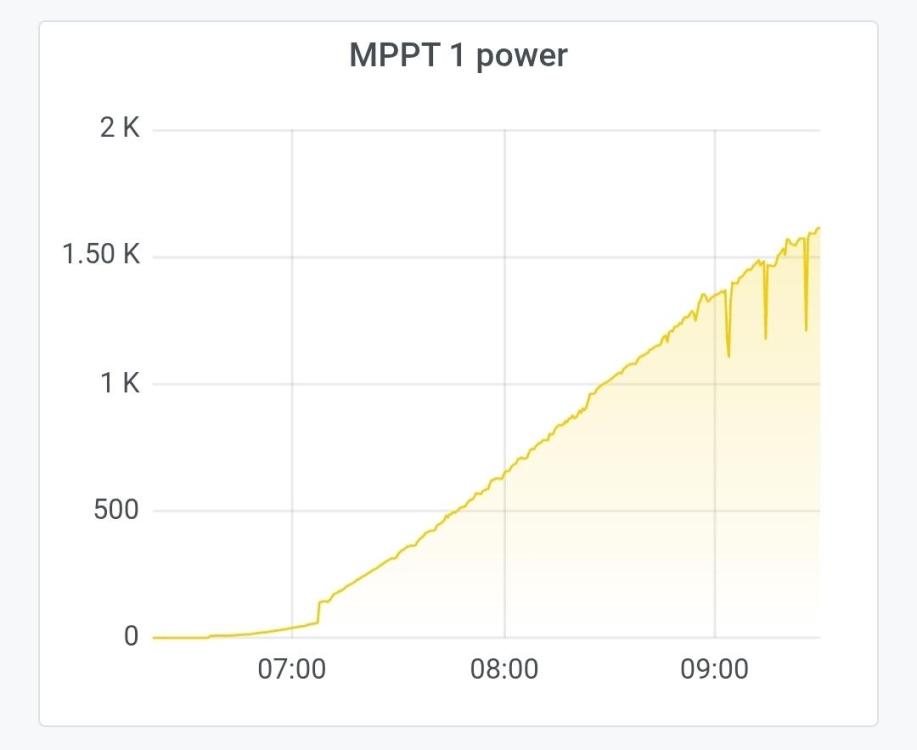


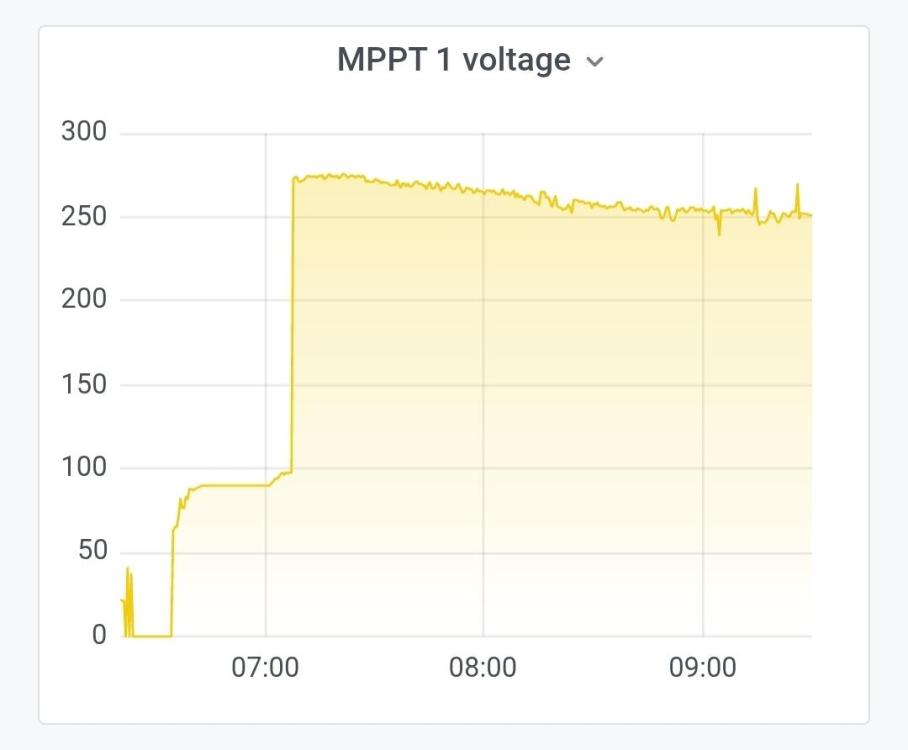

-
Hi, I don't know how, but my panels with 2670 Wp were producing over 3350 W today for a moment!! Reflection in the clouds?!! You don't need to be an engineer to have an engineering hobby No, I just updated to the latest firmware version that you recommended in a previous post in this thread. By cycle I mean switch off and on, physically disconnecting the cable coming from the panels. It seems to wake up the MPPT algorithm! I'm even testing a script on a Shelly to detect the low power state in the MPPTs. It reads the MQTT topics in Solar Assistant and as soon as it detects the low power state it tries to "wake up" the algorithm, turning the panels off and on again. Another output from the Shelly will control a contactor at the inverter's AC input to completely disconnect it from the grid whenever it is operating above the return to grid threshold. This way, I will save between 0.6 and 1 kWh per day from the grid just from the inverter's consumption. A fourth output from the Shelly will control the availability of power for EV charging, taking into account several conditions, such as SOC status, load, battery drain, PV power, time of day, etc. Next month I'm going to install 7 panels on MPPT 2, increasing the current power from 2670 Wp to 5915 Wp. Until then, I'll leave the Shelly algorithm running without controlling anything yet, to see if the outputs are switching correctly. I hope to avoid unpleasant surprises this way... In my case, with just one MPPT, I'm losing around 0.5 kWh on a sunny day and much more on a cloudy day.
-
Hi, From what I understand, the patch is only available for the first version of Axpert Max 8kW. In my case, since I'm only using one of the MPPT's with 2670 Wpeak, I'm losing about 0.5 kWh per day. I don't know if it's worth cycling the string to wake up the MPPT, but in my case, this would be the condition to do so: "IF MPPT_current>1.0A and MPPT_voltage>95V and MPPT_voltage<105V THEN cycle" Is it possible to do this through the internal reading of these parameters in the inverter, or will I have to add external electronics to read the current and voltage of the string?
-
The installation is located on the coast of Portugal, south of Lisbon. I know I'm new to this, and I'm probably facing situations that are common in inverter firmware with MPPT. Is it normal for the MPPT to fix the panel voltage at around 100V during the first hours of the day, wasting a large amount of energy? Why doesn't it behave the same way at the end of the day?! Please see the screenshots I took of Solar Assistant.




-
Wow, what a complex setup! Yes, in my country, the system is very similar. But besides the very high energy costs, the area where I have the solar system installed experiences constant power outages, which even cause damage to some appliances. Since I have a constant consumption of around 300W due to the video surveillance system, alarm, motion lights, network rack, weather station, and two refrigeration units, I opted to install the solar system to be almost self-sufficient when the house is empty. However, I wasn't very satisfied with the WatchPower App when I realized that firmware updates didn't allow remote configuration of SOC values. Furthermore, the inverter's Wi-Fi connection dropped regularly, returning online after a few minutes, the data storage capacity is very limited, deleting all information older than a month, access to this information is also difficult—some days the information simply disappears—and it doesn't display any consumption graphs. Regarding the Solar Assistant software, not many skills are required because, in reality, there's not much science to it… I acquired a 1GB Raspberry Pi 4, added a DIN rail mounting box and a power transformer, added a 32GB SD card, loaded the operating system image onto the card (which is available on the website), and purchased the connection cables between Raspberry Pi/Axpert and Raspberry Pi/Pylontech, as well as the lifetime software license. The setup is extremely easy; you just need to configure the internet connection and the USB ports. It runs in the browser, but it can also be installed on Android or iPhone and has a completely different presentation from WatchPower. It's possible to access a large number of graphs, zoom in/out, it allows some automation, it allows access to the health status of the battery cells, and of course, it allows remote configuration of the SOC for grid return! Since I configured the system only two days ago, I'm still learning the software's features! But I can already see that I made a good choice. I've attached some screenshots I took of the system below.

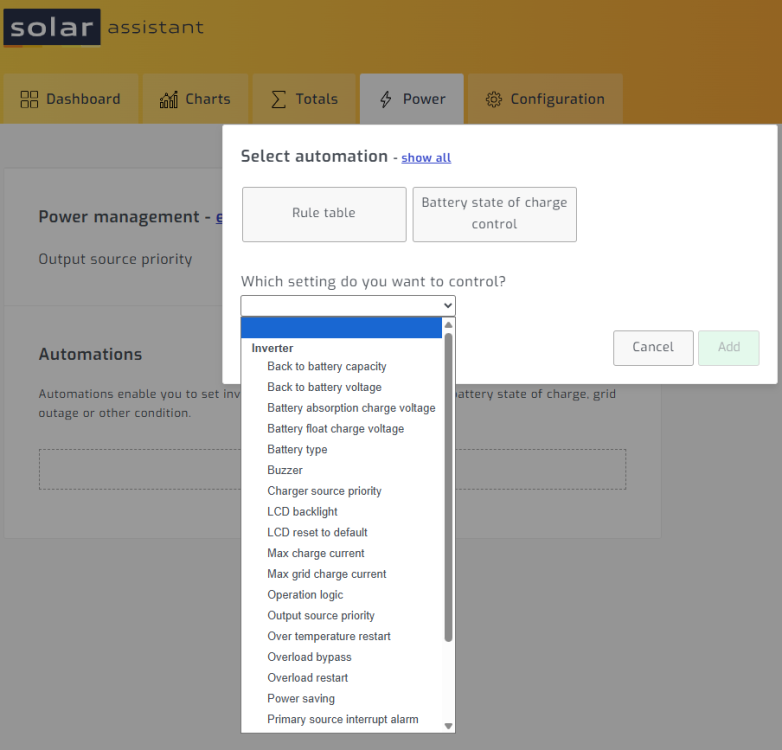
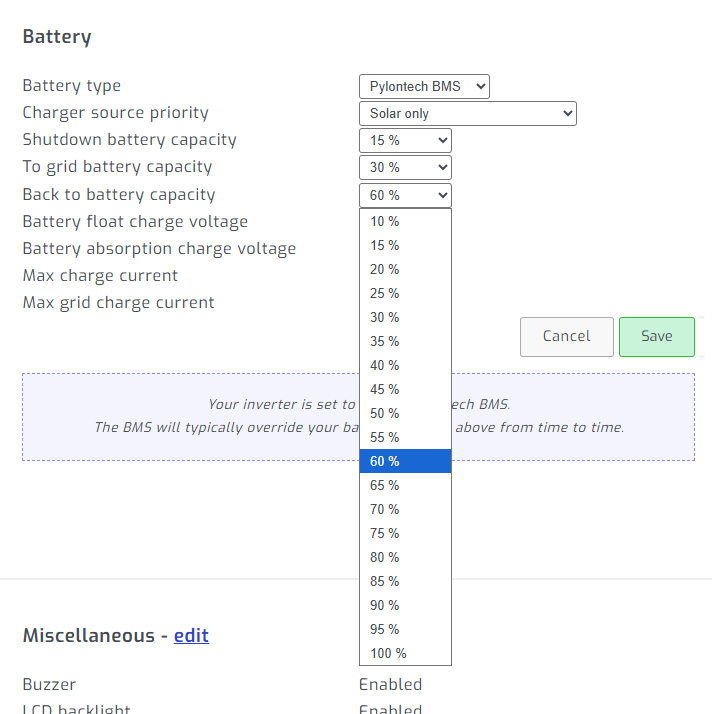

-
Hi Kurt, I'm hoping to get to the facility where I have the axpert to install the Solar Assistant application, which, from what I understand, will allow me to manage not only the inverter but also the Pylontech batteries. The software runs on a Raspberry Pi and is much more complete than WatchPower. Let's see how it goes!
-
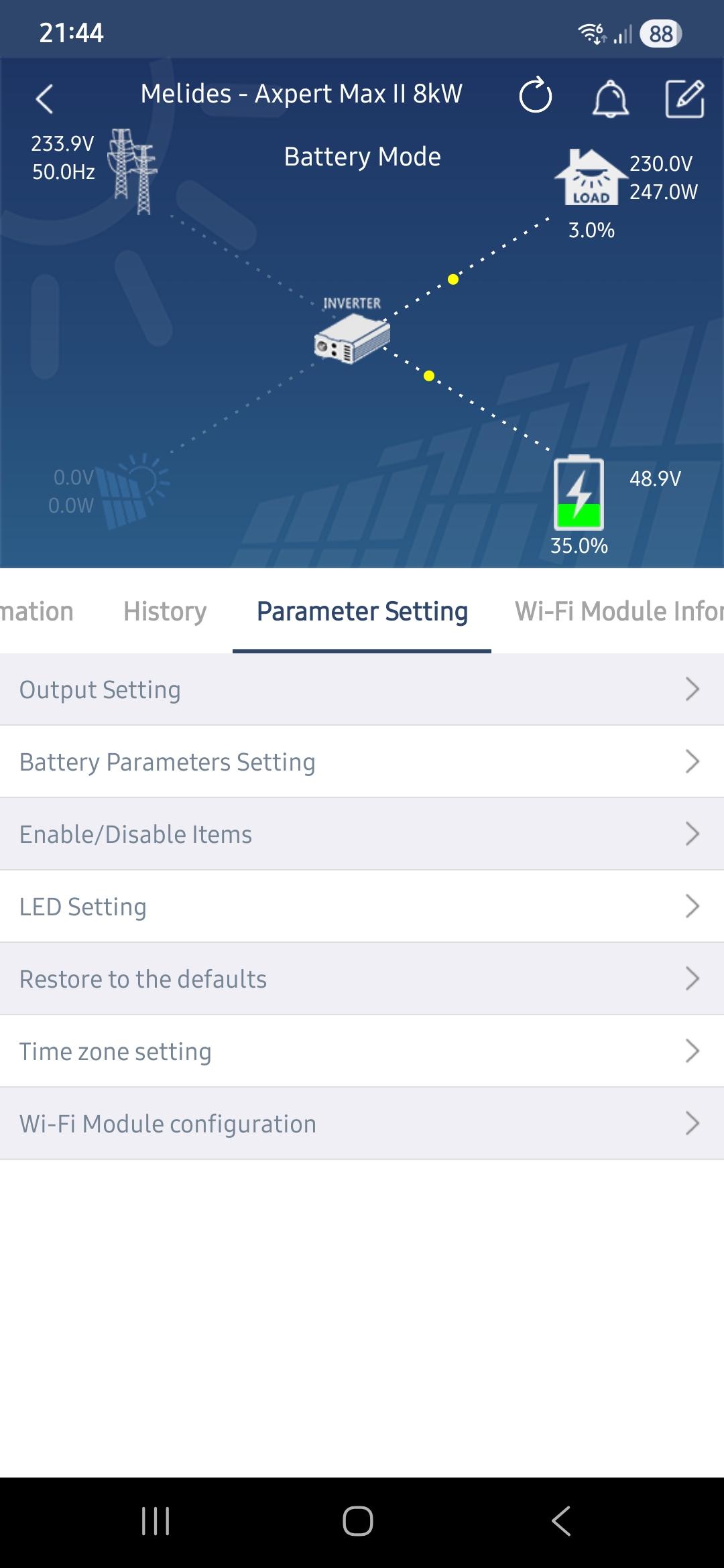
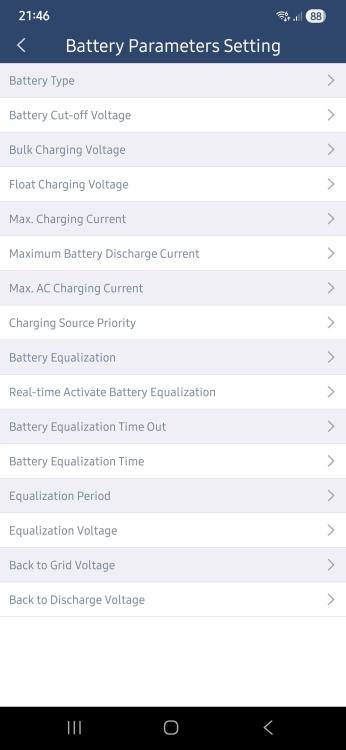
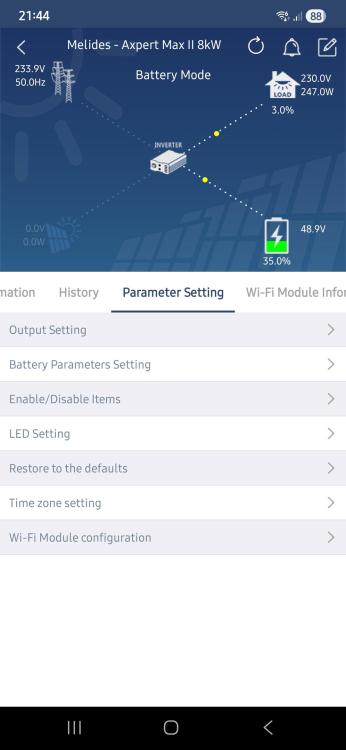
I'm using Watchpower version 1.5.0.0. I don't know if it's the latest version. I can say that the inverter is working according to what I set up (Return to grid: 30%, Return to discharge: 50%). But the Watchpower screens show all the information in voltage! (please see the attached images) Yes, everything appears correctly on the inverter display.


-
Thank you Kurt, I already updated both firmwares yesterday and it seems to be working fine. There's only one unresolved detail regarding the WatchPower app and parameters 12 and 13. They continue showing values in Volt instead of SOC!
-
Thanks Coloumb, I updated both firmwares yesterday and it seems to be working fine. I left "SOC back to utility" at 30% and "SOC back to battery" at 50%. Since I'm far from this solar installation, I use the WatchPower app to make any remote changes. I just noticed that in the WatchPower app, these parameters continue to show voltage values instead of SOC. Is there any additional configuration that can be done?
-
Many thanks Coulomb! I will test it as soon as I can!
-
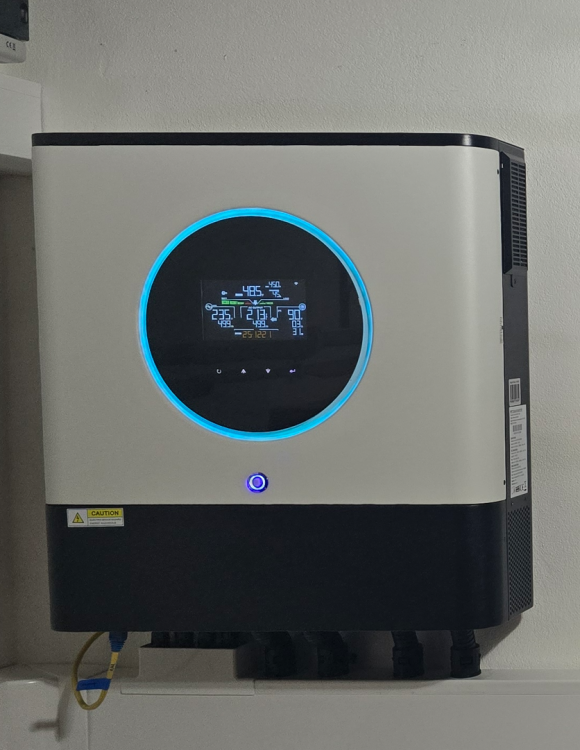
Hi Kurt, Last September, I bought an Axpert Max II 8kW (image attached) with firmware versions 81.07 and 22.21. I am experiencing the same problem that you apparently already went through. Parameters 12 and 13 are still related to battery voltage, instead of battery charge percentage. The lack of values between 48V and 49V does not allow for much resolution for the system to return to line mode. I ask if you can help me find the latest firmware for my Axpert, and if is there is any procedure on how to upgrade them. Thanks in advance!