Skip to content
View in the app

A better way to browse. Learn more.

Power Forum - Renewable Energy Discussion

A full-screen app on your home screen with push notifications, badges and more.

To install this app on iOS and iPadOS
  1. Tap the Share icon in Safari
  2. Scroll the menu and tap Add to Home Screen.
  3. Tap Add in the top-right corner.
To install this app on Android
  1. Tap the 3-dot menu (⋮) in the top-right corner of the browser.
  2. Tap Add to Home screen or Install app.
  3. Confirm by tapping Install.

jevko

Members
  • Joined

  • Last visited

  1. Factory firmware version 64.09 does not have "presumably good" MPPT logic - tested. 264.62 has "presumably good" MPPT logic - tested, also has SOC. Updated and Remote Panel_Reflash_MCU(38.18) I didn't notice any difference.
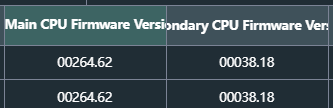
  2. The factory firmware version 46.82 has "supposedly good" MPPT logic and works much better. There is also SOC, but it is visible and adjustable only on the inverter, on the applications it is displayed in volts. The display has also been updated v12.28.
  3. If anyone needs it. I haven't tested it, it's probably for 28066. Maybe Coulomb can see it and tell which inverter it is for. MAXE11K_TWIN_DSP_78.10.zip

Account

Navigation

Search

Search

Configure browser push notifications

Chrome (Android)
  1. Tap the lock icon next to the address bar.
  2. Tap Permissions → Notifications.
  3. Adjust your preference.
Chrome (Desktop)
  1. Click the padlock icon in the address bar.
  2. Select Site settings.
  3. Find Notifications and adjust your preference.