Alduroni
Members
-
Joined
-
Last visited
Everything posted by Alduroni
-
Hello SolarDeity, thanks for replying. I need the country code to register your phone number on WhatsApp.
-
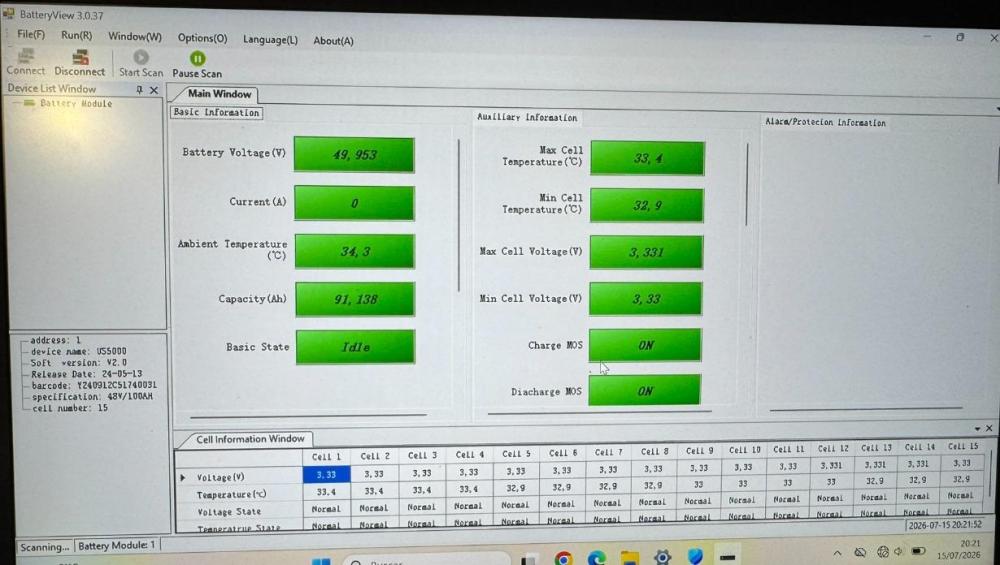
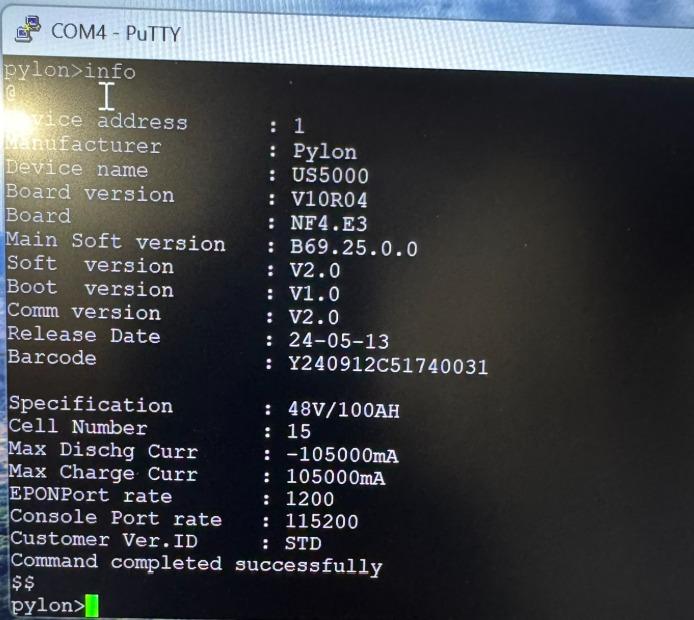
Hello friends. First, I’d like to congratulate you on this wonderful forum; you really help others, thanks for your work. I also want to apologize for my limited English; I am using Google Translate. Here is the issue: I added a US5000 to my rack (which consists of 3x US3000C + 1x US5000), connected via CAN BMS to a Victron Cerbo + Multiplus II 5kW. The problem is that when I added the new battery, the CAN BMS connection failed, and the batteries operated without the controller, I fear they may have experienced overvoltage. As a result, the older US5000 became inactive: the "Run" LED flashes every 4 seconds, while the red LED and SOC LEDs are off. The Cerbo recognizes it and displays its data (SOC 98%, SOH 97%, etc.), but it isn't transferring energy even though it is connected to the inverter. It is running firmware V2.0. When connected to BatteryView, I see this screen: The 32ºC temperature is normal for Spain at this time of year. The "Basic State" is stuck on IDLE. Accessing the console via pylon: and via pylon_debug: What do you think might be happening? Any suggestions? Should I replace blown fuses, or should I try a warranty claim (the battery is 18 months old)? Thanks in advance to everyone.