Skip to content
View in the app

A better way to browse. Learn more.

Power Forum - Renewable Energy Discussion

A full-screen app on your home screen with push notifications, badges and more.

To install this app on iOS and iPadOS
  1. Tap the Share icon in Safari
  2. Scroll the menu and tap Add to Home Screen.
  3. Tap Add in the top-right corner.
To install this app on Android
  1. Tap the 3-dot menu (⋮) in the top-right corner of the browser.
  2. Tap Add to Home screen or Install app.
  3. Confirm by tapping Install.

psedma

Members
  • Joined

  • Last visited

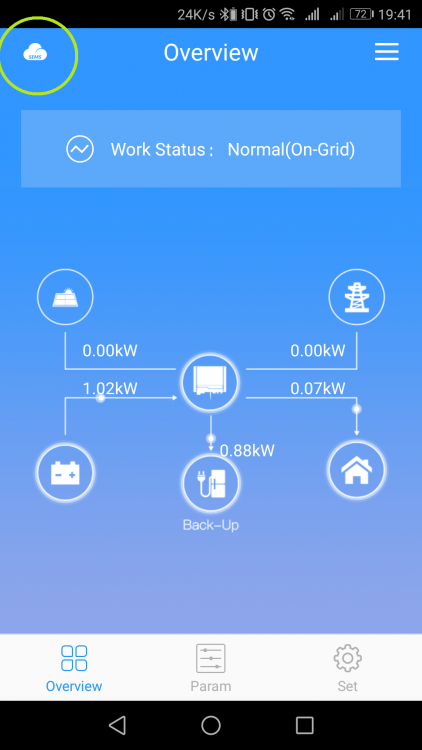
  1. haha, so it is possible to connect to inverter through the local wifi network in PV Master! You just need to tap the "SEMS icon" in the left top corner and it will connect you to the inverter and you are able to do everything in PV Master 👍 next step -> find out how to connect it to Raspberry Pi and be able to control and set up inverter with some basic scripts, so I can make the whole PV system much more efective
  2. Oh, I know about SEMS, it works even from another internet connection (actualy I have now problem with SEMS which does not work at all 😕 ) I hoped PV Master is possible to connect remotly too, I have it out of house and I want to change the setting of inverter sometimes
  3. how is it possible to connect to inverter through home wifi connection???

Account

Navigation

Search

Search

Configure browser push notifications

Chrome (Android)
  1. Tap the lock icon next to the address bar.
  2. Tap Permissions → Notifications.
  3. Adjust your preference.
Chrome (Desktop)
  1. Click the padlock icon in the address bar.
  2. Select Site settings.
  3. Find Notifications and adjust your preference.