-
Axpert Inverter with Sunsynk battery
Did anyone manage to connect an Axpert inverter with Sunsynk battery using CAN or RS485 commumication?
-
Sunsynk grid charging issues
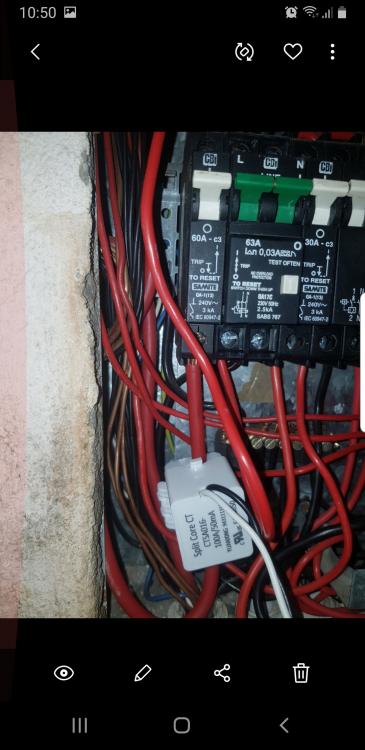
Thanks will let you.kno about the ct
-
Sunsynk grid charging issues
May I ask if you can post a photo of yoir physical connections on the power terminals of your Grid, Gen and Load ?
-
Sunsynk grid charging issues
Thanks, it is having conituity between the two wires and is measuring 7.47volt
-
Sunsynk grid charging issues
Thanks
-
Sunsynk grid charging issues
Only loads is the geyser which is on a timer. Pool pump that is.manually opererated . Aircons but that is normally not run
-
Sunsynk grid charging issues
Will it make sense then that if the CT is faulty that it would then be able to feed back into the grid ?
-
Sunsynk grid charging issues
Thanks will get a new CT a nd try that
-
Sunsynk grid charging issues
Make sense to me that it could be faulty..... had it in 3 and 4 previously with same effect
-
Sunsynk grid charging issues
That is correct
-
Sunsynk grid charging issues
Could you perhaps post a photo of your system mode screen
-
Sunsynk grid charging issues
-
Sunsynk grid charging issues
- Sunsynk grid charging issues
Account
Navigation
Search
Configure browser push notifications
Chrome (Android)
- Tap the lock icon next to the address bar.
- Tap Permissions → Notifications.
- Adjust your preference.
Chrome (Desktop)
- Click the padlock icon in the address bar.
- Select Site settings.
- Find Notifications and adjust your preference.
Safari (iOS 16.4+)
- Ensure the site is installed via Add to Home Screen.
- Open Settings App → Notifications.
- Find your app name and adjust your preference.
Safari (macOS)
- Go to Safari → Preferences.
- Click the Websites tab.
- Select Notifications in the sidebar.
- Find this website and adjust your preference.
Edge (Android)
- Tap the lock icon next to the address bar.
- Tap Permissions.
- Find Notifications and adjust your preference.
Edge (Desktop)
- Click the padlock icon in the address bar.
- Click Permissions for this site.
- Find Notifications and adjust your preference.
Firefox (Android)
- Go to Settings → Site permissions.
- Tap Notifications.
- Find this site in the list and adjust your preference.
Firefox (Desktop)
- Open Firefox Settings.
- Search for Notifications.
- Find this site in the list and adjust your preference.