Skip to content
View in the app

A better way to browse. Learn more.

Power Forum - Renewable Energy Discussion

A full-screen app on your home screen with push notifications, badges and more.

To install this app on iOS and iPadOS
  1. Tap the Share icon in Safari
  2. Scroll the menu and tap Add to Home Screen.
  3. Tap Add in the top-right corner.
To install this app on Android
  1. Tap the 3-dot menu (⋮) in the top-right corner of the browser.
  2. Tap Add to Home screen or Install app.
  3. Confirm by tapping Install.

AJB

Members
  • Joined

  • Last visited

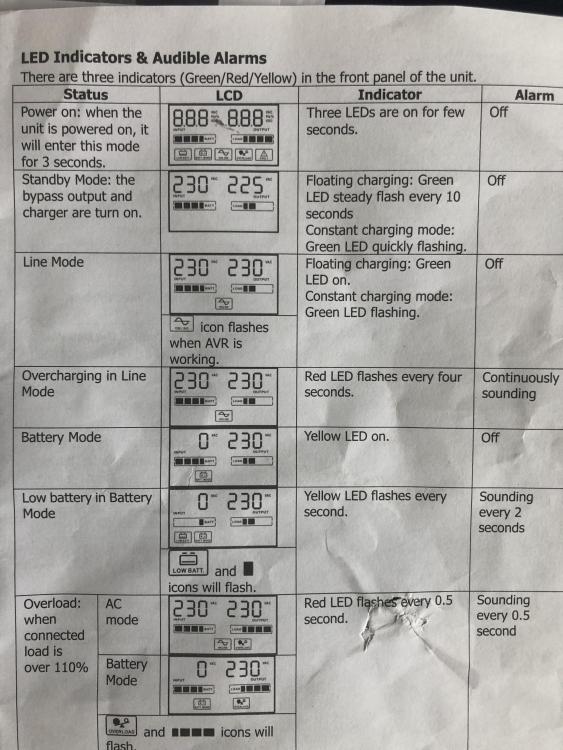
  1. Thanks for your speedy reply. Currently have load shedding. It is a mecer 1200VA/2400VA with a lead acid battery. It is only used for a pc, tv, 3 lamps and a wifi router during load shedding. i am sending a link to the manual with "overcharging in line mode" fault. (flashing red light and continuous beeping) Thanks again.
  2. AJB joined the community
  3. Morning all Can someone perhaps please explain to me what "overcharging in line mode" means ? i cannot find an answer to this -even from the person that sold and installed my 1200VA/2400VA inverter . The continuous beeping noise is irritating.disappears when I switch it off but comes on randomly again. Sorry to ask here but I found this discussion during my search. thanks.

Account

Navigation

Search

Search

Configure browser push notifications

Chrome (Android)
  1. Tap the lock icon next to the address bar.
  2. Tap Permissions → Notifications.
  3. Adjust your preference.
Chrome (Desktop)
  1. Click the padlock icon in the address bar.
  2. Select Site settings.
  3. Find Notifications and adjust your preference.