Skip to content
View in the app

A better way to browse. Learn more.

Power Forum - Renewable Energy Discussion

A full-screen app on your home screen with push notifications, badges and more.

To install this app on iOS and iPadOS
  1. Tap the Share icon in Safari
  2. Scroll the menu and tap Add to Home Screen.
  3. Tap Add in the top-right corner.
To install this app on Android
  1. Tap the 3-dot menu (⋮) in the top-right corner of the browser.
  2. Tap Add to Home screen or Install app.
  3. Confirm by tapping Install.

Hardus

Members
  • Joined

  • Last visited

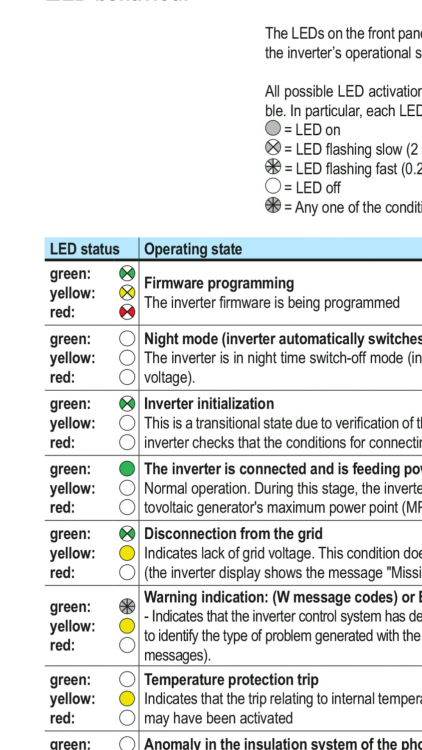
  1. Can any ABB Expert please advice. Unlike my 27.6 Trio Invertors, that was easy to commission, the 50 kW has all 3 led's flashing without coming out of that mode. I note that it means firmware being programmed. By which means as it is not by myself. Question - must this invertor be equiped with a wifi card and then get running via ABBSOLAR? THANK YOU.
  2. Hardus posted a topic in Inverters
    I thought the 50kW Trio would start up easy like the 27.6 Trio, but somewhere I am missing something. Main question: Must this 50kW Trio be started up by connecting to it first with ABBSOLAR? My unit has all three led's flashing indicating "firmware being programmed". I don't understand this as it is not me doing any update. The slow flashing of all three led's goes on, does not matter how long I wait. Any suggestions out there? Thank you.
Account

Navigation

Search

Search

Configure browser push notifications

Chrome (Android)
  1. Tap the lock icon next to the address bar.
  2. Tap Permissions → Notifications.
  3. Adjust your preference.
Chrome (Desktop)
  1. Click the padlock icon in the address bar.
  2. Select Site settings.
  3. Find Notifications and adjust your preference.