


SilverKop
Members
-
Joined
-
Last visited
Everything posted by SilverKop
-
I unticked the “limit to load only” box. Seems to be working.... thanks. I also ticked the “priority load” box in order to prioritise pv power to the load instead of charging the batteries. I also changed the time settings from 05:00-13:00 to 85% instead of the previous 100%. I don’t have a prepaid meter~ so is the last recommendation still warranted??
-
@ Achmat: I haven’t made any changes to the inverter settings. Will do so later today, based upon your recommendations. @bloubul: thanks for the input.I think the no draw settings from 05:00-13:00 is to ensure that I have sufficient battery backup if load shedding kicks in later on in the day. But I think your point is that PV should be suffice you for me, based upon my under 1kw usage (without the kettle; spikes) and what my system is meant to produce.
-
@ Achmat: I used my tablet this morning. With the phone, that screenshot recommendation still wasn’t working. Let me know if you want any other specific screens.
-
Duplicate
 Sorry man. Struggling with making file smaller to upload.. 3MB limit
 Wslm. Thanks for the input Achmat. Where can I check that the CT coil is installed correctly??
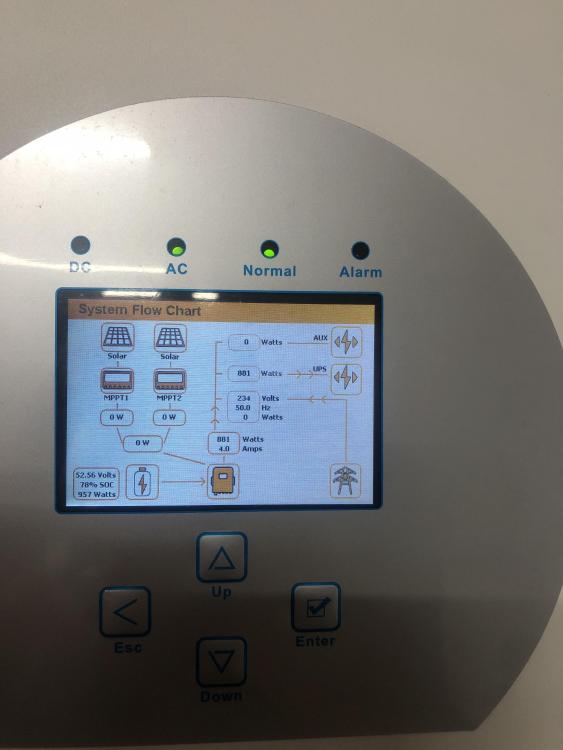 Dag se. I recently had the following installed at my residence, in the past week. Sunsynk 5,5kw, 16x345w JA Solar panels. My roof is north facing, with no obstructions. I am Southern Suburbs, Cpt based. The max production at that I have seen is 2.7kw at any point in time in the past 3-5 days, and that is generally around 09:00-10:30.... but generally averages 1kw. Batteries seem to be fully charged by then. I don’t feed back to grid. Distance from the panels to the inverter is max 25m. Cables are run underground in conduit. I have a 2x3k solar geysers (Geyserwise linked); gas stove/electric oven and my aircons (12000/24000 BTU) running on grid side.... and the rest of my essential loads on the back-up, via the battery. My general consumption draw, without kettle/or other intermittent spikes is in the 0.6-0.8kw range. That is effectively supporting TV, 2x fridges, deep freezer and other general use. The way the guy has set it up is that I start drawing from the batteries for my essential load from 17:00-05:00 daily, with PV and grid and supplementary sources. Apparently, you have to set the time on the Sunsynk to draw from the batteries - which was news to me.... as that is not how it was explained to me when I was designing the system to be implemented. I thought the Sunsynk would draw PV first, then battery and then grid. If I turn off the PV link on the inverter, it then draws grid and NOT battery. Apparently the Goodwe is more intelligent - as it draws PV first, then battery and lastly grid. Yesterday, which was a pretty sunny and clear day.... I was running my 24000BTU unit.... but when I went to check consumption, I saw that it was drawing from the grid.... this was around 12:00-14:00. The way it was explained to me was that the PV would supply the essential loads and the grid side simultaneously.... so, if my essential load is 1kw and I put on the aircons, I would expect that the PV would cover both?? I was drawing around 1-1.5kw from the grid at that point in time. My intention with system was that it must reduce my reliance on EsKOM as much as possible. Question: Is there a way to manage the system a bit better to maximize reduced reliance on EsKom, with what I have in place?? I have already changed the settings on my Geysorwise to a time post the batteries being fully charged. Previously time settings were early mornings at 04:30 and late afternoon 17:00. Thanks in advance.
Account
Navigation
Search
Configure browser push notifications
Chrome (Android)
- Tap the lock icon next to the address bar.
- Tap Permissions → Notifications.
- Adjust your preference.
Chrome (Desktop)
- Click the padlock icon in the address bar.
- Select Site settings.
- Find Notifications and adjust your preference.
Safari (iOS 16.4+)
- Ensure the site is installed via Add to Home Screen.
- Open Settings App → Notifications.
- Find your app name and adjust your preference.
Safari (macOS)
- Go to Safari → Preferences.
- Click the Websites tab.
- Select Notifications in the sidebar.
- Find this website and adjust your preference.
Edge (Android)
- Tap the lock icon next to the address bar.
- Tap Permissions.
- Find Notifications and adjust your preference.
Edge (Desktop)
- Click the padlock icon in the address bar.
- Click Permissions for this site.
- Find Notifications and adjust your preference.
Firefox (Android)
- Go to Settings → Site permissions.
- Tap Notifications.
- Find this site in the list and adjust your preference.
Firefox (Desktop)
- Open Firefox Settings.
- Search for Notifications.
- Find this site in the list and adjust your preference.


