


Graeme McK
Members
-
Joined
-
Last visited
-
 CobusK reacted to a post in a topic:
Combining a heat pump and solar water heater to a single geyser
CobusK reacted to a post in a topic:
Combining a heat pump and solar water heater to a single geyser
-
Y.Hoosen reacted to a post in a topic:
Combining a heat pump and solar water heater to a single geyser
-
Thanks Acuario. Sorry for the delayed response - I only accessed the forum today.
-
Thanks for your feedback Acuario. Are you able to share the circuit configuration and code of your solution?
-
Thanks Vassen. Will non-return valves be necessary for each system?
-
The attached image reflects the current geyser water connection configuration. I would like to connect the inlet of the solar panel to “C” on the geyser and the outlet of the solar panel to “B” on the geyser - both with the applicable fittings and valves if this is possible. You are correct regarding the required operation of the heat pump in the late afternoon if the water temp is too low. However the heat pump will also be used in the early morning to raise the water temp, if required, for showering.
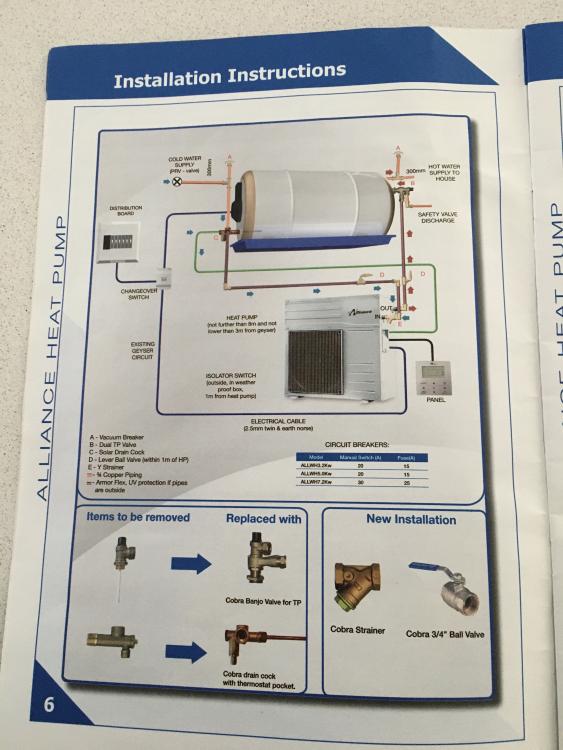
-
Good morning - this is my first post. I have an Alliance Heat Pump connected to a Kwikot 150 Litre solar geyser which has an Isotherm blanket. Is it possible to connect a solar panel to the same geyser using non-return valves. The heat pump will supplement the heating when the solar is unavailable. The control of the heat pump and solar circulation pump will be managed by an Arduino controller.
