ShawnHayes
Members
-
Joined
-
Last visited
-
I wanted to add this to the conversation in case I haven’t mentioned it before. I spoke to a Sol-Ark associate which is the manufacture of my inverter. Cousin to the SunSynk. I was informed the data that leaves the Wi-Fi dongle, goes to the PowerView ES app which you can use to view your data and information. The PowerView ES app is a cloud-based service. The associate stated that if I had the PowerView app desktop version on my computer, I still would not be able to view the data even if I had a local area network set up. The PowerView ES app will only interpret data through the cloud-based service. So basically to view the data using their current service (PowerView ES) you would must have Internet service at your location. If there is a way to use capture the WiFi data at the inverter and view it in real time without Internet service, that is what I need to do. But need assistance from those who know how.
-
We are developers of solar monitoring software and this forum doesn't allow responses from commercial members, so please see this reply purely as technical input in terms of what is possible. I can confirm that we can read all metrics from both the WiFi/RS232 port and the RS485 port of both the Deye and SunSynk inverters. We read it directly meaning it doesn't use or intercept the WiFI dongles that are commonly used. We also store all data on the device and there is no technical reason why internet is required. So in short everything you mentioned is technically completely possible and is how all our customers do their monitoring. So if I understand what you’re saying correctly, even though I have the Sol-Ark inverter, it is possible to capture the data from the RS 232 port? I understand that this may be possible, I guess I am just not understanding how I am able to do that or what I need to accomplish this?
-
I’ve been following this thread and trying to keep up, but I am having some issues I hope someone here can answer? I live in the States, I have the cousin to the SunSynk, the Sol-Ark 12 K. I have been trying, with no success, to get data from my inverter from the RS485 port. I was informed by the manufacture that the RS485 port is intended for battery communication only. I also was informed by Sol-Ark that the Wi-Fi is the only way Data is transmitted from the inverter. Sol-Ark offers a PowerView ES app to view your data. However this power view app is a cloud-based service. So I cannot even use it directly unless I have Internet access. I have read that some folks on this thread have been able to pull data from the Wi-Fi. It appears you need to be some sort of web scraper to figure this out. Knowing the Sunsynk and Sol-Ark are cousins, is it possible to break the data communication between Sol-Ark WiFi & the PowerView cloud app that’s used? Thanks
-
Sorry that I sent that last post before I was finished typing. I have entered the first set of commands to get the RS-485 adapter connected. But once you connect the adapter via the instructions, the next command line once entered, takes me to a screen as if I should be seeing #DATA come in to where I can add info? but once in that screen I can’t do anything as instructed. Does this mean that I’m not receiving data therefore that screen isn’t operating correctly? Or am I missing something else?
-
I've been working with this for several days, getting the USB/RS485 adapter to work. I've enter the commands found on the link provided by BlouBul with the USB/RS485 adapter.
-
Thanks again Kalahari. I think that gives me good idea. I just wasn't very clear on exactly how to connect the wires, that's the best explanation "to me" so far. I'll update as I advance or if I run into any more obstacles.
-
This is what I'm using to get my RS485 from the inverter to Raspberry Pi4. That's why I'm looking for the correct wiring connection. So based on what I've read, once the RS485 is wired correctly, the data should flow to the through this, to the Raspberry Pi via the USB port.
-
Thanks Kalahari for the reply. Yes, I've seen that in my manual. However, not sure how that translates? So using an Ethernet cable plugged into my RS485 inverter port, on the other end of my Ethernet cable, cutting open the Ethernet cable, taking the individual wire stand(s) 1 or 8 and wire it into the RS485-B and 2 or 7 into the RS485-A and so on as described? Sorry but kind of new to this sort of DIY, but learning a lot from this forum. Thanks again.
-
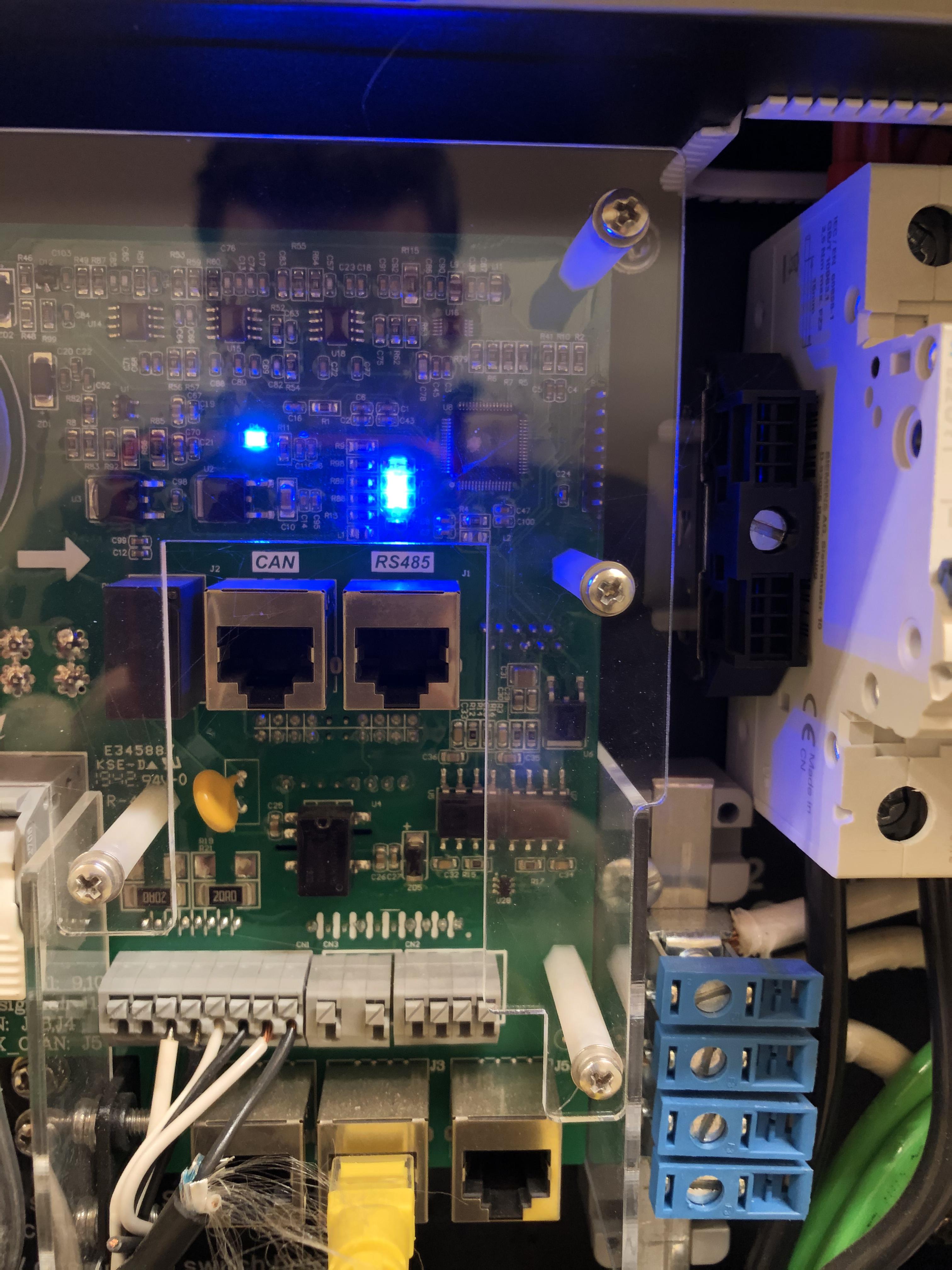
This has been quite an interesting thread that I have been following for a while now. I am finally at the point where I’m able to attempt what is been going on in this thread. I have a Sol-Ark 12 K inverter. My RS 485 port appears to be an ethernet connection port. The RS 485 connections on external devices, that I have seen, all have either two or three wire connections. Maybe I’ve missed it, but how do you go from my ethernet port that’s RS 485 down to a three wire terminal for a 485 connection point? I loaded two pictures, one of my RS 485 ethernet port connection of my Sol Ark. The other is a RS 485 to Ethernet converter? I am basically trying to get the information out of my Sol-Ark over to a raspberry pie. Maybe there’s an easier way?