Skip to content
View in the app

A better way to browse. Learn more.

Power Forum - Renewable Energy Discussion

A full-screen app on your home screen with push notifications, badges and more.

To install this app on iOS and iPadOS
  1. Tap the Share icon in Safari
  2. Scroll the menu and tap Add to Home Screen.
  3. Tap Add in the top-right corner.
To install this app on Android
  1. Tap the 3-dot menu (⋮) in the top-right corner of the browser.
  2. Tap Add to Home screen or Install app.
  3. Confirm by tapping Install.
Guss

Guss

Album created by Guss Davey · Updated

spacer.png

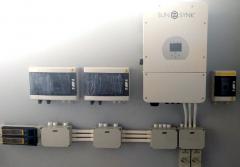
Day 1. Installed most of the hardware against the wall in the spare bedroom.
(the little fu**** also show here, decided he want to pee against the boxes, so I had to get it out of his way)

Guss Davey

Members

(edited)

Day 1. Installed most of the hardware against the wall in the spare bedroom.
(the little fu**** also shown here, decided he want to pee against the boxes, so I had to get it out of his way)

Day 2: Will be crawling around the roof putting in conduits and start some of the component wiring. Panels will have to wait as I'm still waiting for the diamond deck brackets.
Ah...and day 2 will also be building the battery rack.

Edited by Guss

Guss Davey

Members

Day 2 was consumed by crawling in the roof space getting all the conduits in. Attached is a picture of the conduits coming out of the roof, down the outside wall into junction boxes and then through the wall into the room where the other equipment is installed.

Guss Davey

Members

(edited)

Day 3 of install:

  1. Day 3 - Pic 1: The old db in the passage is full. So is the conduits going to the roof space. 
    There is one rule in my house, after renovations over 2 years, that never ever grinding walls, EVER!
    So from 1st option to just add the surface mount db next to the old one.... and, ah, no... surface conduits to the ceiling, we decide to put the new db back to back to the old one, in the opposite room. So we drill through to the other side, and add the new db. To cater for the wires we decide on a square duct, that goes all the what to the roof area, straight into a surface box. I'm still going to wrap my bookshelf (floating shelves) around the new db and trunking to make it less obscure.
    The new box will have all the essentials and the old box the non-essential load (workshop, geysers, borehole pump, oven, etc)
     
  2. Day 3 - Pic 2:  2 x earth spikes coming back into junction box (very long, existing a few kilometers north of Hawaii under water 🙂
     
  3. Day 3 - Pic 3:  No battery brackets, so I had to make shift a quick battery rack. I made provision for a second battery. Still have to clad the frame with something so that it looks a bit better.
     
  4. All junction boxes in roof + outside + inside now connected with conduits.


Pulling wires tomorrow, and panels Friday, and Saturday connecting all the components and start configuring.


Edited by Guss

Guss Davey

Members

(edited)

Day n:
No work - Bracket issue 😞

Edited by Guss Davey

Guss Davey

Members

(edited)

Day n+1:
The 5th day.

Will upload tomorrow when sun is shining.
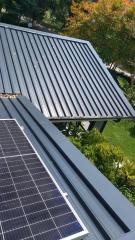
The uploaded pictures was taken mid day after the structures were tied down to roof and while getting all the panels onto the roof.

The rest of the day was then spend connecting the panels to the structure and wiring in the 2 strings.

At 17:30 we went live with solar. No sun, heavy overcast, but we did get a little bit from the panels (0.9kW).... all excited to see what happens tomorrow. Hope it's a sunny day.

Edited by Guss Davey

Chloe

Members

(edited)

Awesome installation! How's the new system running? Hope you have some nice clear sky's for your first day!

Edited by Chloe

Guss Davey

Members

Full cloud cover 😞 Getting between 0.5kW and 0.9kW through full cloud cover.
I still wait for the Wifi Dongle, and will only then have some stats.

Join the conversation

You can post now and register later. If you have an account, sign in now to post with your account.

Guest
Add a comment...

Account

Navigation

Search

Search

Configure browser push notifications

Chrome (Android)
  1. Tap the lock icon next to the address bar.
  2. Tap Permissions → Notifications.
  3. Adjust your preference.
Chrome (Desktop)
  1. Click the padlock icon in the address bar.
  2. Select Site settings.
  3. Find Notifications and adjust your preference.