Sarel Seekat
Members
-
Joined
-
Last visited
Everything posted by Sarel Seekat
-
Just an update, Deye SA has released an update that doesn't resolve the issue. The issue still exists, and there is still no solution to the problem.
-
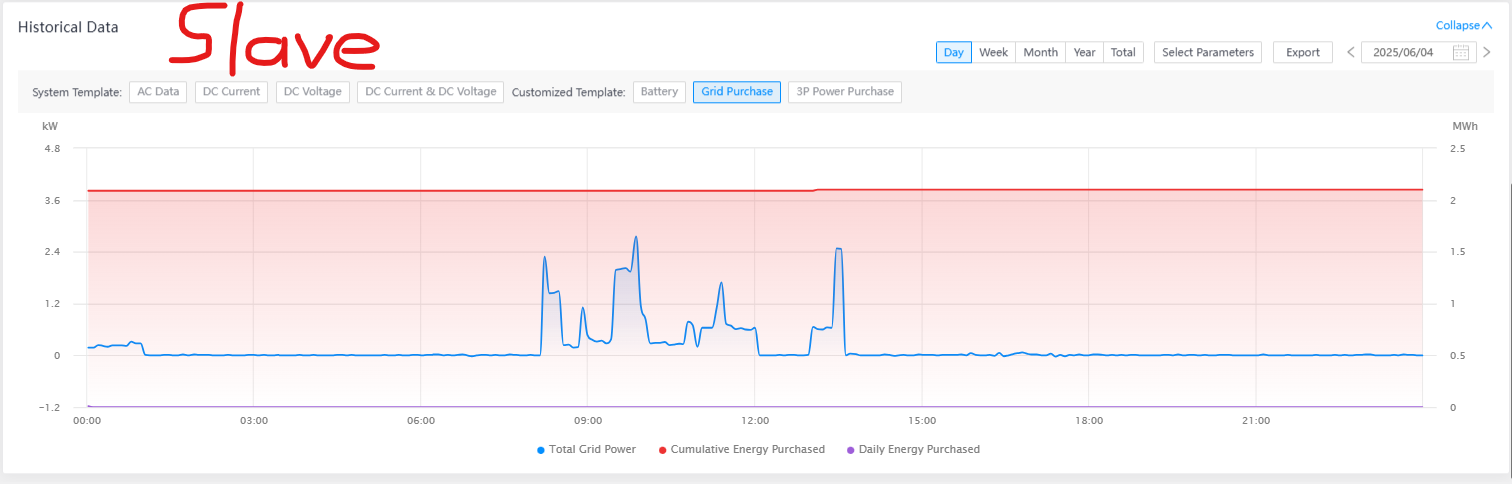
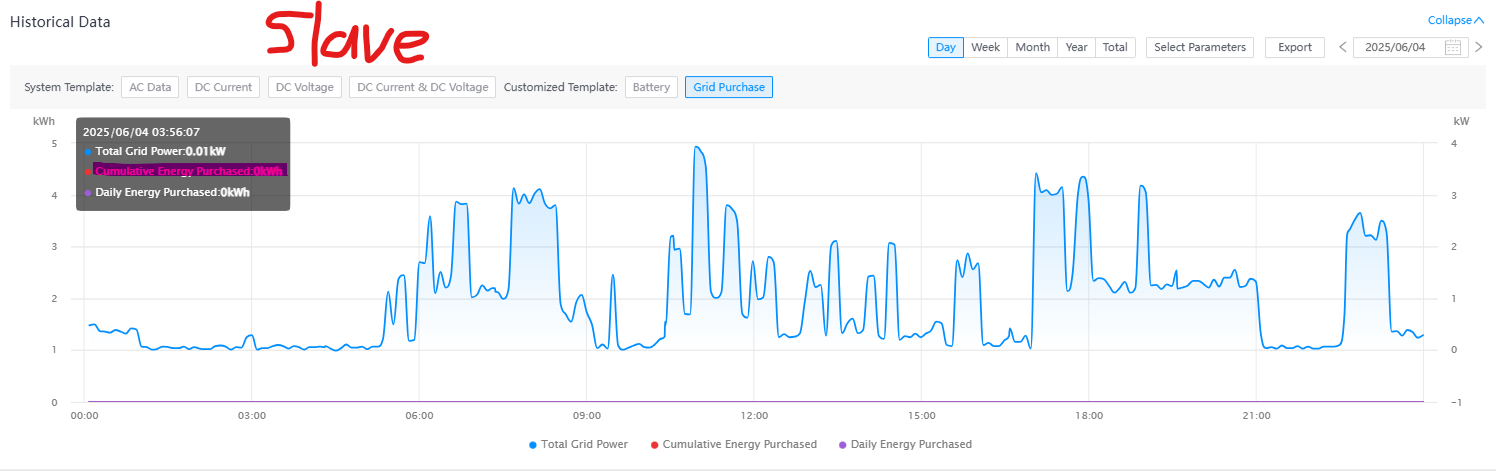
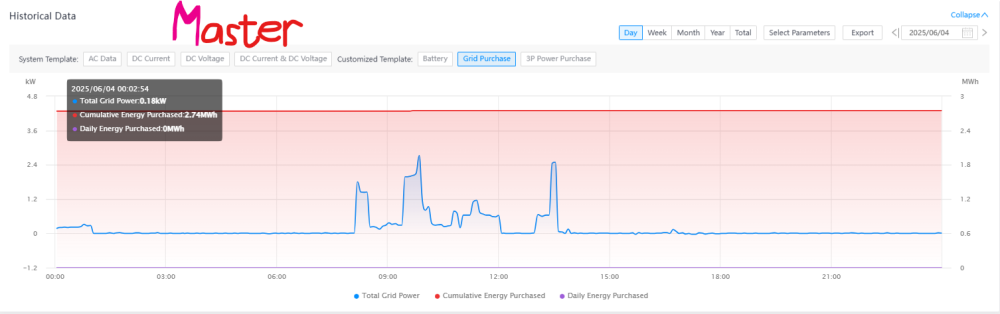
On the older model, You can clearly see both inverter tracking the Power Purchase. See images below. Also on the old inverter you see full Power Grid Details on both the Master and Slave inverters.


-
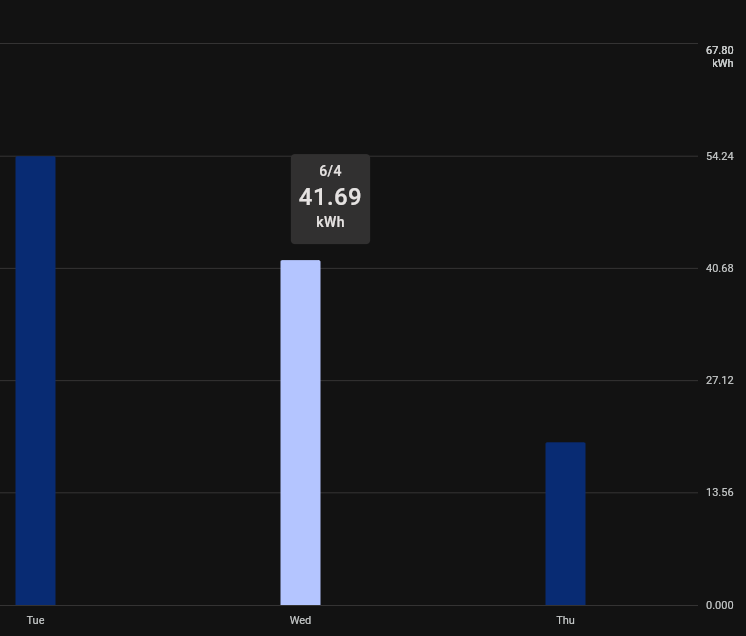
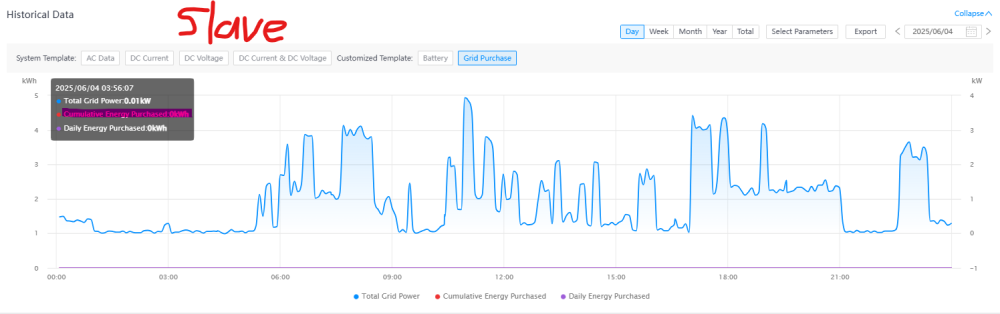
Hi Everyone. We've done a number of new installations with 5kW and 6kW Deye inverters, the new lock model. Currently, we've identified this issue with both the 5 kW and 6 kW models. When the setup has a Master and Slave unit, the purchase power seems to be calculated only on the Master Inverter. The slave shows zero Cumulative Energy Purchased. The effect is that the summed power purchase on the Solarman dashboard is off by 50%. If 3 inverters are running in parallel, then it's out by 66%. I've been in contact with Daye SA, and after 3 days of discussion, there still isn't a solution. Deye SA asked to check that the red jumper block is switched on and mentioned that it's off out of the box. We confirm that it's not off at the site and even a new one we just opened has these jumpers as ON out of the box. Has anyone else experienced this issue? We've even installed a logger to confirm the power purchased, and it's out by about 50% on a Master, Slave setup. CT is in the correct position with no wire extensions (arrow points to the inverter). The CT Wires are not in the same conduit as AC or DC wiring. Inverter is set to for Zero Export to Load. 20W trickle. The parallel cable is connected correctly. The two inverters function fine, but the purchase power displays incorrectly. No Parallel errors or warnings between the inverters. Our 3de party logger reads 41.69kWh for the day, while the Solarman displays it at 19.39kWh. Any advice?


-
Hi There We have a couple of BX51100 batteries that are about 3 years old and discovered that the batteries only read a capacity of 50Ah. Can this be resolved with a firmware update or how can we reset the batteries to run at the original 100Ah capacity?
-
Are you planning on including an R232 -> TTL in the PCB? - Message me privately and we can talk.
-
Hi Adagio To which port did you connect on your inverter? The USB or the Computer RJ45 port?
-
I'm also very interested in going ESP32 way. Raspberry Pi's are rare and expensive regardless. I have a setup with x6 7.2kw Axpert and x6 Hubble batteries. I would like to see how many Inverter's telemetry you can poll on one esp32? Going to try and post back here when I have it working. There's a couple of esp32 mini's lying in my drawer as well as esp32vroom's. What do you think will work the best? Apart from the obvious shortage in PIN count on the mini.
-
-
Hi Grant - Just for the sake of answering your question. It depends what inverter and batteries you have matched with each other. Also depends if the batteries have a direct communication connection to the inverter. If you have a Voltronic, older versions have firmware issues that can be resolved. You're welcome to message me privately and I assist you any way I can.
-
From my understanding - and I might be wrong - the warning initially on firmware 71.90 would accompany the complete disconnection of solar and utility supplies at about 10sec intervals which was a massive system issue. After that (apart from the overshooting) the warning was more of an irritation than anything else. I'm sure that the BMS, regardless of the charge condition will ultimately remain in control of Over charging and Over discharging. The big question is, does the inverter still try to charge the batteries after the BMS tells the inverter that it's SOC is at 100%? Two things I noticed that makes me less concerned - 1. It seems the Inverter reacts to the SOC percentage of the BMS and then control/adjusts the Charge current. After the update, it is not possible to change the charge current anymore. Instead, the inverter charges at 30A when the SOC is under 90% and 10A from 90%-100%. I'm not sure if the inverter does it's own SOC calculation or if it receives SOC data from the BMS. 2. The moment the SOC reading on the Inverter show 100%, the charge current reading drops to 0A and the voltage stays at the recommended charge voltage of 52.5V. This makes me think that there isn't any over charging happening and. I only recently connected a monitoring device to my King Inverter so I'm not sure what the readings were on the old firmware. If I was running my inverter in User Setting on Battery type, an Error 69 would have been very helpful. When there is a setting on my Inverter for the battery I have, I expect there to be seamless integration between the two devices. Any errors or warnings would indicate that my Inverter can read or react to info from the BMS. I hope that there will be a Major Update at some point. Monitoring software shows much more component data that isn't displayed on the inverter removable display.
-
Hi Stephanus Please message me privately for the firmware updates. There is one small bug that we became aware of but this update does fix the error 69 100%
-
Hi Guys I've been monitoring this topic over the last 2 months. Had the same issue with a 2021 purchased King inverter from Rubicon in Cape Town with a 3.55kwh Synapse branded Pylontech battery. The inverter also came with firmware version 71.90 which obviously had the constant Error 69, beeping and disconnecting of mains + PV connections. I was forced the run the battery in Usr mode while Rubicon tried assisting me with a fix. We upgraded to 71.93 which caused a number other issues as the posted by Proxicon. To fully understand what was and wasn't working, we ran on this firmware for 4 days which made it clear that it broke more features than it fixed. An upgrade the 71.94 fixed some of the issues, but still displayed the Error 69 just without the alarm sounding. We once again ran with this firmware for a couple of days. At some point, Rubicon got hold of an edited/experimental firmware version. We labeled it 71.94(Broken). 71.94(Broken) corrupted the inverter a couple of times while being loaded as well as corrupting display. This version was completely messed up but did give us new list of what worked and what didn't. We forced to reload 71.94(Stable) again after a day or two. On the 7th of April, Rubicon got hold a new firmware version 71.97 which we loaded and have been testing until now. The update seems to have fixed the error 69 which is not being displayed anymore. Switching between SUB, SBU & UBS works 100%. Battery BMS seems to be controlling the Max Charge Current setting as well as the Bulk charge and float charge voltages. Battery cut-off and back to grid setting can still be set manually. The inverter seems to be stable in charging from Solar source as well as utility without switching or disconnecting for no apparent reason. I'm very happy with the new update and can new leave the battery setting on PYL. I believe Rubicon has flashed all their stock King Inverters with the new firmware. This firmware seems to be a permanent fix to this issue.