


Bruce K
Members
-
Joined
-
Last visited
-
Hi Guys Has anyone paired Victron equipment with Midea's lithium batteries? They seem to be very new on the market with very little info available, but they use CATL cells which is a good thing.
-
Can anybody assist with this strange behaviour? This happens as soon as the battery fuse is closed. 74360541498__F6E4964B-FCED-424E-8C3C-BF18BFAC29D4.MOV
-
Hi Gents I see lots of talk about extending the CT coil with with various types of cable, CAT6 being the most common. I've tried extending with CAT5 with limited success. What is the difference between CAT5 and CAT6 and is one better than the other for this application?
-
-
Thanks @root, interesting reading. I have all three systems set to Victron's recommended charge voltages which are much lower than the Pylontech specs. Two of them include PV and the third is backup only. In all cases, the problems started a year or two after installation but it could still be a cell balancing issue. I'll try what is suggested. Thanks for the links.
-
Hi All I have three installations, all Victron coupled with Pylontech batteries, that are generating repeated Internal Error alarms, as well as High Voltage alarms. I can see on VRM that the voltages are well within the Pylontech specs. Any thoughts on what might be causing this and what the solution is?
-
-
-
@Blowdart18, the firmware upgrade did the trick.
-
Hello All Hoping someone can impart some wisdom regarding this problem. I have a client installation with 2 x Infinisolar 5k Plus paralleled. The batteries are 6 x Pylontech US3000C's with a 7.8kW PV array. When the grid fails at night, the slave inverter trips the system on low battery voltage yet the batteries are still strong. The master inverter shows the correct battery voltage as confirmed with a multimeter but the slave inverter drops down to trip voltage. When the grid returns, it's voltage remains about 1V lower than the actual voltage under load, and if I switch it off so that the master inverter carries the full load then the slave unit battery voltage rises to 1V higher than actual voltage. Under load, the master voltage is stable but the slave voltage is very erratic. The installation includes a Raspberry Pi ICC connected to the master unit to enable the BMS to control charge and discharge. Should this be connected to both inverters somehow or should I have two ICCs in the system? Solarpower Pro needs Adobe Flash Player to run but Adobe have discontinued Flash Player so it won't run. Is there an alternative that works? Solarpower (not Pro) works but does not give me the 'Sync' option described in the installation manual. 'Parallel for Output' is enabled. The batteries are connected in a single bank and the inverters are both connected to a common busbar so should read exactly the same voltage. Perhaps I should split the batteries into two separate banks, one for each inverter (?). Maybe the PV array should also be split into two sets instead of just one? Lastly, the slave inverter seems to carry about 60% of the AC output load and the master the remainder. Surely they should share the load equally? The AC wiring to the master is about 1m longer than the slave (6mm2 so more than adequate for 5kW load). Would this have such an influence on the load sharing? I know DC cabling should always be exactly the same length. Attached photos may assist. Top photo is the master under load, second photo is the slave with no load and third is the slave under load. Any advice will be appreciated.


-
Not to worry, found the password on the same Czech site. It helps to read thoroughly.
-
Hello All I've downloaded the latest firmware files for the Infinisolar 5k Plus from the Czech site often mentioned but it requires a password to extract the files. Does anyone have this password, please?
-
Hi All I have a client with 2 x 5kW Infinisolars parallelled. His Gel/AGM batteries have reached their end and need to be replaced with LiFePO4 batteries, but which one? I have installed Pylontech a lot but they need a Raspberry Pi ICC to communicate with Infinisolar. Are there others that have direct comms capability, maybe Hubble, BSL, or any others?
-
Thanks Coulomb I've read through this and I'm sure it will help. I'll give it a bash tomorrow.
-
Hi Coulomb I tried that too but still no joy.
-
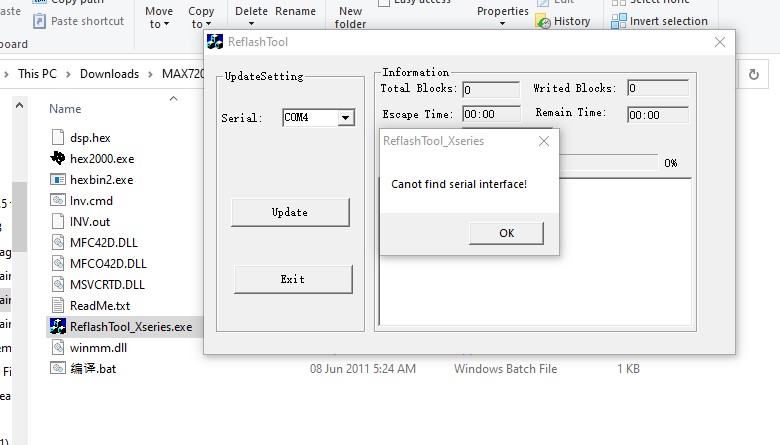
Thanks Pieta My Device Manager identified COM4 as the USB port on my PC but I'll try a different port. I bought a brand new USB to Serial converter for this job, maybe it's faulty. I'm using the far right hand RJ45 port on the display panel - is that correct?
-
Hi Gents I have the same grid feed-in problem with a Max 7.2, also bought from Full Circle Solar. I downloaded firmware version 90.19 from the above site but I cannot get it uploaded to the inverter. This is what I get on my screen. What am I doing wrong?
-
-
Thanks Coulomb. Since posting this post, I've spoken to the client and he confirms that his prepaid meter is registering usage even though his PV production is well above the current load. So I'm fairly sure the firmware is allowing grid feed-in as mentioned in another post that I saw. South African prepaid meters are dual core, not quad core, so cannot determine direction of energy flow and therefore charge the consumer for feed-in energy. I will flash the newer firmware tomorrow and let's see what happens.

