Skip to content
View in the app

A better way to browse. Learn more.

Power Forum - Renewable Energy Discussion

A full-screen app on your home screen with push notifications, badges and more.

To install this app on iOS and iPadOS
  1. Tap the Share icon in Safari
  2. Scroll the menu and tap Add to Home Screen.
  3. Tap Add in the top-right corner.
To install this app on Android
  1. Tap the 3-dot menu (⋮) in the top-right corner of the browser.
  2. Tap Add to Home screen or Install app.
  3. Confirm by tapping Install.

Trung

Members
  • Joined

  • Last visited

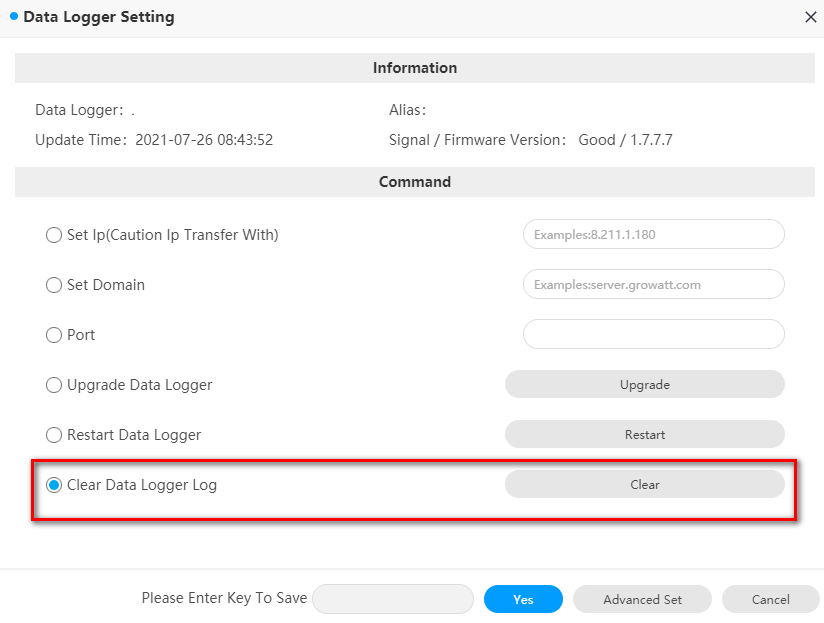
  1. Hi all, I had tried to perform "Clear Data Logger Log" now my Data Logger cant re-connect to the Growatt server. so do we have solution to restore/repair this issues ? I'm happy to get any suggestion from you. thanks & Regards
  2. Hi all, I have an inverter Growatt 5000TL-X fail when user reset factory while inverter online(required standby mode). now it cant start, no ways to connect and check, update firmware. So do we have solution to repair this? And, can we download firmware from where ? I'm happy to receive any suggestion from you. thanks & regards,
  3. Trung joined the community
  4. Hi, where did you download Firmware ?

Account

Navigation

Search

Search

Configure browser push notifications

Chrome (Android)
  1. Tap the lock icon next to the address bar.
  2. Tap Permissions → Notifications.
  3. Adjust your preference.
Chrome (Desktop)
  1. Click the padlock icon in the address bar.
  2. Select Site settings.
  3. Find Notifications and adjust your preference.