


tjs000
Members
-
Joined
-
Last visited
-
I'm at a loss here, still haven't managed to get any results or progress in editing my parallel register values. Starting to think there's something wrong with either my inverters or how I have them configured. I don't suppose anyone would be willing to try (with the inverters switched off/not doing anything) using modbus to change the values of the parallel register (417), and see if their inverter allows this?
-
Hi Sc00bs, Thanks for the reply. I'm pretty sure the format is correct. I have requests/registry reads in my flow(s) already, and the values I'm trying to write are the ones that changing settings on the touch-screen results in on the inverter. Switching the inverters on/off using the button at the bottom doesn't change any of the parallel settings, the only way I've found to do this is using the Parallel Settings screen in the advanced settings menu. With Parallel off (on the master), value is 1026, and on is 1027. On inverter 2 (slave) it's 2048 and 2049, and on inverter 3 it's 3072 and 3073. I can observe/read register 417 changing when I change the settings on the touch screen, but writing the registry with these values changes nothing. I read/write values using the same methods on every other registry I've tried, but 417 does/will not change. The flow is a bit of a mess, but until I can turn Parallel on/off, I get all the info I need from other sources (other power monitors, BMS interfaces, spoofing Battery SoC, the on/off button relays etc), so this is purely for testing..
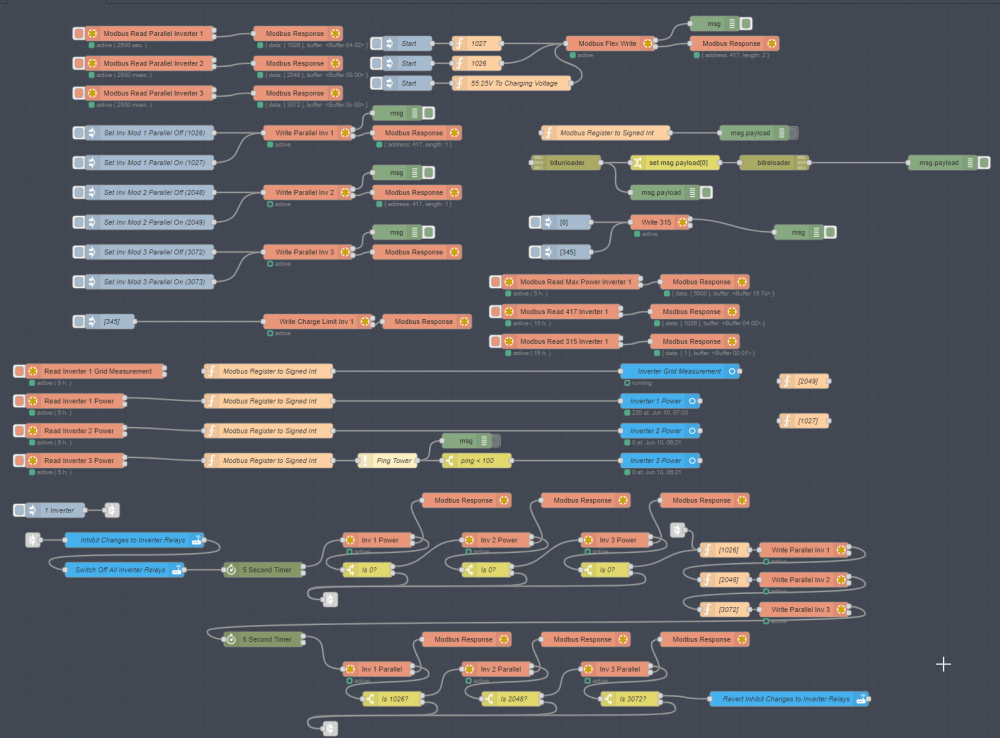

-
I can't believe it's taken me this long to find this forum/thread, I've been doing it by myself on a set of 3 Deye Inverters (I think they're Sunsynk rebrands or vice versa?). I am looking to optimise my battery storage/grid export implementation from an efficiency standpoint. Having 3 inverters sitting active the whole time is wasteful when a single inverter being active covers 99.9% of my house's normal power consumption needs. (I have the 3 inverters because I'm on Octopus Agile in the UK so I need to pull as much from the grid I can in as short (cheap) period of time). I can use the node-red interface to modify essentially every useful Modbus register with the exception of ID 417 which controls the inverter Parallel settings. I want to edit this register so I can disable (turn off) inverters (I have relays hooked up to the power buttons on the undersides), enable/disable parallel, then switch on only the inverter(s) I want running (essentially the minimum for the load/grid charge power I want at any given time). According to the tech at Deye (who replies once in a blue moon) this is possible (he's shown me vague and blurry modbus messages confirming this), but I can't get it to work, or at least I don't know what state(s) the inverters need to be in for it to work. Can anyone who has more than one inverter running in parallel see if they can write register 417 (clearly with the inverters switched off/disabled to prevent damage) and have the changes reflected in a subsequent read? (For this I'm trying to read/write 1026 (dec) 0402 (hex) to this register for parallel off, and 1027/0403 for parallel on, which matches the Deye tech's values). Well up for a conversation with anyone about this, it's good to find some like minded people! :D
